

AVID Products
AVID Products R-Go Wireless Vertical Ergonomic Mouse Large Right Hand Black
US$71.99
0.00091371BTC
재고 있음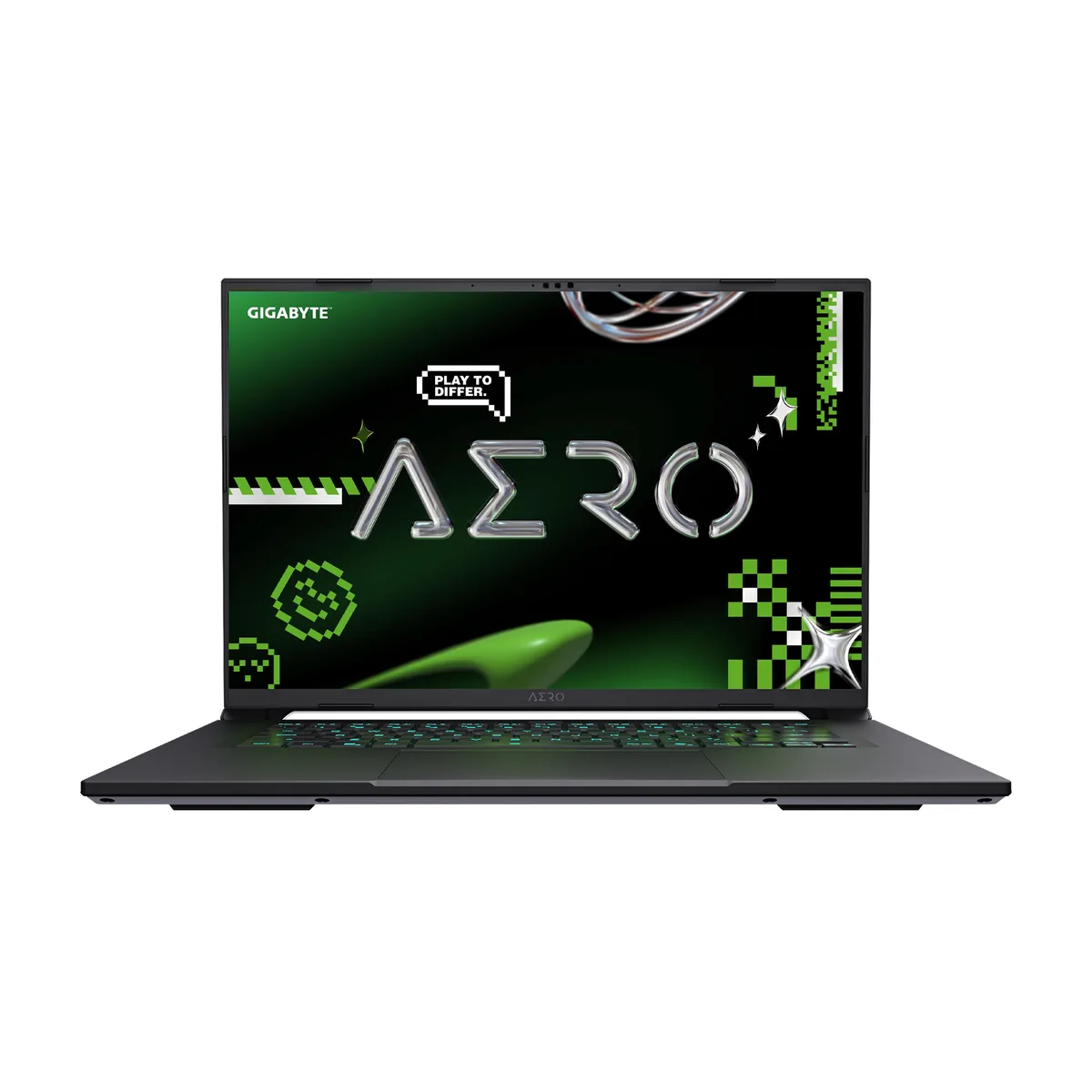


GIGABYTE
A 16-inch IPS WQXGA 165Hz display, RTX 5070 graphics, and an 8-core Ryzen AI 7 350 CPU with 16GB DDR5 and a 1TB NVMe SSD
The GIGABYTE AERO X16 1WH93USC94DH is a 16-inch Windows 11 Home laptop in Lunar White. It pairs an AMD Ryzen AI 7 350 8-core processor with an NVIDIA GeForce RTX 5070 Laptop GPU. The IPS panel runs at 2560 x 1600 resolution and 165 Hz refresh rate with 100% sRGB coverage. It includes 16GB DDR5 5600 memory and a 1TB PCIe Gen4 NVMe M.2 SSD.
The Pantone Validated display and MUX switch benefit content work and competitive gaming. The 8-core Zen 5 CPU handles multi-threaded loads. Buyers who need a touchscreen, larger factory RAM, or a heavier GPU tier should evaluate other configurations. The single 16GB module leaves one slot open for expansion up to 64GB.
The system ships with a DC-in jack for the supplied adapter. External monitors connect via HDMI 2.1 or the USB4 Type-C port with DisplayPort 1.4 support. Wired networking uses the RJ-45 Gigabit LAN port. Verify that your peripherals match the available Type-A ports (USB 3.2 Gen1 and USB 2.0) and the 3.5mm combo jack before ordering.
| Brand | GIGABYTE |
|---|---|
| Model | AERO X16 1WH93USC94DH |
| Color | Lunar White |
| Operating System | Windows 11 Home |
| CPU | AMD Ryzen Al 7 350 |
| Screen | 16" |
| Memory | 16GB |
| Storage | 1 TB PCIe Gen4 NVMe M.2 SSD |
| Graphics Card | NVIDIA GeForce RTX 5070 Laptop GPU |
| Communication | Gigabit LAN and WLAN |
| Dimensions (W x D x H) | 13.98" x 9.87" x 0.66"-0.79" |
| Weight | 4.19 lbs. |
| CPU Type | AMD Ryzen AI 300 Series |
| Processor Name | AMD Ryzen AI 7 350 |
| Number of Cores | 8-core Processor |
| CPU L2 Cache | 8MB |
| CPU L3 Cache | 16 MB |
| Screen Size | 16" |
| Touchscreen | Non-Touch Screen |
| Wide Screen Support | Yes |
| Display Type | WQXGA |
| Resolution | 2560 x 1600 |
| Panel | IPS |
| Refresh Rate | 165 Hz |
| Color Gamut | sRGB 100% |
| Display Features | 3ms, 400nits (typical) MUX Switch Pantone Validated TÜV Rheinland Low Blue Light |
| GPU/VPU | GeForce RTX 5070 Laptop GPU |
| Graphic Type | Dedicated Card |
| SSD | 1TB NVMe |
| Memory Speed | DDR5 5600 |
| Memory Spec | 16 GB x 1 |
| Memory Slot (Total) | 2 |
| Memory Slot (Available) | 1 |
| Optical Drive Type | No |
| LAN | 10/100/1000Mbps |
| WLAN | 802.11ax Wireless LAN |
| WiFi Generation | Wi-Fi 6E |
| Bluetooth | Bluetooth 5.2 |
| USB | 1 x USB 2.0/1.1 / 1 x USB4 / 2 x USB 3.2 Gen 1 Type-A |
| HDMI | 1 x HDMI 2.1 |
| Ethernet | 1 x RJ-45 (1Gbps) |
| Audio Ports | 1 x Headphone/Microphone Combo Jack |
| Audio | Microphone Dolby Atmos |
| Speaker | 2 x 2W speakers |
| Virtual Reality Ready | Yes |
| Keyboard | 1-zone RGB Backlit Keyboard, Up to 1.7mm Key-travel (Support N-Key) |
| Backlit Keyboard | Backlit |
| Webcam | Yes |
| AC Adapter/Charger | 150-watt AC Adapter |
| Battery | Li Polymer 76Wh |
Yes, the laptop ships with a DC-in jack and a matching power adapter; the 165 Hz WQXGA display and RTX 5070 GPU draw more power than the battery alone can sustain for gaming sessions.
The laptop provides one USB 2.0 Type-A port and two USB 3.2 Gen 1 Type-A ports, so legacy flash drives and current Gen 1 devices connect without adapters.
Open the GIGABYTE Control Center, switch GPU Mode to "Discrete Only", then confirm the panel reports 165 Hz in Windows display settings and that games show the dGPU as the active renderer.
이 진열대의 다른 상품
같은 진열대, 같은 체크아웃 — 코인 8종, 환율 잠금 30분.
결제할 코인과 가격을 확인할 통화입니다.
체크아웃 시 지갑에서 전송됩니다.
표시 전용 — 카탈로그 가격은 달러 기준입니다.
일치하는 통화가 없습니다.
사이트에서 사용할 언어를 선택하십시오.
일치하는 언어가 없습니다.
처음 방문하셨나요?
이미 계정이 있으신가요?
자동 재설정 기능은 없습니다. 이 쇼핑몰은 어떠한 메일도 보내지 않으므로 요청할 일회용 링크 자체가 없습니다. 계정에 등록된 이메일 주소를 그대로 두시면 담당자가 직접 확인해 처리합니다.
요청 접수
받은편지함으로 오는 것은 아무것도 없습니다 — 이 쇼핑몰은 메일을 전혀 보내지 않습니다. 담당자가 직접 확인해 처리합니다.
기억나셨나요?



