

Das Keyboard
Das Keyboard 5QS Smart RGB Mechanical Keyboard Gamma Zulu Switches
US$193.99
0.00248015BTC
재고 있음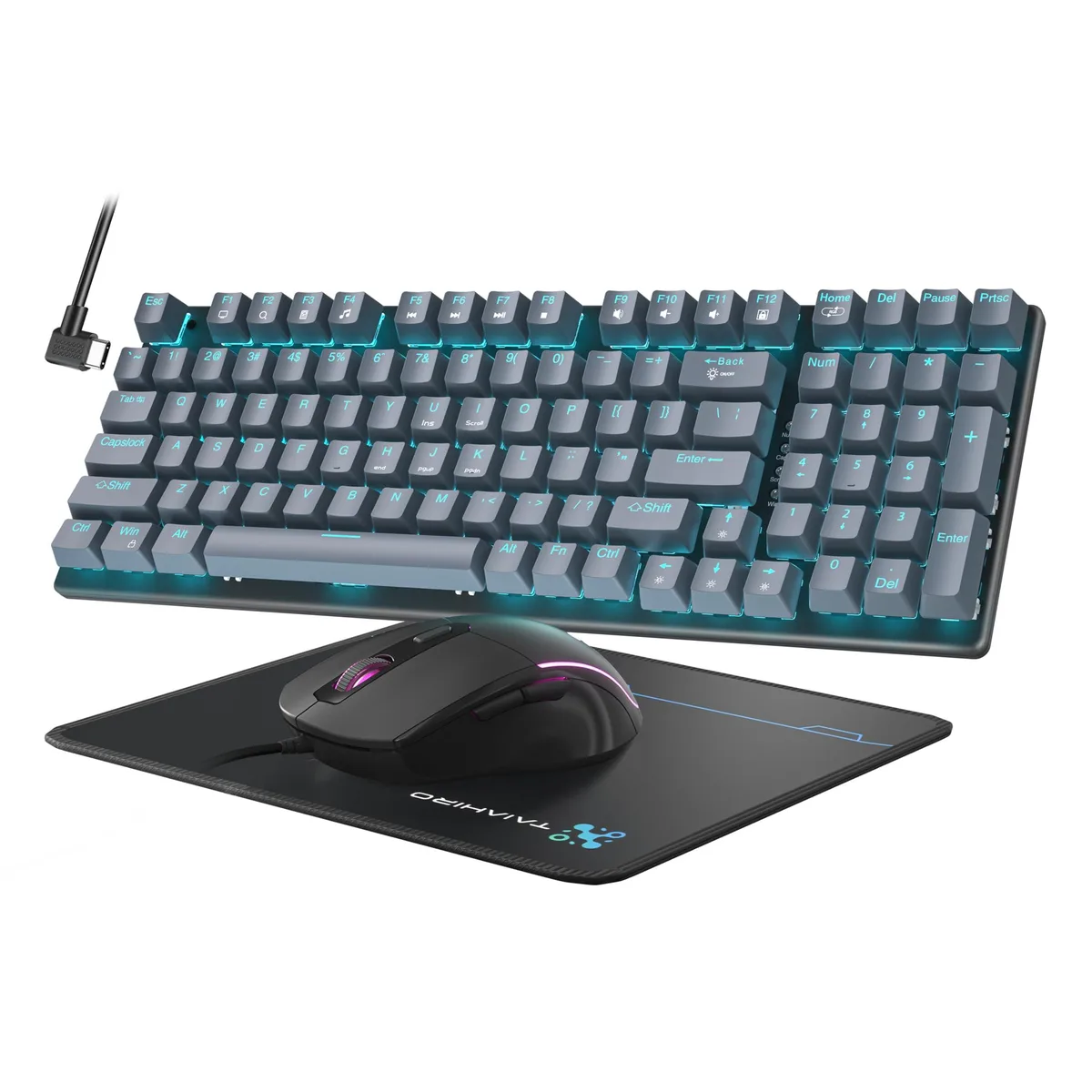


A 98-key mechanical gaming keyboard and mouse set with 18 LED backlight modes, adjustable DPI up to 3200, and included mouse pad
The HIRO 6301 set includes a 98-key mechanical keyboard, a 4-DPI optical mouse and a large mouse pad. All components connect through Type-C cables for a simple wired setup. Blue LED backlighting on the keyboard offers 18 selectable modes with adjustable brightness and breathing speed. The mouse cycles through seven RGB colours and provides DPI steps of 800, 1600, 2400 and 3200. Gray keycaps and chassis give the bundle a neutral look suited to desktop gaming or office work.
Mechanical switches deliver audible, tactile response for fast input in FPS, MOBA, RTS and CF titles. The full anti-ghosting layout registers every simultaneous keystroke. Ambidextrous mouse shape fits left- or right-handed grip styles. Buyers who need wireless freedom or per-key RGB customisation should consider other options. The fixed Blue LED backlight cannot display custom colour palettes or reactive lighting effects.
A single Type-C cable carries data and power for the keyboard, while the mouse uses its own Type-C cord. No wireless receiver, Bluetooth or software driver is mentioned in the specifications. The corded design ensures consistent latency without battery management. Verify that your system has available Type-C ports or suitable adapters before purchase.
| Brand | HIRO |
|---|---|
| Name | 6301 |
| Part Number | 6301 |
| Keyboard Interface | Type-C Cable |
| Design Style | Gaming |
| Layout | Full-Key Anti-Ghosting |
| Palm Rest | Backlit |
| Normal Keys | Mechanical Gaming Keyboard Mouse and Pad Combo |
| Function Keys | 8 |
| Mechanical Keyboard | Mechanical Gaming Keyboard Mouse and Pad Combo |
| Keycaps | RGB Gaming Mouse |
| Keyboard Color | Gray |
| Backlit | Backlit |
| Dimensions | 7.7978 cm x 13.8938 cm x 38.1 cm |
| Type | Type-C Cable, Corded Electric |
| Mouse Interface | Type-C Cable |
| Hand Orientation | Ambidextrous |
| Mouse Grip Style | Ambidextrous |
| Mouse Color | Gray |
| Power Source | Corded Electric, false |
| Operating Time | Corded Electric, false |
| Distance | Type-C Cable |
| System Requirement | Type-C Cable |
| Features | Backlit, Ergonomic, RGB Gaming Mouse |
| Package Contents | 1 |
No. The keyboard and mouse connect by Type-C cable and are recognised by Windows as standard HID devices, so they work immediately without installing any driver or utility.
Yes. Both devices draw power and communicate over the Type-C cable, which is fully compatible with USB 2.0 ports; the keyboard’s full anti-ghosting and the mouse’s four DPI steps function normally on the older interface.
Press the keyboard’s lighting control key to cycle through the 18 preset modes; the blue LEDs will change pattern and brightness instantly, confirming the backlight engine is operating as designed.
이 진열대의 다른 상품
같은 진열대, 같은 체크아웃 — 코인 8종, 환율 잠금 30분.
결제할 코인과 가격을 확인할 통화입니다.
체크아웃 시 지갑에서 전송됩니다.
표시 전용 — 카탈로그 가격은 달러 기준입니다.
일치하는 통화가 없습니다.
사이트에서 사용할 언어를 선택하십시오.
일치하는 언어가 없습니다.
처음 방문하셨나요?
이미 계정이 있으신가요?
자동 재설정 기능은 없습니다. 이 쇼핑몰은 어떠한 메일도 보내지 않으므로 요청할 일회용 링크 자체가 없습니다. 계정에 등록된 이메일 주소를 그대로 두시면 담당자가 직접 확인해 처리합니다.
요청 접수
받은편지함으로 오는 것은 아무것도 없습니다 — 이 쇼핑몰은 메일을 전혀 보내지 않습니다. 담당자가 직접 확인해 처리합니다.
기억나셨나요?



