

HP
HP ProBook 640 G4 i5-8350U 16 GB 128 GB 14 FHD laptop
- Silver
- Windows 11 Pro
US$285.99
0.0036436BTC
재고 있음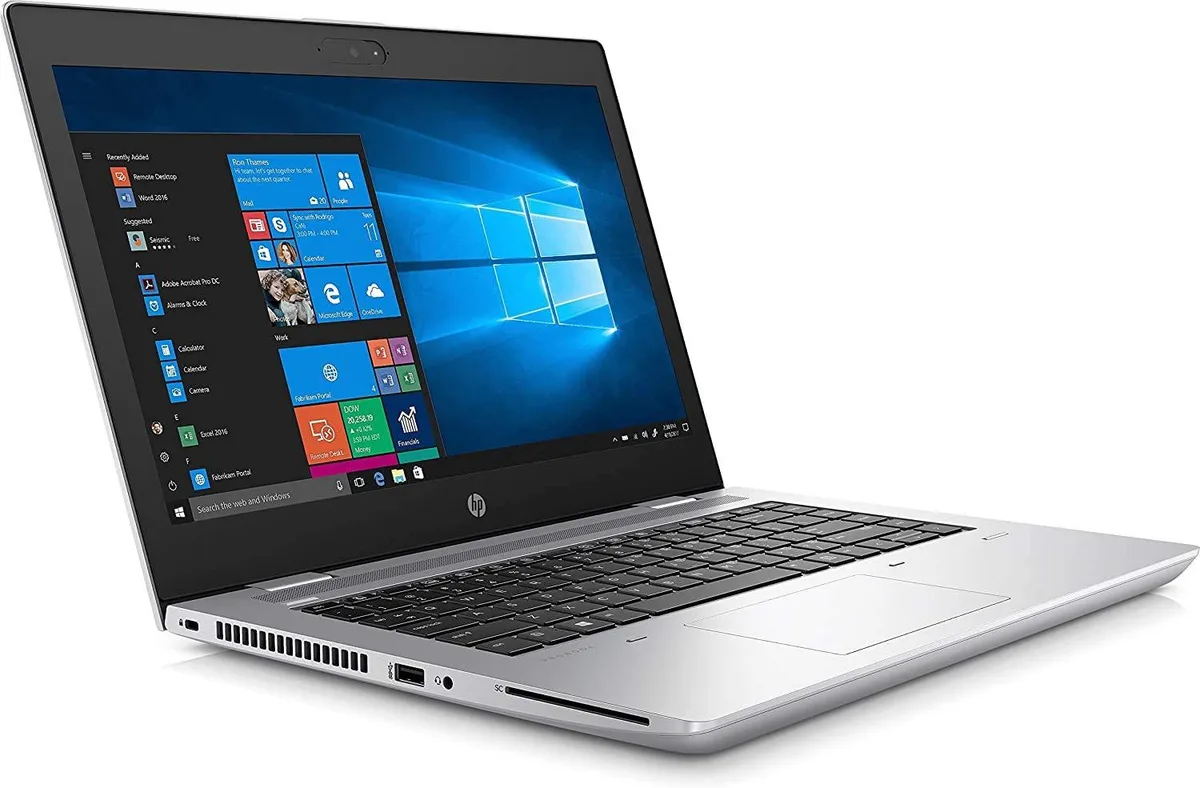


HP
14-inch Full HD IPS laptop with Intel Core i5-8350U, 16 GB DDR4, 128 GB SSD and 1 TB HDD
Options 16GB/128GB+1TB
The HP ProBook 640 G4 is a 14-inch Windows 11 Pro laptop built around an 8th Generation Intel Core i5-8350U processor with four cores and eight threads. Sixteen gigabytes of DDR4 memory support multitasking across office applications and browser sessions. A 128 GB M.2 solid-state drive holds the operating system and key programmes, while a 1 TB hard drive provides bulk capacity for archives and media.
The silver aluminium unibody resists daily wear and keeps weight low for a 14.0 inch device. Connectivity includes Wi-Fi 5, Bluetooth 4.1, an HDMI output and one USB 3.1 Type-C Gen 1 port that supports Power Delivery and DisplayPort. Three additional USB 3.1 Gen 1 Type-A ports accommodate legacy peripherals without adapters.
This configuration replaces laptops that rely on a single spinning drive or offer less than 16 GB of RAM, eliminating the boot-time penalty and memory pressure common on older fleets. The jump is worth it when IT requires vPro manageability, Sure Start BIOS protection and a Full HD IPS panel for extended screen work. Buyers who need discrete graphics or larger than 1 TB of solid-state storage should consider other models.
| Brand | HP |
|---|---|
| Series | ProBook |
| Model | 640 G4 |
| Part Number | 5LL63US |
| Color | Silver |
| Operating System | Windows 11 Pro |
| CPU Type | Intel Core i5 8th Gen |
| Processor Name | Intel Core i5-8350U |
| Number of Cores | 6-core Processor |
| CPU L2 Cache | 6MB |
| Screen Size | 14.0" |
| Touchscreen | Non-Touch Screen |
| Display Type | FHD |
| Resolution | 1920 x 1080 |
| Panel | IPS |
| Display Features | LED backlight |
| GPU/VPU | Intel UHD Graphics 620 |
| Graphic Type | Integrated Card |
| SSD | 128GB |
| HDD | 1TB |
| Storage Spec | 128 M.2 SSD + 1TB HDD |
| Memory | 16GB |
| Memory Speed | DDR4 |
| Memory Spec | 8 GB x 2 |
| Memory Slot (Total) | 2 |
| Memory Slot (Available) | 0 |
| Max Memory Supported | 32 GB |
| Optical Drive Type | No |
| LAN | 10/100/1000Mbps |
| WiFi Generation | Wi-Fi 5 |
| Bluetooth | Yes |
| USB | 1x USB 3.1 Type-C Gen 1 connector (Power Delivery, DisplayPort), 3 x USB 3.1 Gen 1 |
| Video Port | 1 x HDMI |
| HDMI | 1 x HDMI |
| Ethernet | 1 x RJ-45 (1Gbps) |
| Audio Ports | 1 x Microphone Jack, 1 x Headphone Jack |
| Audio | Integrated Sound card |
| Touchpad | Yes |
| Keyboard | Standard |
| Webcam | Yes |
| Style | Ultrabook |
| Type | Mainstream |
| Usage | Consumer |
| AC Adapter/Charger | 65-watt AC Adapter |
| Weight | 3 - 3.9 lbs. |
이 모델의 다른 버전
같은 제품군에서 메모리·쿨러·클럭이 다릅니다 — 결정 전에 비교해 보세요.
The USB 3.1 Type-C Gen 1 connector runs at up to 5 Gbps and supports Power Delivery and DisplayPort output.
The laptop includes a 128 GB M.2 drive and a 1 TB 2.5-inch hard drive; the M.2 slot accepts 2280 modules.
Remove the bottom cover, insert the M.2 module at an angle, then secure it with the single retention screw before reassembling.
이 진열대의 다른 상품
같은 진열대, 같은 체크아웃 — 코인 8종, 환율 잠금 30분.
결제할 코인과 가격을 확인할 통화입니다.
체크아웃 시 지갑에서 전송됩니다.
표시 전용 — 카탈로그 가격은 달러 기준입니다.
일치하는 통화가 없습니다.
사이트에서 사용할 언어를 선택하십시오.
일치하는 언어가 없습니다.
처음 방문하셨나요?
이미 계정이 있으신가요?
자동 재설정 기능은 없습니다. 이 쇼핑몰은 어떠한 메일도 보내지 않으므로 요청할 일회용 링크 자체가 없습니다. 계정에 등록된 이메일 주소를 그대로 두시면 담당자가 직접 확인해 처리합니다.
요청 접수
받은편지함으로 오는 것은 아무것도 없습니다 — 이 쇼핑몰은 메일을 전혀 보내지 않습니다. 담당자가 직접 확인해 처리합니다.
기억나셨나요?



