

SanDisk
SanDisk Cruzer Blade 8 GB USB 2.0 USB flash drive Black SDCZ50-008G-B35
US$391.99
0.00502107BTC
재고 있음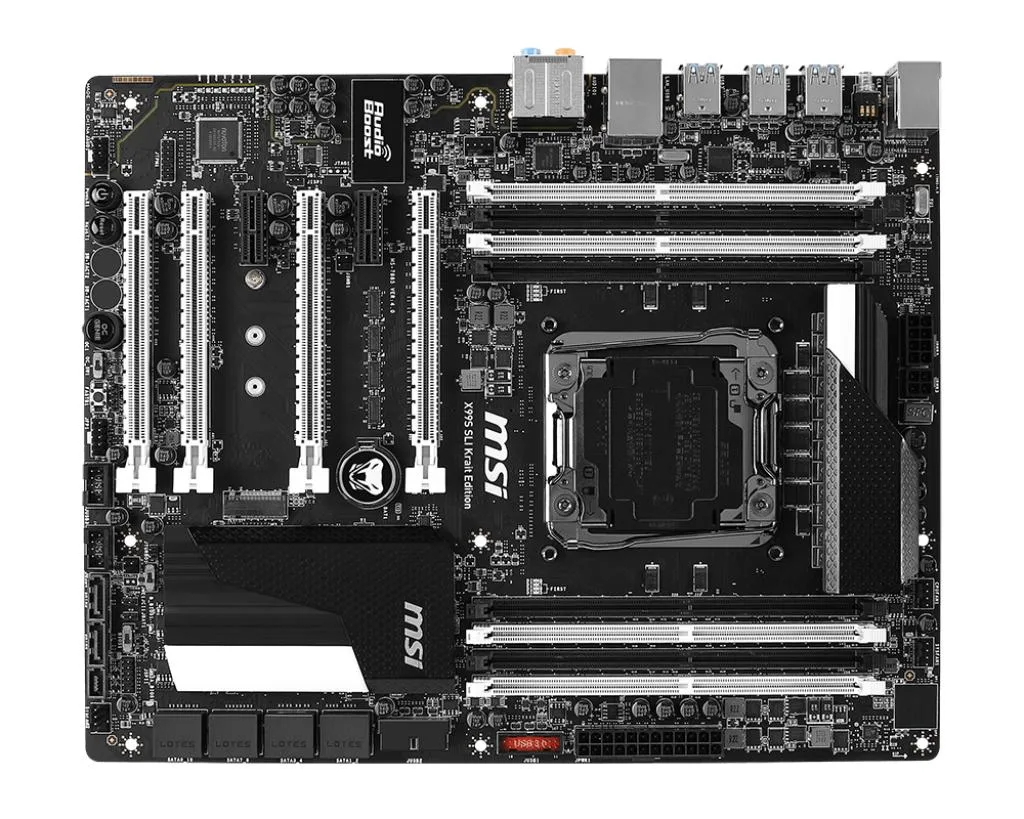


MSI
Supports Core i7 Extreme CPUs on LGA 2011-v3 with four-channel DDR4 up to 3333 MHz and 128 GB capacity
This MSI motherboard uses the Intel X99 chipset and an LGA 2011-v3 socket for Core i7 Extreme Edition processors. It targets enthusiasts building high-end desktop systems that need quad-channel DDR4 memory and multi-GPU capability. The board supports up to 128 GB of RAM across eight slots.
Four full-length PCIe 3.0 x16 slots run at x16, x16/x16 or x16/x16/x8 depending on how many cards are installed. Two additional PCIe 2.0 x1 slots provide room for add-in controllers. Ten SATA III ports, one SATA Express connector and one M.2 interface give extensive storage options.
A single Intel I210-AT controller handles wired networking at gigabit speeds. The Realtek ALC1150 codec delivers 7.1-channel high-definition audio with S/PDIF output. Six USB 3.0 ports and six USB 2.0 ports are split between the rear panel and internal headers for front-panel connectivity.
| Brand | MSI |
|---|---|
| Series | MSI X99S SLI Krait Edition |
| Model | MSI X99S SLI Krait Edition |
| CPU Socket Type | LGA 2011-v3 |
| CPU Type | Supports New Intel Core™ i7 Processor Extreme Edition for LGA2011-3 Socket. |
| Chipset | Intel X99 |
| Memory Standard | Supports four-channel DDR4 2133/2200/2400/2600/2666/2750/3000/3110/3333 (OC) MHz memory |
| Maximum Memory Supported | 128GB |
| PCI Slots | 4 x PCIe 3.0 x16 slots (PCI_E1,3,5,6), support up to 3-way mode - 1-way mode: x16/ x0/ x0/ x0 - 2-way mode: x16/ x16/ x0/ x0*, 16/ x8/ x0/ x0** - 3-way mode: x16/ x16/ x0/ x8*, x8/ x8/ x8/ x0** 2x PCIe 2.0 x1 slots (PCI_E2,4) * For the CPU that supports 40 PCIe lanes ** For the CPU that supports 28 PCIe lanes |
| SATA RAID | 1XM.2 interface, 1xSATA Express interface, 10xSATA III interface |
| Audio Chipset | Realtek ALC1150 Codec - 7.1-Channel High Definition Audio - Supports S/PDIF output |
| LAN Chipset | 1 x Intel I210-AT Gigabit LAN controller |
| Onboard USB | Intel X99 Express Chipset - 6 x USB 3.0 ports (2 ports on the back panel, 4 ports available through the internal USB 3.0 connectors*) - 6 x USB 2.0 ports (2 ports on the back panel, 4 ports available through the internal USB 2.0 connectors) ASMedia ASM1042AE - 2 x USB 3.0 ports on the back panel VIA VL805 - 4 x USB 3.0 ports on the back panel * Internal JUSB1 connector supports MSI Super Charger. |
The board supports four-channel DDR4 at 2133, 2200, 2400, 2600, 2666, 2750, 3000, 3110 and 3333 MHz; speeds above 2133 MHz require overclocking.
It fits any chassis with Micro ATX or larger mounting holes and uses the standard ATX I/O shield supplied in the box.
Fit the I/O shield into the case before seating the board; skipping it forces a full teardown to add it later.
이 진열대의 다른 상품
같은 진열대, 같은 체크아웃 — 코인 8종, 환율 잠금 30분.
결제할 코인과 가격을 확인할 통화입니다.
체크아웃 시 지갑에서 전송됩니다.
표시 전용 — 카탈로그 가격은 달러 기준입니다.
일치하는 통화가 없습니다.
사이트에서 사용할 언어를 선택하십시오.
일치하는 언어가 없습니다.
처음 방문하셨나요?
이미 계정이 있으신가요?
자동 재설정 기능은 없습니다. 이 쇼핑몰은 어떠한 메일도 보내지 않으므로 요청할 일회용 링크 자체가 없습니다. 계정에 등록된 이메일 주소를 그대로 두시면 담당자가 직접 확인해 처리합니다.
요청 접수
받은편지함으로 오는 것은 아무것도 없습니다 — 이 쇼핑몰은 메일을 전혀 보내지 않습니다. 담당자가 직접 확인해 처리합니다.
기억나셨나요?



