

EVESKY
EVESKY MW4500 Wireless Vertical Ergonomic Mouse 1200 DPI 6 Buttons
US$ 157,99
0.0019913BTC
Op voorraadWij accepteren cryptovaluta — zo kunnen de munten die u bezit echte hardware kopen.Betaal in crypto, besteed het aan echte hardware. Gratis verzekerde verzending wereldwijd vanaf $399. Neutrale dozen zonder merk, verzonden vanuit Duitsland.Gratis verzekerde verzending vanaf $399. Uw koers wordt 30 minuten vastgezet zodra het afrekenen begint.Koers 30 minuten vastgezet. Elk artikel is verzegeld, het serienummer wordt gecontroleerd, en het valt onder 24 maanden garantie.Verzegeld, 24 maanden garantie.


Logitech
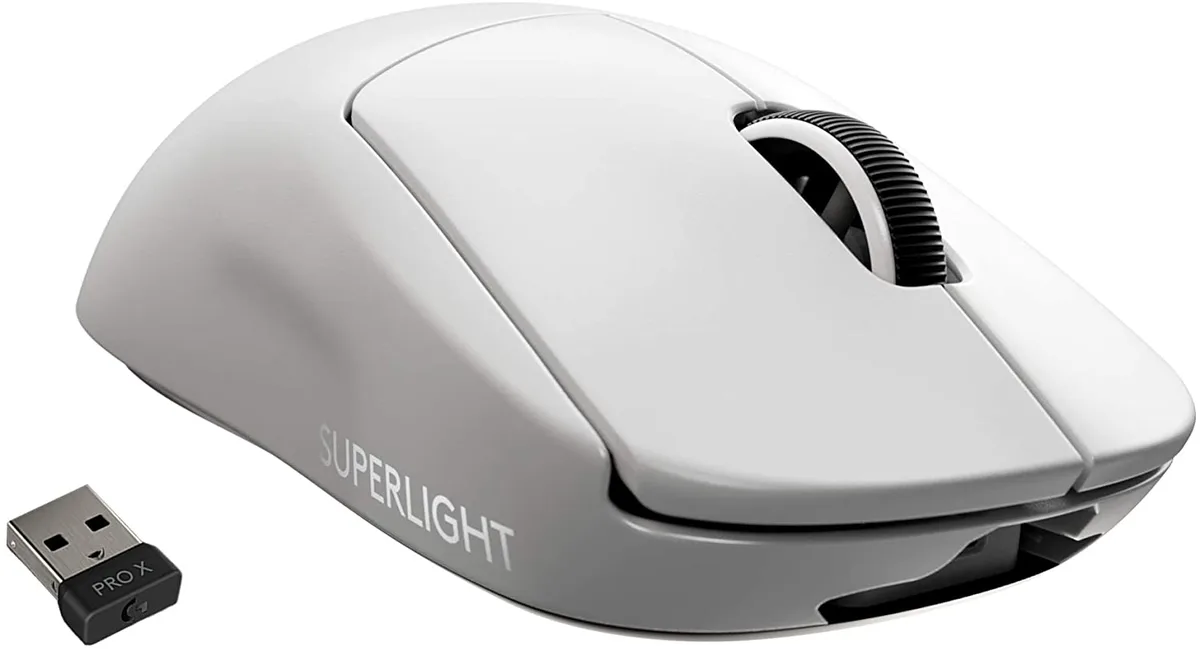
Ultra-light 63 g wireless gaming mouse with 16000 DPI sensor and 10 programmable buttons for competitive play
The Logitech G PRO X Superlight is a wireless gaming mouse weighing under 63 grams. It uses a HERO sensor and LIGHTSPEED connectivity for competitive play. The right-handed shape suits palm and claw grips. It is built for players who prioritise speed and minimal mass above all else.
This model reduces weight by nearly 25 percent compared to the standard PRO Wireless mouse. The hyper-minimal redesign removes excess material without adding holes. The upgrade is worth it when every gram affects flick speed and endurance in long sessions. Heavier mice will feel sluggish by comparison.
The sensor reaches 16000 DPI and can be tuned up to 25600 DPI via software for high-sensitivity setups. Ten programmable buttons cover essential macros and key binds for MOBA or FPS titles. Battery life supports extended tournaments without recharging. It lacks left-handed ergonomics and wired-mode flexibility.
| Type | Lightspeed Wireless |
|---|---|
| Mouse Grip Style | Palm / Claw |
| Tracking Method | SurfaceTrack |
| Resolution (DPI) | 16000 dpi |
| Hand Orientation | Right Hand |
| Buttons | 10 |
| Color | White |
The large zero-additive PTFE feet work on any flat surface; a standard mouse pad gives enough room for the 63 g frame to move freely.
Plug the receiver into a USB port, turn the mouse on, then press the connect button on the underside until the LED blinks — skipping the button press leaves it unpaired.
Replace the feet when you feel increased friction or see visible wear on the zero-additive PTFE pads; lifespan varies by pad surface and daily hours of use.
Ook in deze afdeling
Dezelfde afdeling, dezelfde kassa — acht munten en een koers die 30 minuten vaststaat.
Waarmee u betaalt, en waarin u de prijzen leest.
Verzonden vanuit uw wallet bij het afrekenen
Alleen ter weergave — de catalogus is geprijsd in USD
Geen valuta gevonden.
Kies de taal waarin de site met u spreekt.
Nieuw hier?
Al een account?
Er is geen automatisch herstel: deze winkel verstuurt geen e-mail, dus er is geen eenmalige link om aan te vragen. Laat het adres op het account achter en het wordt handmatig opgepakt.
Verzoek genoteerd
Er is niets onderweg naar uw inbox — deze winkel verstuurt helemaal geen e-mail. Iemand pakt dit handmatig op.
Weet u het weer?


