ASUS
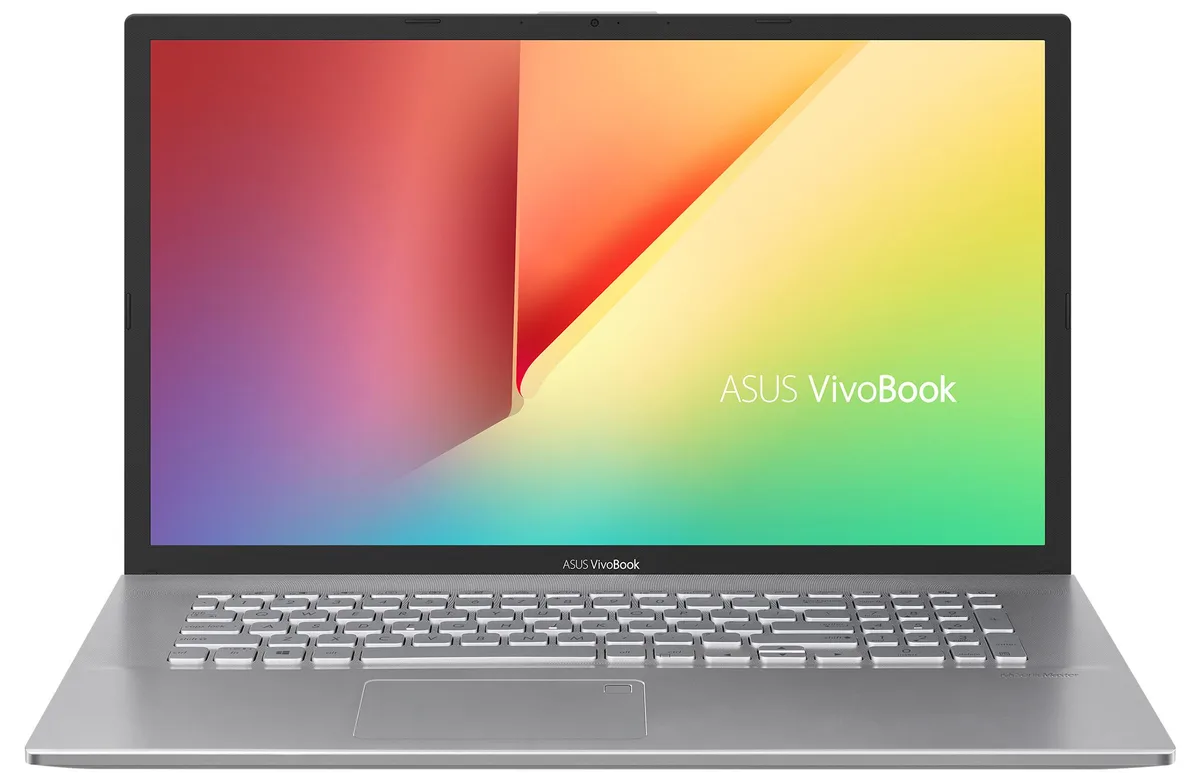
ASUS VivoBook S712JA-WH54 17.3" i5-1035G1 12GB 512GB+1TB laptop
- Silver
- Windows 11 Pro
766,99 USD
0.0098538BTC
DostępnyAkceptujemy kryptowaluty — posiadane środki można więc wykorzystać na zakup prawdziwego sprzętu.Płatność kryptowalutą — realny sprzęt w zamian. Bezpłatna, ubezpieczona dostawa na całym świecie powyżej 399 $. Neutralne kartony, bez oznaczeń, wysyłane z Niemiec.Bezpłatna, ubezpieczona dostawa powyżej 399 $. Kurs zostaje zablokowany na 30 minut od otwarcia kasy.Kurs zablokowany na 30 minut. Każdy produkt jest fabrycznie zapieczętowany, jego numer seryjny jest sprawdzany, a całość objęta jest 24-miesięczną gwarancją.Zapieczętowane fabrycznie, 24 miesiące gwarancji.


ASUS
17.3-inch FHD IPS laptop with Intel Core i5, 12GB DDR4, 256GB SATA SSD plus 2TB HDD, WiFi 6 and Windows 11 Home
Options 12GB/256GB+2TB W11H
The ASUS VivoBook S712JA-WH54 pairs a 10th Gen Intel Core i5-1035G1 processor with 12GB of DDR4 memory. A 256GB SATA SSD handles the operating system and apps while a 2TB hard drive stores large media libraries. Integrated Intel UHD graphics drive the 1920 x 1080 display at 60Hz. Windows 11 Home 64-bit comes pre-installed.
The large 17.3-inch panel and dual-drive layout help spreadsheet work and media collections. Buyers who want discrete graphics for gaming or video editing should look elsewhere. The single USB 3.2 Gen1 Type-A and one USB 3.2 Gen1 Type-C port limit high-speed peripheral expansion. No optical drive is fitted.
The SSD provides fast boot and application launch for the OS and core programs. The 2TB mechanical drive accommodates photo archives, video projects and backups. Heavy creative suites or modern game libraries will exceed the SSD space quickly. The 47 WHr battery and 45W adapter set practical limits on unplugged runtime.
| Brand | ASUS |
|---|---|
| Series | VivoBook |
| Color | Silver |
| Operating System | Windows 11 Home |
| CPU Type | Intel Core i5 10th Gen |
| Processor Name | 1.00GHz |
| Turbo Frequency | 3.6 GHz |
| CPU L3 Cache | 6MB Cache |
| Screen Size | 17.3" |
| Touchscreen | Non-Touch Screen |
| Resolution | 1920 x 1080 |
| GPU/VPU | Intel UHD Graphics |
| Graphic Type | Integrated Card |
| SSD | 256GB |
| HDD | 2TB |
| Storage Spec | 256GB SATA SSD + 2TB HDD |
| Memory | 12GB |
| Memory Speed | DDR4 |
| Optical Drive Type | No |
| WLAN | Wi-Fi 6 AX201 |
| Bluetooth | Bluetooth 5.1 |
| HDMI | 1 x HDMI |
| Audio Ports | 1 x Headphone/Microphone Combo Jack |
| Backlit Keyboard | Backlit |
| Other Input Devices | No |
| Webcam | Yes |
| Card Reader | Yes |
| Style | Standard |
| Type | Home / Personal |
Inne wersje tego modelu
Ta sama rodzina, inna pamięć, inne chłodzenie lub taktowanie — proszę porównać przed decyzją.
The 17.3" Full HD IPS panel is built in and driven by the Intel UHD integrated graphics; no external monitor or cable is required to begin working.
Yes, the two USB 2.0 ports and the USB 3.2 Gen1 Type-A port are backward compatible with USB 2.0 devices, so existing drives and mice will work without adapters.
Open Windows Settings, go to Network & Internet to see Wi-Fi 6 listed, and check Devices for Bluetooth 5.1; both should show as connected and ready to pair.
Także w tym dziale
Ten sam dział, ta sama kasa — osiem kryptowalut i 30-minutowa blokada kursu.
Waluta płatności i waluta wyświetlania cen.
Wysyłane z portfela przy kasie
Tylko podgląd — katalog wyceniony jest w dolarach
Brak pasującej waluty.
Wybierz język, w którym wyświetla się strona.
Brak pasującego języka.
Pierwsza wizyta?
Konto już założone?
Nie ma automatycznego resetowania hasła: ten sklep nie wysyła żadnych e-maili, więc nie ma jednorazowego linku, o który można by poprosić. Adres pozostawiony przy koncie zostanie obsłużony ręcznie.
Zgłoszenie zapisane
Do skrzynki odbiorczej nic nie trafi — ten sklep nie wysyła żadnych e-maili. Zgłoszenia są obsługiwane ręcznie.
Hasło się przypomniało?