
Lenovo
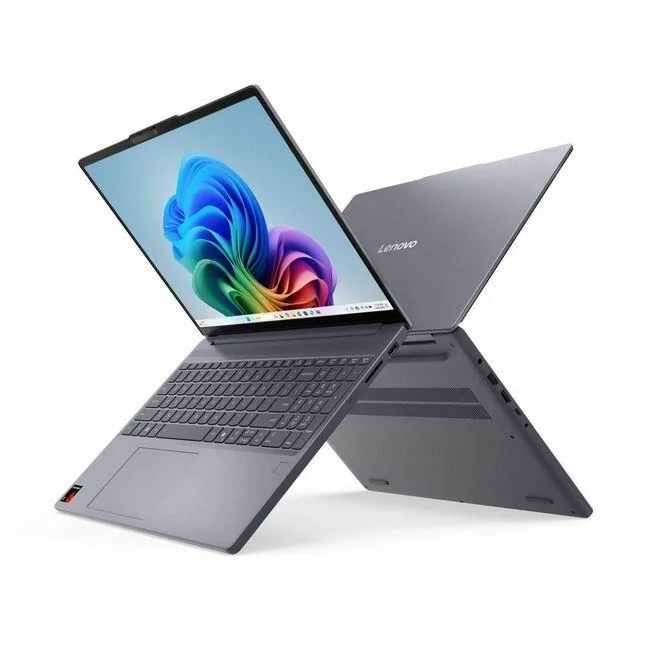
Lenovo 83N3004BUS business laptop 15.3" 16 GB 1 TB SSD
- Gray
- 15.3"
619,99 USD678,99 USD−9%
0.00795297BTC
DostępnyAkceptujemy kryptowaluty — posiadane środki można więc wykorzystać na zakup prawdziwego sprzętu.Płatność kryptowalutą — realny sprzęt w zamian. Bezpłatna, ubezpieczona dostawa na całym świecie powyżej 399 $. Neutralne kartony, bez oznaczeń, wysyłane z Niemiec.Bezpłatna, ubezpieczona dostawa powyżej 399 $. Kurs zostaje zablokowany na 30 minut od otwarcia kasy.Kurs zablokowany na 30 minut. Każdy produkt jest fabrycznie zapieczętowany, jego numer seryjny jest sprawdzany, a całość objęta jest 24-miesięczną gwarancją.Zapieczętowane fabrycznie, 24 miesiące gwarancji.


DELL
A 15.6 inch FHD business laptop with an Intel Core i5-5300U processor, 8GB DDR3 memory and a new 240GB SATA SSD, sold without an operating system
This 15.6" FHD laptop ships with an Intel Core i5-5300U dual-core processor at 2.30 GHz, 8GB DDR3 memory and a new 240GB SSD. It arrives without an operating system, so the buyer installs their preferred Windows or Linux build. The 1920 x 1080 non-touch display and Intel HD Graphics 5500 suit general office and web workloads.
The 2.5" SATA SSD and two memory slots are accessible after removing the base cover, allowing straightforward storage or RAM upgrades up to 16 GB. No OS is pre-installed, so the first boot requires a bootable USB drive and manual driver installation for Wi-Fi, Bluetooth and the webcam. Buyers unfamiliar with clean OS deployments should budget time for setup and driver hunting.
This unit is sold without any operating system licence or recovery media, so it cannot be used out of the box for standard Windows workflows. Organisations that require immediate deployment with a supported Windows image should choose a system that ships with an activated OS.
The installed 240GB 2.5" SATA drive sets the storage ceiling unless you replace or supplement it. Users with large local datasets, multiple virtual machines or extensive media libraries will find this capacity limiting and should plan an upgrade before purchase.
| Brand | DELL |
|---|---|
| Series | Latitude |
| Model | Latitude E5550 |
| Color | Black |
| Operating System | No |
| CPU Type | Intel Core i5 5th Gen |
| Processor Name | Intel Core i5-5300U |
| Turbo Frequency | 2.90 GHz |
| Number of Cores | Dual-core Processor |
| Screen Size | 15.6" |
| Touchscreen | Non-Touch Screen |
| Display Type | FHD |
| Resolution | 1920 x 1080 |
| GPU/VPU | Intel HD Graphics 5500 |
| SSD | 240GB |
| HDD | No |
| Storage Spec | 240GB SSD 2.5" SATA |
| Memory | 8GB |
| Memory Slot (Total) | 2 |
| Max Memory Supported | 16 GB |
| Optical Drive Type | No |
| Audio | Integrated Sound card |
| Style | Standard |
| Type | Mainstream |
| Dimensions (W x D x H) | 10.10" x 14.80" x .90" |
| Weight | 4 - 4.9 lbs. |
Open Task Manager in Windows or run lscpu in Linux and watch the live clock speed while a heavy single-thread load runs; the value should climb toward 2.90 GHz.
The 240GB SSD is already installed in the internal 2.5" bay and the 8GB DDR3 occupies one of two slots; no cables, caddies or extra modules are required to start.
If you run virtual machines, large spreadsheets or many browser tabs, add a second 8GB DDR3 stick to reach 16 GB; otherwise the factory 8GB is adequate for office work.
Także w tym dziale
Ten sam dział, ta sama kasa — osiem kryptowalut i 30-minutowa blokada kursu.
Waluta płatności i waluta wyświetlania cen.
Wysyłane z portfela przy kasie
Tylko podgląd — katalog wyceniony jest w dolarach
Brak pasującej waluty.
Wybierz język, w którym wyświetla się strona.
Brak pasującego języka.
Pierwsza wizyta?
Konto już założone?
Nie ma automatycznego resetowania hasła: ten sklep nie wysyła żadnych e-maili, więc nie ma jednorazowego linku, o który można by poprosić. Adres pozostawiony przy koncie zostanie obsłużony ręcznie.
Zgłoszenie zapisane
Do skrzynki odbiorczej nic nie trafi — ten sklep nie wysyła żadnych e-maili. Zgłoszenia są obsługiwane ręcznie.
Hasło się przypomniało?


