

Intel
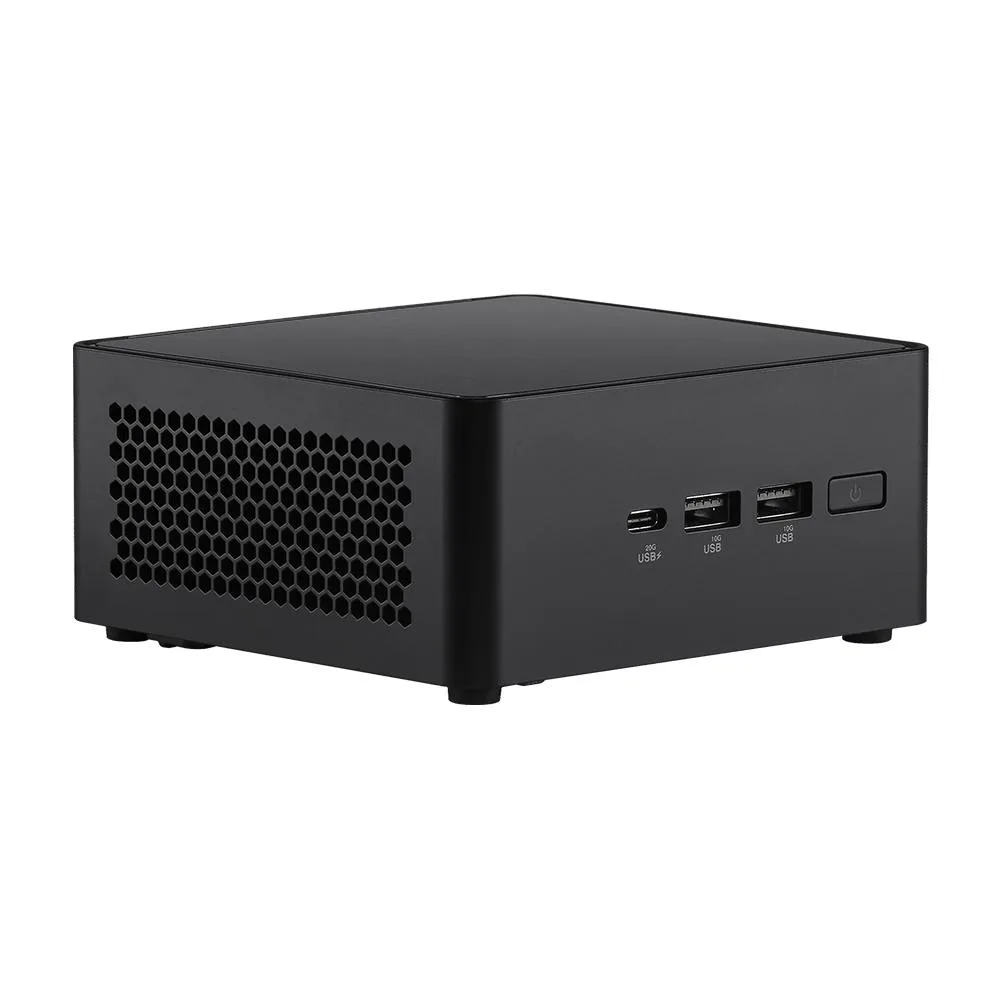
Intel NUC14RVHU5 barebone mini PC Core Ultra 5 125H DDR5 96GB
- Black
- Tall
801,99 USD
0.01005857BTC
DostępnyAkceptujemy kryptowaluty — posiadane środki można więc wykorzystać na zakup prawdziwego sprzętu.Płatność kryptowalutą — realny sprzęt w zamian. Bezpłatna, ubezpieczona dostawa na całym świecie powyżej 399 $. Neutralne kartony, bez oznaczeń, wysyłane z Niemiec.Bezpłatna, ubezpieczona dostawa powyżej 399 $. Kurs zostaje zablokowany na 30 minut od otwarcia kasy.Kurs zablokowany na 30 minut. Każdy produkt jest fabrycznie zapieczętowany, jego numer seryjny jest sprawdzany, a całość objęta jest 24-miesięczną gwarancją.Zapieczętowane fabrycznie, 24 miesiące gwarancji.


Intel
Barebone mini PC with Intel Core Ultra 5 125H, Arc graphics, integrated NPU, dual DDR5-5600 SO-DIMM slots up to 96 GB, two M.2 NVMe slots, 2.5 GbE, Wi-Fi 6E, Bluetooth 5.3, dual HDMI 2.1.
Group 32gb / 2tb ssd
This barebone mini PC targets builders who want a compact system for productivity and light creative work. It ships without memory or storage so you can choose DDR5-5600 modules up to 96 GB and two NVMe drives. The integrated Arc graphics and NPU handle AI-enhanced video calls and quad-display output. It is not for buyers who need a pre-configured unit with RAM and SSD already installed.
The 117 x 112 x 54 mm black enclosure includes VESA mounting hardware for behind-monitor or wall placement. A 19 V 120 W power adapter with US cord is supplied and the board accepts 12 V to 20 V DC input. Front and rear I/O provide two HDMI 2.1 ports, two Thunderbolt 4 Type-C ports, one USB 3.2 Gen 2x2 Type-C, three USB 3.2 Gen 2 Type-A, one USB 2.0 Type-A and a Kensington lock slot. Wired networking uses a single 2.5 GbE RJ45 jack.
The package includes the AC adapter with power cord, a collateral flyer, a warranty card and the VESA mount bracket. No operating system is installed but the platform supports Windows 11 and various Linux distributions. Wireless connectivity comes from the soldered Intel Wi-Fi 6E AX211 module with Bluetooth 5.3. Builders must supply their own SO-DIMM memory and M.2 NVMe storage to complete the system.
| Brand | Intel |
|---|---|
| Series | NUC (Next Unit of Computing) |
| Model | NUC14RVHU5 |
| Color | Black |
| Form Factor | Tall |
| CPU Type | Intel Core Ultra 5 |
| Memory installed | No Memory |
| Memory Type Supported | DDR5 5600 |
| Max Memory Supported | 96GB |
| Dual Channel Memory Supported | Yes |
| Storage Installed | No Hard Drive |
| LAN | Intel i226-LM |
| Max LAN Speed | 2.5Gbps |
| Bluetooth | Bluetooth 5.3 |
| HDMI | 2 |
| Rear USB | 4 |
| RJ45 | 1 |
Inne wersje tego modelu
Ta sama rodzina, inna pamięć, inne chłodzenie lub taktowanie — proszę porównać przed decyzją.
Each Thunderbolt 4 port delivers up to 20Gbps, shared with the USB 3.2 Gen2x2 Type-C port on the front.
The tall chassis measures 117 x 112 x 54 mm and includes VESA mounting hardware for behind-monitor installation.
Insert both DDR5 SO-DIMMs at an angle into the two slots until they click, then press down firmly to lock both retention clips — skipping the second clip leaves a module loose.
Także w tym dziale
Ten sam dział, ta sama kasa — osiem kryptowalut i 30-minutowa blokada kursu.
Waluta płatności i waluta wyświetlania cen.
Wysyłane z portfela przy kasie
Tylko podgląd — katalog wyceniony jest w dolarach
Brak pasującej waluty.
Wybierz język, w którym wyświetla się strona.
Pierwsza wizyta?
Konto już założone?
Nie ma automatycznego resetowania hasła: ten sklep nie wysyła żadnych e-maili, więc nie ma jednorazowego linku, o który można by poprosić. Adres pozostawiony przy koncie zostanie obsłużony ręcznie.
Zgłoszenie zapisane
Do skrzynki odbiorczej nic nie trafi — ten sklep nie wysyła żadnych e-maili. Zgłoszenia są obsługiwane ręcznie.
Hasło się przypomniało?


