

MSI
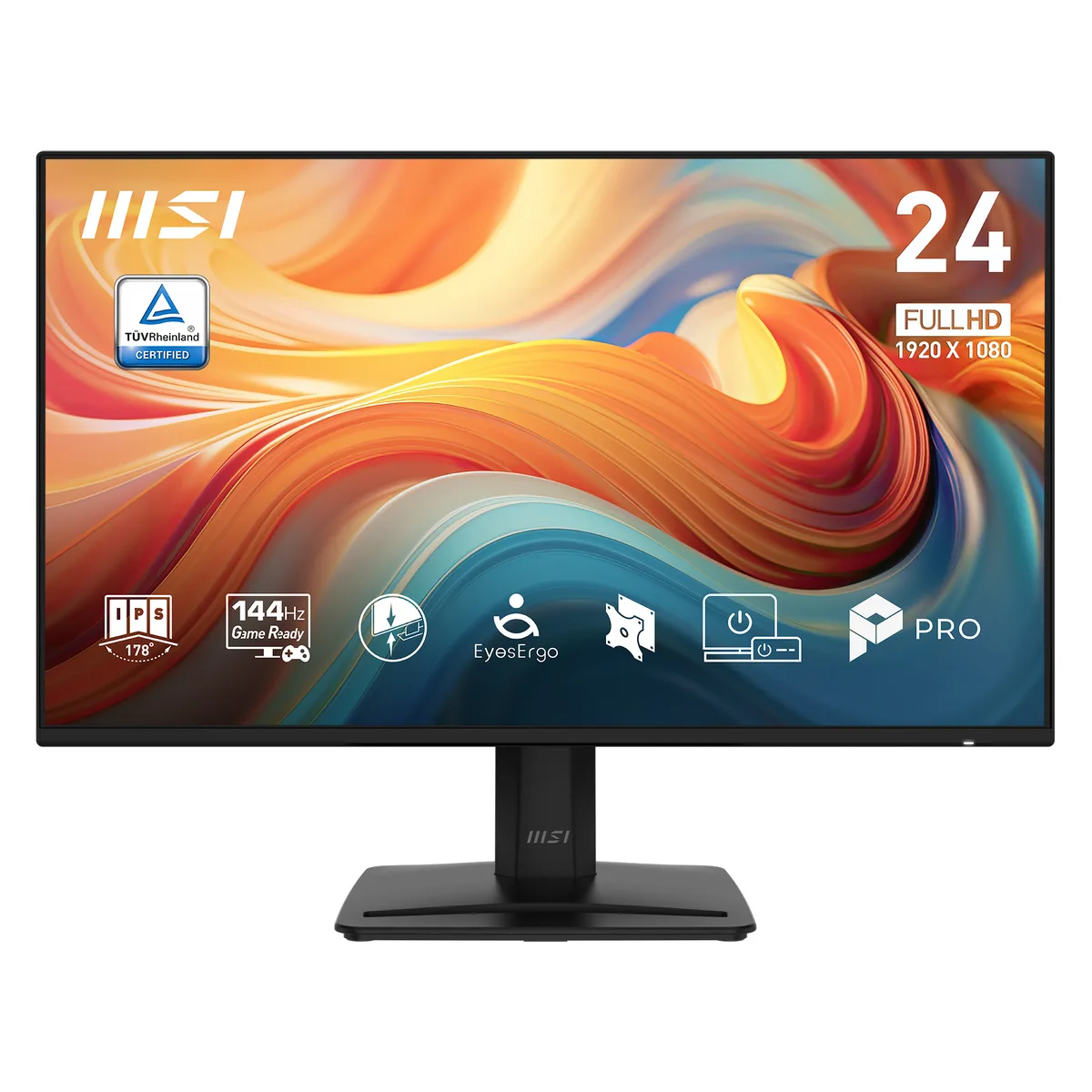
MSI PRO MP242 E14A 23.8" 144Hz IPS FHD monitor
A 23.8 inch IPS panel delivers 144 Hz refresh, 1 ms MPRT response and FreeSync adaptive sync with 91 % DCI-P3 and 121 % sRGB colour coverage
- Cabinet ColorBlack
- Cosmetic ConditionN/A
- Screen Size23.8"
- Glare ScreenAnti-glare
- WidescreenNo
- Resolution1920 x 1080
- Smooth 144 Hz motion for fluid work and play
- 1 ms MPRT response cuts ghosting in fast scenes
- IPS panel delivers 178° wide viewing angles with consistent colour
- 86 % Adobe RGB and 91 % DCI-P3 coverage for accurate creative output
- Four-side slim bezel plus VESA mount enables clean multi-screen setups
Compact 23.8-inch productivity display
The MSI PRO MP242 E14A is a 23.8-inch Full HD IPS monitor built for daily office work and casual gaming. Its 144 Hz refresh rate and Adaptive-Sync support suit users who want smoother motion without stepping up to a larger or higher-resolution panel. The anti-glare coating and wide viewing angles keep the image consistent across a typical desk setup.
144 Hz IPS panel with Adaptive-Sync
In normal use the 144 Hz IPS panel delivers 300 cd/m² brightness and a 1,500:1 contrast ratio while Adaptive-Sync eliminates tearing at variable frame rates. Response times are rated at 1 ms MPRT and 4 ms GtG, so motion stays clear during video playback or light gaming sessions. The flat anti-glare surface keeps reflections low under office lighting.
86 % Adobe RGB and 91 % DCI-P3 coverage
Colour output reaches 86 % Adobe RGB, 91 % DCI-P3 and 121 % sRGB (CIE 1976), making the monitor suitable for general content creation where those gamuts are the reference. Buyers who need full Adobe RGB or a hardware calibration workflow should look elsewhere. The 16.7 million colour depth and 1920 x 1080 resolution complete the core specification.
Najważniejsze cechy
- Smooth 144 Hz motion for fluid work and play
- 1 ms MPRT response cuts ghosting in fast scenes
- IPS panel delivers 178° wide viewing angles with consistent colour
- 86 % Adobe RGB and 91 % DCI-P3 coverage for accurate creative output
- Four-side slim bezel plus VESA mount enables clean multi-screen setups
Specyfikacja
| Brand | MSI |
|---|---|
| Model | PRO MP242 E14A |
| Cabinet Color | Black |
| Cosmetic Condition | N/A |
| Screen Size | 23.8" |
| Glare Screen | Anti-glare |
| Widescreen | No |
| Resolution | 1920 x 1080 |
| 3D Ready | No |
| Refresh Rate | 144Hz |
| Viewing Angle | 178° (H) / 178° (V) |
| Monitor Pixel Density | 0.2745mm |
| Display Colors | 16.7 Million |
| Brightness | 300 cd/m2 |
| Contrast Ratio | 1,500:1 |
| Aspect Ratio | 16:9 |
| Response Time | 1ms (MPRT) / 4ms (GtG) |
| Panel | IPS |
| Display Type | FHD |
| Color Gamut | 86% Adobe RGB / 91% DCI-P3 / 121% sRGB (CIE 1976) |
| VESA Certified DisplayHDR | HDR Ready |
| Adaptive Sync Technology | FreeSync (AMD Adaptive Sync) |
| Curved Surface Screen | Flat Panel |
| Video Ports | 1 x D-Sub / 1 x DisplayPort 1.2a / 1 x HDMI 2.0b |
| USB Ports | N/A |
| D-Sub | 1 |
| DVI | N/A |
| Video | N/A |
| HDMI | 1 x HDMI 2.0 |
| Thunderbolt 3 | No |
| DisplayPort | No |
| USB 2.0 | NO |
| USB 3.0 | NO |
| Headphone | 1 x Headphone-out |
| Power Supply | 100-240V, 50/60Hz, Internal Power Board |
| Stand Adjustments | -5° ~ 20° |
| 3D Glasses Included | No |
| Built-in Speakers | No |
| Built-in Webcam | N/A |
| HDCP Support | N/A |
| VESA Compatibility - Mountable | 100 x 100mm |
| Dimensions | 16.09" x 21.26" x 7.41" with stand 12.46" x 21.26" x 1.81" without stand |
| Weight | 10.58 lbs. with stand 6.83 lbs. without stand |
| Package Contents | 1 x HDMI Cable (1.4), 1 x Quick Guide, 1 x Power Cord (C13) |
Pytania dotyczące tego produktu
How do I attach this monitor to a VESA arm and what step is often missed?
Remove the original stand by releasing the latch at the back, then fasten the four M4 screws through the VESA holes; the step most people miss is checking that their arm supports the monitor's weight before mounting.
What maintenance will this display need over time?
Wipe the anti-glare screen with a dry microfibre cloth; no user-serviceable parts exist inside, so the only replacement that may arise years later is the external power cord if it becomes damaged.
What limit appears first during long sessions at 144 Hz?
The 300 cd/m² brightness ceiling is reached before any thermal throttle, so sustained HDR content in a bright room will look dimmer than expected.
Także w tym dziale
Klienci porównywali też te produkty
Ten sam dział, ta sama kasa — osiem kryptowalut i 30-minutowa blokada kursu.