


Vszerda
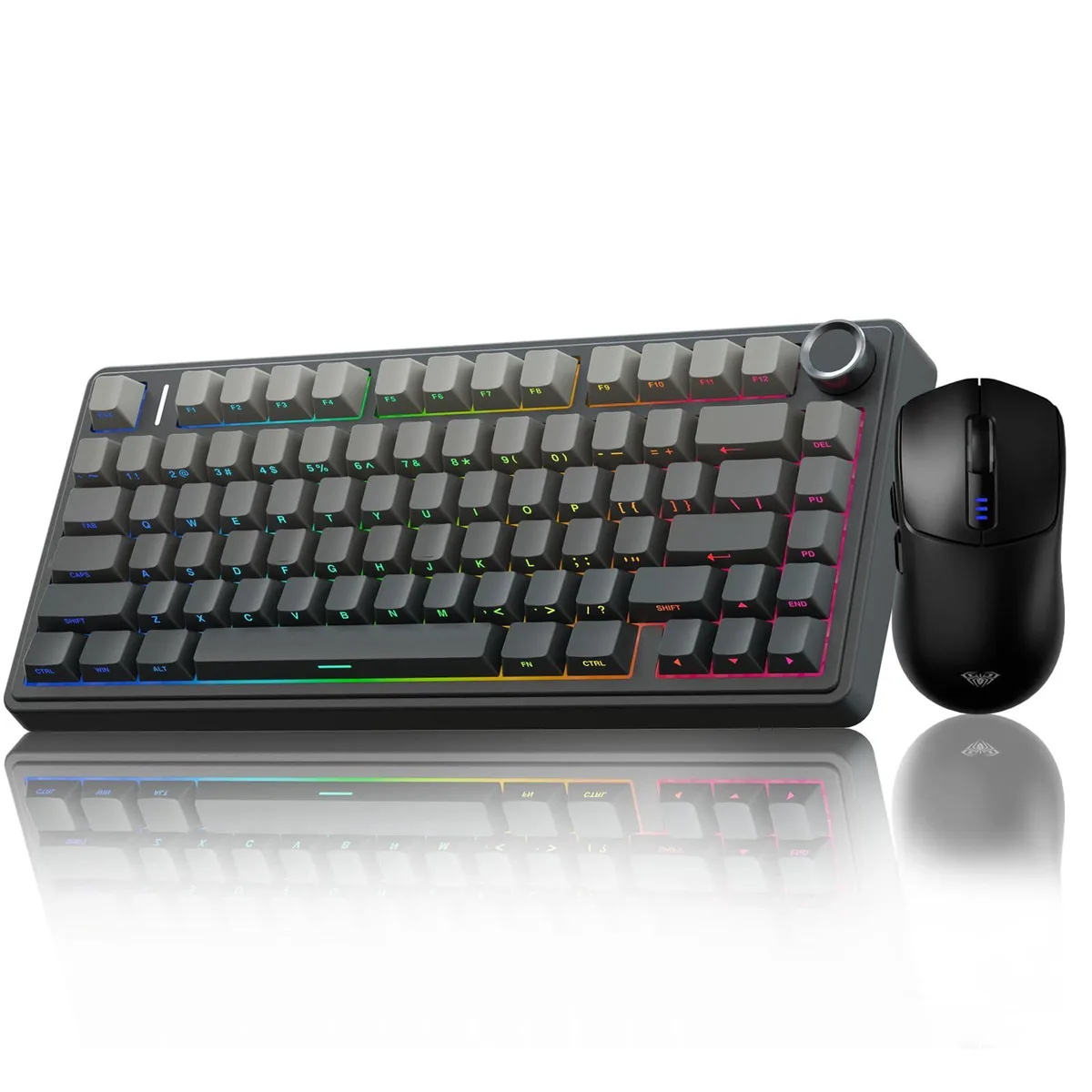
Vszerda F75 Pro 75% Gasket Hot-Swap Keyboard + SC580 Mouse
A 75% gasket mechanical keyboard with hot-swappable switches and tri-mode Bluetooth 5.0 connectivity plus a SC580 wireless mouse offering 10000 DPI and 1000 Hz polling
- NameF75 Pro
- MaterialAcrylonitrile Butadiene Styrene
- Keyboard InterfaceUSB-C
- Design StyleModern
- Layout75%
- Palm RestHot-Swappable
- Tri-mode connectivity links up to five devices via Bluetooth 5.0, 2.4 GHz wireless and USB-C
- Hot-swappable PCB accepts 3-pin and 5-pin switches for solder-free customisation
- Gasket mount with five silencing layers delivers a softer, thocky typing feel
- 4000 mAh battery powers extended wireless sessions
- SC580 mouse offers six DPI steps up to 10000 and 1000 Hz polling rate
75% Gasket Keyboard & SC580 Mouse Combo
The Vszerda F75 Pro is a 75% layout mechanical keyboard paired with the SC580 wireless gaming mouse. It uses a gasket-mounted structure with hot-swappable sockets that accept 3-pin or 5-pin switches. The keyboard connects via Bluetooth 5.0, 2.4 GHz wireless or USB-C and runs on a 4000 mAh battery. The mouse offers six adjustable DPI levels up to 10000 and a 1000 Hz polling rate.
Users Who Want Hot-Swap Customisation
This combo suits enthusiasts who want to swap switches without soldering and need one keyboard that pairs with up to five devices across PC, mobile and console platforms. Buyers who require a full-size layout with a dedicated number pad or a wired-only keyboard with zero latency should look at other form factors. The ambidextrous mouse shape may not fit gamers who prefer a pronounced ergonomic right-hand contour.
Straightforward Setup
Installing the keyboard is as simple as plugging the 2.4 GHz dongle or connecting the USB-C cable, then pairing additional devices over Bluetooth 5.0 via shortcut keys. Switch changes are tool-free thanks to the hot-swap PCB, though beginners must align 3-pin or 5-pin pins carefully to avoid bent contacts. The mouse stores four device profiles and switches them with a bottom button; the only common issue is forgetting to update the DPI software for custom sensitivity steps.
Najważniejsze cechy
- Tri-mode connectivity links up to five devices via Bluetooth 5.0, 2.4 GHz wireless and USB-C
- Hot-swappable PCB accepts 3-pin and 5-pin switches for solder-free customisation
- Gasket mount with five silencing layers delivers a softer, thocky typing feel
- 4000 mAh battery powers extended wireless sessions
- SC580 mouse offers six DPI steps up to 10000 and 1000 Hz polling rate
Specyfikacja
| Brand | AULA |
|---|---|
| Name | F75 Pro |
| Model | F75 Pro |
| Material | Acrylonitrile Butadiene Styrene |
| Keyboard Interface | USB-C |
| Design Style | Modern |
| Layout | 75% |
| Palm Rest | Hot-Swappable |
| Mechanical Keyboard | Mechanical |
| Key Switch Type | Mechanical |
| Keyboard Color | Black |
| Backlit | rgb |
| Type | USB-C |
| Hand Orientation | Ambidextrous |
| Power Source | Battery Powered |
| Operating System Supported | PC |
| Features | Hot-Swappable |
| Package Contents | AULA F75 Pro Wireless Mechanical Keyboard, SC580 Wireless Gaming Mouse |
Pytania dotyczące tego produktu
Which host-side USB port do I need for the F75 Pro keyboard's wired link?
The keyboard uses a USB-C interface, so the host must provide a USB-C receptacle or an adapter with a USB-C plug.
Can the SC580 mouse share a single 2.4 GHz receiver with the F75 Pro keyboard?
No, each device pairs with its own 2.4 GHz dongle; they cannot share one receiver.
How do I confirm the F75 Pro keyboard's 4000 mAh battery is charging after I plug it in?
The keyboard's RGB backlight will display a charging indicator pattern while power is flowing into the battery.
Także w tym dziale
Klienci porównywali też te produkty
Ten sam dział, ta sama kasa — osiem kryptowalut i 30-minutowa blokada kursu.



Cherry
Cherry MX 3.1 Mechanical Wired Gaming Keyboard White MX2A Silent Red
- Red Switch
- White
116,99 USD
0.00145639BTC
Dostępny