

Womier
Womier S-K80 Retro 75% Gaming Keyboard Coffee Cat
- S-K80
- Polybutylene Tereph…
44,99 USD
0.00056112BTC
DostępnyAkceptujemy kryptowaluty — posiadane środki można więc wykorzystać na zakup prawdziwego sprzętu.Płatność kryptowalutą — realny sprzęt w zamian. Bezpłatna, ubezpieczona dostawa na całym świecie powyżej 399 $. Neutralne kartony, bez oznaczeń, wysyłane z Niemiec.Bezpłatna, ubezpieczona dostawa powyżej 399 $. Kurs zostaje zablokowany na 30 minut od otwarcia kasy.Kurs zablokowany na 30 minut. Każdy produkt jest fabrycznie zapieczętowany, jego numer seryjny jest sprawdzany, a całość objęta jest 24-miesięczną gwarancją.Zapieczętowane fabrycznie, 24 miesiące gwarancji.


Womier
A 75% mechanical keyboard with a colour multimedia display, gasket mount, pre-lubed linear switches and hot-swappable PCB
Color Kanagawa Black
Przekreślone wersje istnieją, ale nie są dostępne w tym miejscu.
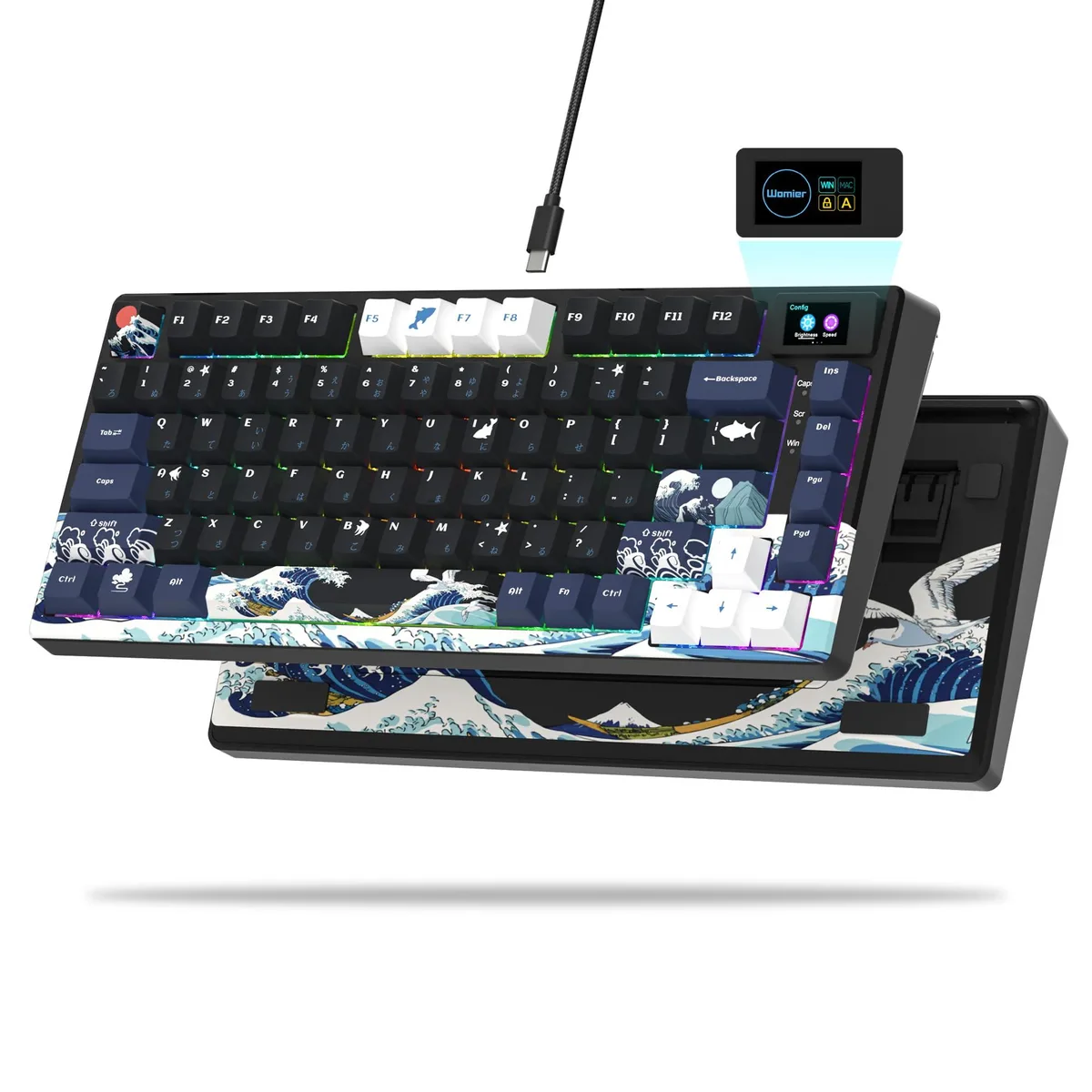
The Womier S-K80 is a 75% mechanical gaming keyboard with an 82-key layout, a colour multimedia display and a gasket-mount structure. It connects via a wired USB-C cable and features pre-lubed linear switches with south-facing RGB lighting. Hot-swappable sockets accept both 3-pin and 5-pin switches for easy customisation. The board includes Cherry-profile PBT keycaps in a Black Kanagawa theme.
This keyboard suits users who want a compact 75% form factor with a built-in colour screen for custom GIFs, system status and RGB control. The gasket mount and EVA dampening provide a creamy typing sound. Buyers who prefer a larger layout with a dedicated number pad or who do not want an integrated display should consider other options. Disassembly is not recommended due to fragile screen wiring.
The defining specification is the 82-key 75% layout combined with the colour multimedia display in the upper-right corner. This screen shows custom GIFs, Caps Lock status, connection mode, WIN/MAC toggle, brightness, RGB mode, volume and language settings. The 11° oblique angle aims to match natural viewing habits. The hot-swappable PCB supports 3-pin and 5-pin switches.
| Brand | Womier |
|---|---|
| Part Number | SK80 75% Gaming Keyboard |
| Material | Metal |
| Keyboard Interface | USB-C |
| Design Style | Black Kanagawa |
| Layout | 75% |
| Mechanical Keyboard | Mechanical |
| Key Switch Type | Linear |
| Keyboard Color | Kanagawa Black |
| Backlit | rgb |
| Dimensions | 32.5 in x 13.5 in x 3.5 in |
| Type | USB-C |
| Hand Orientation | Ambidextrous |
| Buttons | 82 |
| Power Source | Wired |
| Operating System Supported | Gaming Console |
| Package Contents | USB Cable |
Inne wersje tego modelu
Ta sama rodzina, inna pamięć, inne chłodzenie lub taktowanie — proszę porównać przed decyzją.
The USB-C connection provides a wired link to a PC, Mac or gaming console and powers the keyboard without batteries.
The board measures 32.5 in by 13.5 in by 3.5 in and uses a gasket mount with an EVA positioning plate and bottom foam; two-stage feet adjust the typing angle.
Plug the supplied USB-C cable into the board and a host port, then use the driver software to set the WIN/MAC toggle so the multimedia screen and macros work correctly.
Także w tym dziale
Ten sam dział, ta sama kasa — osiem kryptowalut i 30-minutowa blokada kursu.
Waluta płatności i waluta wyświetlania cen.
Wysyłane z portfela przy kasie
Tylko podgląd — katalog wyceniony jest w dolarach
Brak pasującej waluty.
Wybierz język, w którym wyświetla się strona.
Pierwsza wizyta?
Konto już założone?
Nie ma automatycznego resetowania hasła: ten sklep nie wysyła żadnych e-maili, więc nie ma jednorazowego linku, o który można by poprosić. Adres pozostawiony przy koncie zostanie obsłużony ręcznie.
Zgłoszenie zapisane
Do skrzynki odbiorczej nic nie trafi — ten sklep nie wysyła żadnych e-maili. Zgłoszenia są obsługiwane ręcznie.
Hasło się przypomniało?


