

NEMIX RAM
NEMIX RAM DDR5-5600 2TB (16x128GB) ECC RDIMM CL46 1.1V Supermicro H14SST-G memory upgrade
- 2TB (16 x 128GB)
- 288-Pin DDR5 RDIMM
62 908,99 USD
0.78366851BTC
DostępnyAkceptujemy kryptowaluty — posiadane środki można więc wykorzystać na zakup prawdziwego sprzętu.Płatność kryptowalutą — realny sprzęt w zamian. Bezpłatna, ubezpieczona dostawa na całym świecie powyżej 399 $. Neutralne kartony, bez oznaczeń, wysyłane z Niemiec.Bezpłatna, ubezpieczona dostawa powyżej 399 $. Kurs zostaje zablokowany na 30 minut od otwarcia kasy.Kurs zablokowany na 30 minut. Każdy produkt jest fabrycznie zapieczętowany, jego numer seryjny jest sprawdzany, a całość objęta jest 24-miesięczną gwarancją.Zapieczętowane fabrycznie, 24 miesiące gwarancji.
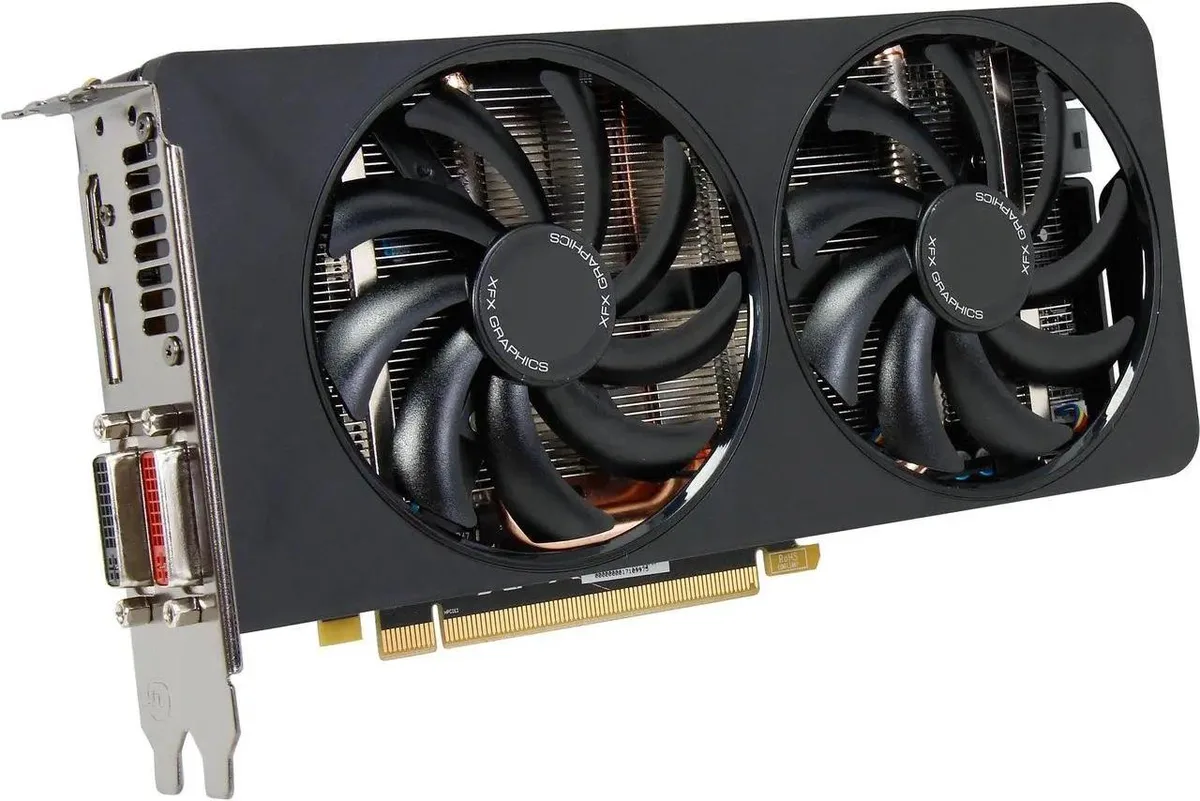


XFX
Dual-fan AMD Radeon R9 270X card with 2 GB GDDR5 memory, 1280 stream processors and boost clocks up to 1050 MHz for 1080p gaming
The XFX Double D Radeon R9 270X is a PCI Express 3.0 graphics card built on the AMD GCN architecture with 1280 Stream Processors. It targets gamers who want factory-overclocked performance at 1080p without moving to a higher tier. The dual-fan Ghost Thermal 2.0 design runs up to 13 dB quieter and 45 degrees cooler than reference coolers.
Moving from the standard R9 270 with its 900 MHz base and 925 MHz boost clocks gives an immediate 1000 MHz base and 1050 MHz boost. The jump is worth it when you need consistent frame rates in DirectX 11.2 titles without manual tuning. PowerTune 2.0 keeps clocks stable inside the TDP envelope.
The 2GB GDDR5 buffer on a 256-bit bus at 5600 MHz effective delivers enough bandwidth for high texture quality at 1080p. Four display outputs including HDMI, DVI and Mini DisplayPort 1.2 drive multi-monitor setups and 4K desktop work. The frame buffer becomes the limit in modern games that exceed 2GB VRAM allocation.
| Brand | XFX |
|---|---|
| Series | Double D |
| Model | R9-270A-CDFC |
| Interface | PCI Express 3.0 x16 |
| Chipset Manufacturer | AMD |
| GPU Series | AMD Radeon R9 200 Series |
| GPU | Radeon R9 270 |
| Core Clock | 900 MHz |
| Boost Clock | 925 MHz |
| Stream Processors | 1280 |
| Effective Memory Clock | 5600 MHz |
| Memory Size | 2GB |
| Memory Interface | 256-Bit |
| Memory Type | GDDR5 |
| DirectX | DirectX 11.2 |
| OpenGL | OpenGL 4.3 |
| Multi-Monitor Support | 4 |
| HDMI | 1 x HDMI |
| DisplayPort | 1 x DisplayPort 1.2 |
| DVI | 1 x DL-DVI-I 1 x DL-DVI-D |
| Max Resolution | ANALOG: 2048 x 1536 DIGITAL: 2560 x 1600 (DVI); 4096 x 2160 (HDMI; DP) |
| RoHS Compliant | Yes |
| Eyefinity Support | Yes |
| CrossFireX Support | Yes |
| Cooler | With Fan |
| Thermal Design Power | 150W |
| System Requirements | Minimum Power Supply Requirement: 500W XFX Recommended Power Supply: XFX 650W PSU |
| Power Connector | 6-Pin |
| Dual-Link DVI Supported | Yes |
| Card Dimensions (L x H) | 8.66" x 4.38" |
| Slot Width | 2 Slots |
| Package Contents | XFX R9-270A-CDFC Video Card |
Yes, it installs in any PCI Express 3.0 x16 slot on the motherboard. The dual-fan cooler occupies two expansion brackets at the rear of the case, so verify you have two adjacent slots free.
Connect both 6-pin PCIe power cables from the power supply to the card. The step often missed is seating both connectors fully until they click; a loose cable causes instability or no boot.
Use compressed air to clear dust from the fan blades and heatsink fins every few months. The floating heatsink design relies on open airflow, so keeping the fins clean preserves the 13 dB quieter operation and 45°F cooler temperatures.
Także w tym dziale
Ten sam dział, ta sama kasa — osiem kryptowalut i 30-minutowa blokada kursu.
Waluta płatności i waluta wyświetlania cen.
Wysyłane z portfela przy kasie
Tylko podgląd — katalog wyceniony jest w dolarach
Brak pasującej waluty.
Wybierz język, w którym wyświetla się strona.
Pierwsza wizyta?
Konto już założone?
Nie ma automatycznego resetowania hasła: ten sklep nie wysyła żadnych e-maili, więc nie ma jednorazowego linku, o który można by poprosić. Adres pozostawiony przy koncie zostanie obsłużony ręcznie.
Zgłoszenie zapisane
Do skrzynki odbiorczej nic nie trafi — ten sklep nie wysyła żadnych e-maili. Zgłoszenia są obsługiwane ręcznie.
Hasło się przypomniało?


