ASUS
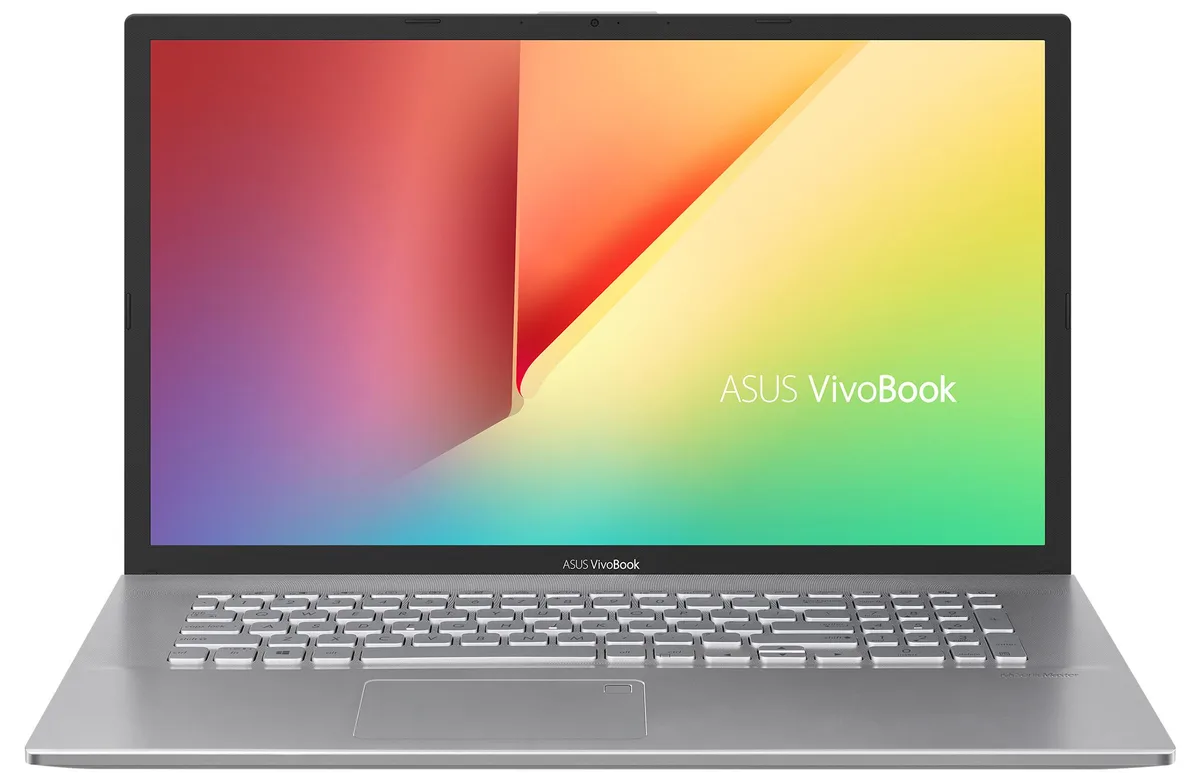
ASUS VivoBook S712JA-WH54 laptop 17.3" i5-1035G1 36GB 2TB SSD 1TB HDD
- Silver
- Windows 11 Home
US$1,103.99
0.01402088BTC
มีสินค้าเรารับชำระด้วยคริปโต — เหรียญที่คุณถืออยู่จึงนำมาซื้อฮาร์ดแวร์ของจริงได้จ่ายด้วยคริปโต แล้วนำไปซื้อฮาร์ดแวร์ของจริง จัดส่งฟรีพร้อมประกันภัยทั่วโลก เมื่อสั่งซื้อเกิน US$399 กล่องพัสดุเรียบไม่มีตราสินค้า จัดส่งจากประเทศเยอรมนีจัดส่งฟรีพร้อมประกันภัย เมื่อสั่งซื้อเกิน US$399 อัตราแลกเปลี่ยนของคุณจะถูกล็อกไว้ 30 นาที ทันทีที่เปิดหน้าชำระเงินล็อกอัตราแลกเปลี่ยน 30 นาที สินค้าทุกชิ้นปิดผนึกจากโรงงาน ตรวจสอบหมายเลขซีเรียล และรับประกัน 24 เดือนปิดผนึกจากโรงงาน รับประกัน 24 เดือน


ASUS
A 17.3-inch Full HD IPS laptop with Intel Core i5-1035G1, 20GB DDR4, 2TB PCIe SSD plus 1TB HDD, WiFi 6 and fingerprint reader
Options 20GB/2TB+1TB W11H
The ASUS VivoBook S712JA-WH54 is a 17.3-inch laptop driven by an Intel Core i5-1035G1 processor that reaches 3.6 GHz. It combines 20GB of DDR4 memory with a 2TB PCIe SSD and a 1TB hard drive. The 1920 x 1080 IPS panel runs at 60Hz and the system ships with Windows 11 Home 64-bit.
This configuration suits users who need a large screen for documents, web browsing and streaming. The integrated Intel UHD graphics and 60Hz display make it unsuitable for buyers who want gaming frame rates or colour-critical creative work. The single USB 3.2 Gen1 Type-A port also limits anyone who must connect several high-speed peripherals at once.
The laptop arrives with the operating system and drivers pre-installed, so initial configuration follows the standard Windows 11 out-of-box experience. The 4GB of onboard memory cannot be upgraded, leaving only the SODIMM slot for future expansion. The 47 WHr battery and 45W charger provide modest runtime, so users planning long unplugged sessions should keep the adapter nearby.
| Brand | ASUS |
|---|---|
| Series | VivoBook |
| Color | Silver |
| Operating System | Windows 11 Home |
| CPU Type | Intel Core i5 10th Gen |
| Processor Name | 1.00GHz |
| Turbo Frequency | 3.6 GHz |
| CPU L3 Cache | 6MB Cache |
| Screen Size | 17.3" |
| Touchscreen | Non-Touch Screen |
| Resolution | 1920 x 1080 |
| GPU/VPU | Intel UHD Graphics |
| Graphic Type | Integrated Card |
| SSD | 2TB |
| HDD | 1TB |
| Storage Spec | 2TB PCIe SSD + 1TB HDD |
| Memory | 20GB |
| Memory Speed | DDR4 |
| Optical Drive Type | No |
| WLAN | Wi-Fi 6 AX201 |
| Bluetooth | Bluetooth 5.1 |
| HDMI | 1 x HDMI |
| Audio Ports | 1 x Headphone/Microphone Combo Jack |
| Backlit Keyboard | Backlit |
| Other Input Devices | No |
| Webcam | Yes |
| Card Reader | Yes |
| Style | Standard |
| Type | Home / Personal |
รุ่นอื่นในตระกูลเดียวกัน
ตระกูลเดียวกัน แต่หน่วยความจำ คูลเลอร์ หรือสัญญาณนาฬิกาต่างกัน — เปรียบเทียบก่อนตัดสินใจ
The 4 GB soldered and 16 GB SO-DIMM modules are different capacities, so the memory controller operates in flex mode: the first 8 GB runs dual-channel and the remaining 8 GB runs single-channel.
Yes, the two USB 2.0 ports are fully backward compatible with USB 2.0, 1.1 and 1.0 devices.
Open Task Manager > Performance > Disk 0 and verify the drive shows "NVMe" and a link speed of PCIe Gen 3 x4.
อื่น ๆ ในหมวดนี้
หมวดเดียวกัน การชำระเงินแบบเดียวกัน — แปดสกุลเงินคริปโตและอัตราแลกเปลี่ยนที่ล็อกไว้ 30 นาที
สิ่งที่คุณใช้ชำระ และสิ่งที่คุณใช้อ่านราคา
ส่งจากกระเป๋าเงินของคุณเมื่อชำระเงิน
แสดงผลเท่านั้น — แคตตาล็อกสินค้าตั้งราคาเป็นดอลลาร์สหรัฐ
ไม่พบสกุลเงินที่ตรงกัน
เลือกภาษาที่ต้องการให้เว็บไซต์แสดงผล
ไม่พบภาษาที่ตรงกัน
ยังไม่เคยใช้งานใช่ไหม
มีบัญชีอยู่แล้วใช่ไหม
ไม่มีการรีเซ็ตแบบอัตโนมัติ ร้านนี้ไม่ส่งอีเมลใด ๆ จึงไม่มีลิงก์ใช้ครั้งเดียวให้ขอ ปล่อยที่อยู่อีเมลนี้ไว้ในบัญชี แล้วเจ้าหน้าที่จะดำเนินการให้ด้วยตนเอง
รับคำขอแล้ว
ไม่มีอะไรถูกส่งไปยังกล่องจดหมายของคุณ — ร้านนี้ไม่ส่งอีเมลใด ๆ เลย มีคนดำเนินการเรื่องนี้ให้ด้วยมือ
นึกออกแล้วใช่ไหม