

AVID Products
AVID Products R-Go Wireless Vertical Ergonomic Mouse Large Right Hand Black
US$71.99
0.00092642BTC
มีสินค้าเรารับชำระด้วยคริปโต — เหรียญที่คุณถืออยู่จึงนำมาซื้อฮาร์ดแวร์ของจริงได้จ่ายด้วยคริปโต แล้วนำไปซื้อฮาร์ดแวร์ของจริง จัดส่งฟรีพร้อมประกันภัยทั่วโลก เมื่อสั่งซื้อเกิน US$399 กล่องพัสดุเรียบไม่มีตราสินค้า จัดส่งจากประเทศเยอรมนีจัดส่งฟรีพร้อมประกันภัย เมื่อสั่งซื้อเกิน US$399 อัตราแลกเปลี่ยนของคุณจะถูกล็อกไว้ 30 นาที ทันทีที่เปิดหน้าชำระเงินล็อกอัตราแลกเปลี่ยน 30 นาที สินค้าทุกชิ้นปิดผนึกจากโรงงาน ตรวจสอบหมายเลขซีเรียล และรับประกัน 24 เดือนปิดผนึกจากโรงงาน รับประกัน 24 เดือน


HP
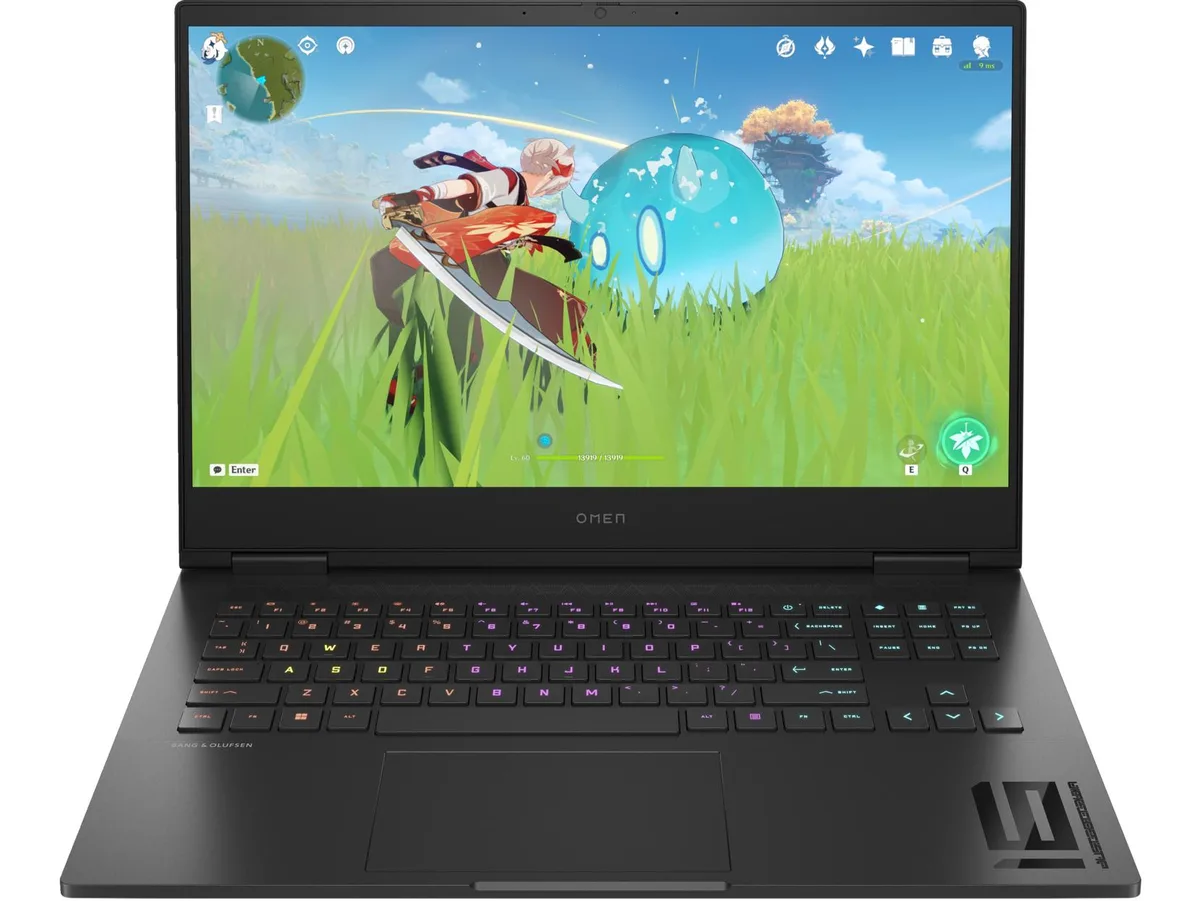
16.1-inch FHD 165 Hz IPS display driven by a Ryzen 7 7840HS and RTX 4060 with 8 GB GDDR6, 16 GB DDR5-5600 and 1 TB NVMe
This HP OMEN laptop pairs an AMD Ryzen 7 7840HS processor with an NVIDIA GeForce RTX 4060 Laptop GPU. The 16.1 inch display runs at 1920 x 1080 resolution with a 165 Hz refresh rate and 100 percent sRGB coverage. It targets gamers and creators who need a portable machine for high-frame-rate play and colour-accurate work.
The RTX 4060 with 8 GB GDDR6 dedicated memory replaces integrated Radeon Graphics or older mid-range mobile GPUs. The jump is worth it when you want consistent 165 Hz performance in competitive titles or hardware-accelerated rendering in creative apps. Buyers who need more storage or a second GPU should look at desktop alternatives.
The 1 TB PCIe Gen4 NVMe SSD and 16 GB DDR5-5600 RAM (two 8 GB modules) sit behind a service panel secured by standard screws. Most owners can swap the drive or add memory in minutes. The only common snag is forgetting to re-seat the battery connector after the panel comes off.
| Screen Size | 16.1" |
|---|---|
| GPU/VPU | GeForce RTX 4060 Laptop GPU |
The display is a 16.1" diagonal FHD panel with 165 Hz refresh and 300 nits brightness; HP does not publish bezel dimensions or mounting-hole patterns for this chassis.
Remove all base screws, pry the bottom cover off with a plastic tool, disconnect the 83 Wh battery cable first, then swap the 2 x 8 GB modules; skipping the battery disconnect risks a short.
Order the HP 6-cell 83 Wh Li-ion polymer pack (same part used in this model), remove the base cover, unplug the old pack, fit the new one, and reconnect before closing the chassis.
อื่น ๆ ในหมวดนี้
หมวดเดียวกัน การชำระเงินแบบเดียวกัน — แปดสกุลเงินคริปโตและอัตราแลกเปลี่ยนที่ล็อกไว้ 30 นาที
สิ่งที่คุณใช้ชำระ และสิ่งที่คุณใช้อ่านราคา
ส่งจากกระเป๋าเงินของคุณเมื่อชำระเงิน
แสดงผลเท่านั้น — แคตตาล็อกสินค้าตั้งราคาเป็นดอลลาร์สหรัฐ
ไม่พบสกุลเงินที่ตรงกัน
เลือกภาษาที่ต้องการให้เว็บไซต์แสดงผล
ไม่พบภาษาที่ตรงกัน
ยังไม่เคยใช้งานใช่ไหม
มีบัญชีอยู่แล้วใช่ไหม
ไม่มีการรีเซ็ตแบบอัตโนมัติ ร้านนี้ไม่ส่งอีเมลใด ๆ จึงไม่มีลิงก์ใช้ครั้งเดียวให้ขอ ปล่อยที่อยู่อีเมลนี้ไว้ในบัญชี แล้วเจ้าหน้าที่จะดำเนินการให้ด้วยตนเอง
รับคำขอแล้ว
ไม่มีอะไรถูกส่งไปยังกล่องจดหมายของคุณ — ร้านนี้ไม่ส่งอีเมลใด ๆ เลย มีคนดำเนินการเรื่องนี้ให้ด้วยมือ
นึกออกแล้วใช่ไหม



