
JAENFONG
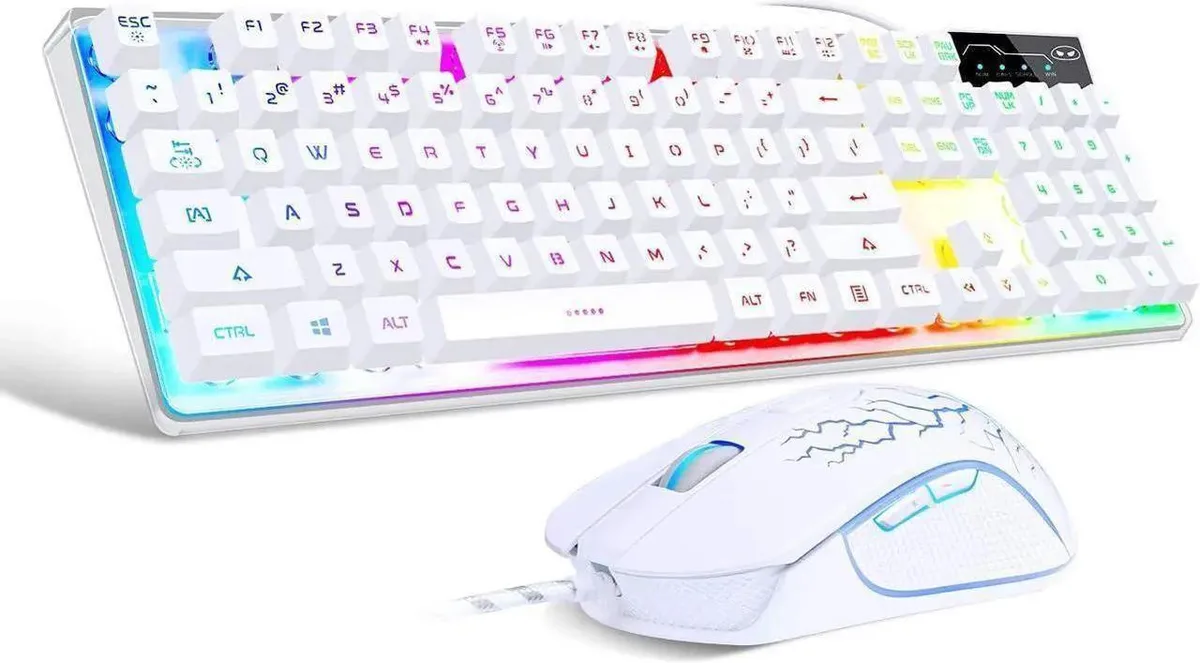
JAENFONG K1 Gaming Keyboard & Mouse Combo 104-Key Rainbow LED 800-3200 DPI
- Full-size
US$41.99
0.00053754BTC
มีสินค้าเรารับชำระด้วยคริปโต — เหรียญที่คุณถืออยู่จึงนำมาซื้อฮาร์ดแวร์ของจริงได้จ่ายด้วยคริปโต แล้วนำไปซื้อฮาร์ดแวร์ของจริง จัดส่งฟรีพร้อมประกันภัยทั่วโลก เมื่อสั่งซื้อเกิน US$399 กล่องพัสดุเรียบไม่มีตราสินค้า จัดส่งจากประเทศเยอรมนีจัดส่งฟรีพร้อมประกันภัย เมื่อสั่งซื้อเกิน US$399 อัตราแลกเปลี่ยนของคุณจะถูกล็อกไว้ 30 นาที ทันทีที่เปิดหน้าชำระเงินล็อกอัตราแลกเปลี่ยน 30 นาที สินค้าทุกชิ้นปิดผนึกจากโรงงาน ตรวจสอบหมายเลขซีเรียล และรับประกัน 24 เดือนปิดผนึกจากโรงงาน รับประกัน 24 เดือน


JAENFONG
Full-size 104-key wired keyboard with rainbow LED backlight plus a mouse offering four DPI settings up to 3200
Option Black
The JAENFONG K1 combo includes a 104-key keyboard and a wired mouse. The keyboard uses a standard layout with function row and numeric keypad, while the mouse offers four preset DPI steps of 800, 1200, 2400 and 3200. Both devices connect via USB and work immediately without driver installation.
This combo upgrades basic office peripherals that lack backlighting or adjustable mouse sensitivity. The jump is worth it when you want rainbow LED illumination on the keyboard and on-the-fly DPI switching on the mouse without configuring software. It is not for users who need mechanical switches, per-key RGB customisation, programmable macros or a wireless connection.
The keyboard's colour LED backlight makes key legends visible in low light and can be turned off when not needed. The mouse's four DPI levels cover everyday desktop work at 800, productivity at 1200, fast-paced gaming at 2400 and high-sensitivity aiming at 3200. Headroom ends at the maximum 3200 DPI setting and the fixed rainbow lighting pattern.
| Layout | Full-size |
|---|
รุ่นอื่นในตระกูลเดียวกัน
ตระกูลเดียวกัน แต่หน่วยความจำ คูลเลอร์ หรือสัญญาณนาฬิกาต่างกัน — เปรียบเทียบก่อนตัดสินใจ
Both the keyboard and mouse use standard USB-A plugs, so you need two free USB-A ports on your PC or laptop for plug-and-play operation.
The backlight is controlled by a dedicated key combination on the keyboard itself — no software install is required, just press the indicated keys to toggle or adjust brightness.
Blow out dust from the key switches and mouse sensor every few weeks, and wipe the keycaps and mouse feet with a lightly damp cloth when they feel sticky.
อื่น ๆ ในหมวดนี้
หมวดเดียวกัน การชำระเงินแบบเดียวกัน — แปดสกุลเงินคริปโตและอัตราแลกเปลี่ยนที่ล็อกไว้ 30 นาที
สิ่งที่คุณใช้ชำระ และสิ่งที่คุณใช้อ่านราคา
ส่งจากกระเป๋าเงินของคุณเมื่อชำระเงิน
แสดงผลเท่านั้น — แคตตาล็อกสินค้าตั้งราคาเป็นดอลลาร์สหรัฐ
ไม่พบสกุลเงินที่ตรงกัน
เลือกภาษาที่ต้องการให้เว็บไซต์แสดงผล
ไม่พบภาษาที่ตรงกัน
ยังไม่เคยใช้งานใช่ไหม
มีบัญชีอยู่แล้วใช่ไหม
ไม่มีการรีเซ็ตแบบอัตโนมัติ ร้านนี้ไม่ส่งอีเมลใด ๆ จึงไม่มีลิงก์ใช้ครั้งเดียวให้ขอ ปล่อยที่อยู่อีเมลนี้ไว้ในบัญชี แล้วเจ้าหน้าที่จะดำเนินการให้ด้วยตนเอง
รับคำขอแล้ว
ไม่มีอะไรถูกส่งไปยังกล่องจดหมายของคุณ — ร้านนี้ไม่ส่งอีเมลใด ๆ เลย มีคนดำเนินการเรื่องนี้ให้ด้วยมือ
นึกออกแล้วใช่ไหม




