

SanDisk
SanDisk Cruzer Blade 8 GB USB 2.0 USB flash drive Black SDCZ50-008G-B35
US$391.99
0.00502448BTC
มีสินค้าเรารับชำระด้วยคริปโต — เหรียญที่คุณถืออยู่จึงนำมาซื้อฮาร์ดแวร์ของจริงได้จ่ายด้วยคริปโต แล้วนำไปซื้อฮาร์ดแวร์ของจริง จัดส่งฟรีพร้อมประกันภัยทั่วโลก เมื่อสั่งซื้อเกิน US$399 กล่องพัสดุเรียบไม่มีตราสินค้า จัดส่งจากประเทศเยอรมนีจัดส่งฟรีพร้อมประกันภัย เมื่อสั่งซื้อเกิน US$399 อัตราแลกเปลี่ยนของคุณจะถูกล็อกไว้ 30 นาที ทันทีที่เปิดหน้าชำระเงินล็อกอัตราแลกเปลี่ยน 30 นาที สินค้าทุกชิ้นปิดผนึกจากโรงงาน ตรวจสอบหมายเลขซีเรียล และรับประกัน 24 เดือนปิดผนึกจากโรงงาน รับประกัน 24 เดือน


MSI
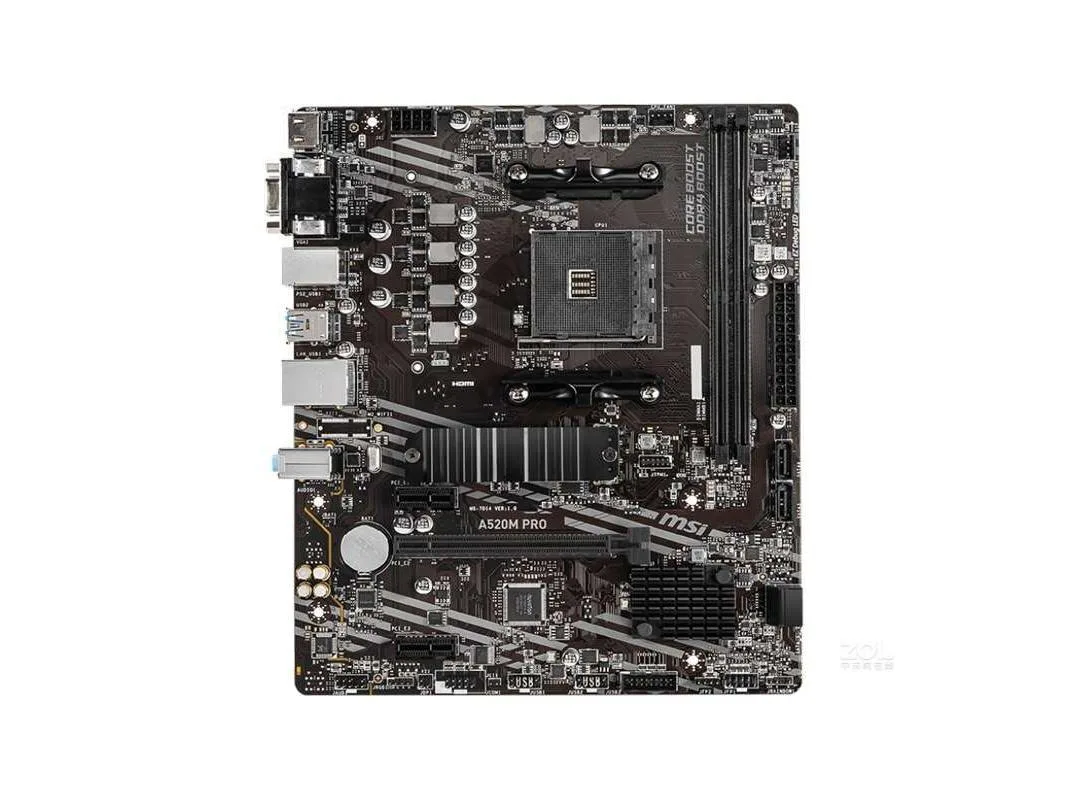
A Socket AM4 micro-ATX board supporting Ryzen 3000, 4000G and 5000 series CPUs with dual-channel DDR4 up to 4600 MHz and 64 GB capacity
The MSI A520M PRO is a Micro ATX motherboard built around the AMD A520 chipset. It accepts third-generation Ryzen desktop processors and Ryzen 4000 G-series desktop processors in the AM4 socket. Dual-channel DDR4 memory runs at speeds from 1866 up to 4600 MHz with a 64GB maximum capacity. A single PCIe 3.0 x16 slot and one PCIe 3.0 x1 slot provide expansion room.
This board suits builders pairing a Ryzen 5000, 5000G, 4000G or 3000 series CPU with a single graphics card and SATA storage. The x16 link operates at full speed with those processors, while a Ryzen 3000G processor drops the slot to x8 speed. Users needing multiple M.2 drives, additional PCIe lanes or integrated Wi-Fi should look at a different chipset.
The Realtek RTL8111H gigabit LAN controller and Realtek ALC892/ALC897 audio codecs handle continuous network traffic and audio streaming without extra hardware. Four SATA III ports and one M.2 interface keep storage bandwidth available during extended file transfers. Six USB 2.0 ports and two USB 3.2 Gen 1 5Gbps ports maintain peripheral connectivity throughout long sessions.
| Brand | MSI |
|---|---|
| Series | MSI A520M PRO |
| Model | MSI A520M PRO |
| CPU Socket Type | Socket AM4 |
| CPU Type | Supports 3rd generation AMD Ryzen desktop processors and AMD Ryzen 4000 G series desktop processors |
| Chipset | AMD A520 |
| Memory Standard | Support Dual-Channel DDR4 1866/2133/2400/2667/2800/2933/3000/3066/3200/3466/3733/3866/4000/4133/4266/4400/4600 + MHz memory |
| Maximum Memory Supported | 64GB |
| PCI Slots | 1 PCIe 3.0 x1 slot 1 PCIe x16 slot Support x16 speed through Ryzen 5000, 5000G, 4000G, and 3000 processors Support x8 speed through Ryzen 3000G processor AMD Athlon supports x4 speeds through Radeon graphics processors |
| SATA RAID | 1XM.2 interface, 4xSATA III interface |
| Audio Chipset | Realtek ALC892/ALC897 Codecs |
| LAN Chipset | 1 Realtek RTL8111H gigabit network interface card |
| Onboard USB | AMD A520 chipset 2 USB 3.2 Gen 1 5Gbps ports available via on-board USB 3.2 Gen1 5Gbps connector 6 USB 2.0 ports (2 Type-A ports on the backplane, 4 ports available via onboard USB 2.0 connector) AMD processor 4 USB 3.2 Gen 1 5Gbps Type-A ports on the backplane |
Install a 3rd-generation Ryzen desktop processor or a Ryzen 4000 G-series processor in the Socket AM4 socket, and add up to 64 GB of DDR4 modules running at speeds from 1866 MHz up to 4600 MHz in dual-channel mode.
The board provides one PCIe 3.0 x16 slot that runs at x16 speed with Ryzen 5000, 5000G, 4000G and 3000 processors, plus one M.2 interface and four SATA III ports for your current drives.
In Windows Device Manager, verify that the Realtek ALC892 or ALC897 audio codec and the Realtek RTL8111H gigabit network adapter both appear without error icons.
อื่น ๆ ในหมวดนี้
หมวดเดียวกัน การชำระเงินแบบเดียวกัน — แปดสกุลเงินคริปโตและอัตราแลกเปลี่ยนที่ล็อกไว้ 30 นาที
สิ่งที่คุณใช้ชำระ และสิ่งที่คุณใช้อ่านราคา
ส่งจากกระเป๋าเงินของคุณเมื่อชำระเงิน
แสดงผลเท่านั้น — แคตตาล็อกสินค้าตั้งราคาเป็นดอลลาร์สหรัฐ
ไม่พบสกุลเงินที่ตรงกัน
เลือกภาษาที่ต้องการให้เว็บไซต์แสดงผล
ไม่พบภาษาที่ตรงกัน
ยังไม่เคยใช้งานใช่ไหม
มีบัญชีอยู่แล้วใช่ไหม
ไม่มีการรีเซ็ตแบบอัตโนมัติ ร้านนี้ไม่ส่งอีเมลใด ๆ จึงไม่มีลิงก์ใช้ครั้งเดียวให้ขอ ปล่อยที่อยู่อีเมลนี้ไว้ในบัญชี แล้วเจ้าหน้าที่จะดำเนินการให้ด้วยตนเอง
รับคำขอแล้ว
ไม่มีอะไรถูกส่งไปยังกล่องจดหมายของคุณ — ร้านนี้ไม่ส่งอีเมลใด ๆ เลย มีคนดำเนินการเรื่องนี้ให้ด้วยมือ
นึกออกแล้วใช่ไหม



