

EVESKY
EVESKY MW4500 Wireless Vertical Ergonomic Mouse 1200 DPI 6 Buttons
157.99 US$
0.00203527BTC
متوفرنقبل الدفع بالعملة المشفرة — لذلك يمكن للعملات الرقمية التي تملكها أن تشتري أجهزة حقيقية.ادفع بالعملة المشفرة، وأنفقها على أجهزة حقيقية. شحن مؤمن مجانا إلى كل أنحاء العالم لما يتجاوز 399 US$. صناديق شحن بسيطة بلا علامة تجارية، ترسل من ألمانيا.شحن مؤمن مجانا لما يتجاوز 399 US$. يُقفل سعرك لمدة 30 دقيقة بمجرد فتح صفحة الدفع.السعر مقفل لمدة 30 دقيقة. كل قطعة مختومة، ورقمها التسلسلي متحقق منه، ومشمولة بضمان 24 شهرا.مختوم، وبضمان 24 شهرا.


DELL
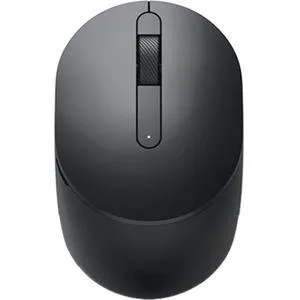
A black Dell wireless mouse designed for mobile use with three buttons
The Dell MS3320WBLK is a mobile wireless mouse finished in black. It connects without cables for portable use with laptops or desktops. The design is built for everyday control on the move.
The mouse suits users who want a simple wireless pointer for travel or hot-desking. It does not suit buyers who need extra programmable buttons or adjustable sensitivity settings. Gamers who require high polling rates should look at a dedicated gaming model.
The product type is listed as a gaming mouse by the category path while the manufacturer highlights describe a standard mobile wireless mouse. Check this classification against the features you actually need before buying.
| Brand | DELL PERIPHERALS |
|---|---|
| Type | Mouse |
| Color | Black |
| وزن الشحنة | 0.45 kg |
| أبعاد الطرد | 140 × 89 × 48 mm |
The MS3320WBLK is a wireless mouse that connects via a USB receiver included in the box.
Insert the USB receiver into a free port, switch the mouse on using the power button on the underside, and wait for the driver to install automatically.
The mouse runs on a replaceable AA battery; swap it when the cursor starts to lag or the LED indicator flashes red.
أيضًا في هذا القسم
نفس القسم، ونفس صفحة الدفع — ثماني عملات رقمية وقفل سعر لمدة 30 دقيقة.
ما تدفعه، وما تُعرض به الأسعار.
يُرسَل من محفظتك عند إتمام الطلب
للعرض فقط — أسعار الكتالوج بالدولار الأمريكي
لا توجد عملة مطابقة.
اختر اللغة التي يخاطبك بها الموقع.
هل أنت جديد هنا؟
لديك حساب بالفعل؟
لا توجد إعادة تعيين تلقائية: هذا المتجر لا يُرسل أي بريد، فلا يوجد رابط لمرة واحدة يمكن طلبه. اترك العنوان في الحساب، وسيُعالَج الأمر يدويًا.
تم تسجيل الطلب
لا شيء في طريقه إلى بريدك الوارد — هذا المتجر لا يُرسل أي بريد إطلاقًا. يتولّى أحدهم معالجة هذه الطلبات يدويًا.
تذكّرتها؟


