


DELL
DELL MS3320WBLK gaming mouse black
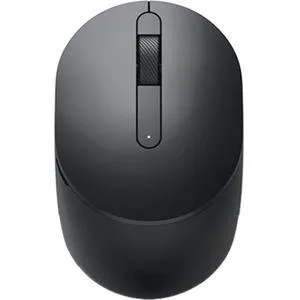
A black Dell wireless mouse designed for mobile use with three buttons
- TypeMouse
- ColorBlack
- Wireless freedom for desk or travel use
- Dell engineering for reliable daily performance
- Sleek black finish suits any setup
- Lightweight mobile design moves with you
- Launched July 2024 with current Dell quality
Mobile wireless mouse
The Dell MS3320WBLK is a mobile wireless mouse finished in black. It connects without cables for portable use with laptops or desktops. The design is built for everyday control on the move.
Who this suits
The mouse suits users who want a simple wireless pointer for travel or hot-desking. It does not suit buyers who need extra programmable buttons or adjustable sensitivity settings. Gamers who require high polling rates should look at a dedicated gaming model.
Deciding specification
The product type is listed as a gaming mouse by the category path while the manufacturer highlights describe a standard mobile wireless mouse. Check this classification against the features you actually need before buying.
Highlights
- Wireless freedom for desk or travel use
- Dell engineering for reliable daily performance
- Sleek black finish suits any setup
- Lightweight mobile design moves with you
- Launched July 2024 with current Dell quality
Specifications
| Brand | DELL PERIPHERALS |
|---|---|
| Type | Mouse |
| Color | Black |
| Shipping weight | 0.45 kg |
| Package size | 140 × 89 × 48 mm |
Questions about this item
Does the MS3320WBLK require a USB receiver to connect?
The MS3320WBLK is a wireless mouse that connects via a USB receiver included in the box.
How do I install the MS3320WBLK and what step is often missed?
Insert the USB receiver into a free port, switch the mouse on using the power button on the underside, and wait for the driver to install automatically.
What maintenance will the MS3320WBLK need over time?
The mouse runs on a replaceable AA battery; swap it when the cursor starts to lag or the LED indicator flashes red.
Also in this aisle
People compared these
Same shelf, same checkout — eight coins and a 30-minute rate lock.



BFKK
BFKK Wireless Gaming Mouse PAW 3950Max 42000 DPI 8KHz 38g Black & Sticker
- Black
$106.99
0.00136458BTC
In stock
