

Corsair
Corsair K55 Core TKL Gaming Keyboard CH-9216065-NA
- K55 CORE TKL
- Gaming
36,99 US$44,24 US$−16%
0.00046591BTC
SklademPřijímáme kryptoměny — takže to, co držíte, můžete utratit za skutečný hardware.Plaťte kryptem, utrácejte ho za skutečný hardware. Pojištěná doprava zdarma po celém světě nad 399 $. Neutrální přepravní krabice bez loga, odesílané z Německa.Pojištěná doprava zdarma nad 399 $. Jakmile se otevře pokladna, je váš kurz zablokovaný na 30 minut.Kurz zablokovaný na 30 minut. Každý výrobek je zapečetěný, jeho sériové číslo je zkontrolované a vztahuje se na něj 24měsíční záruka.Zapečetěno, záruka 24 měsíců.


Corsair
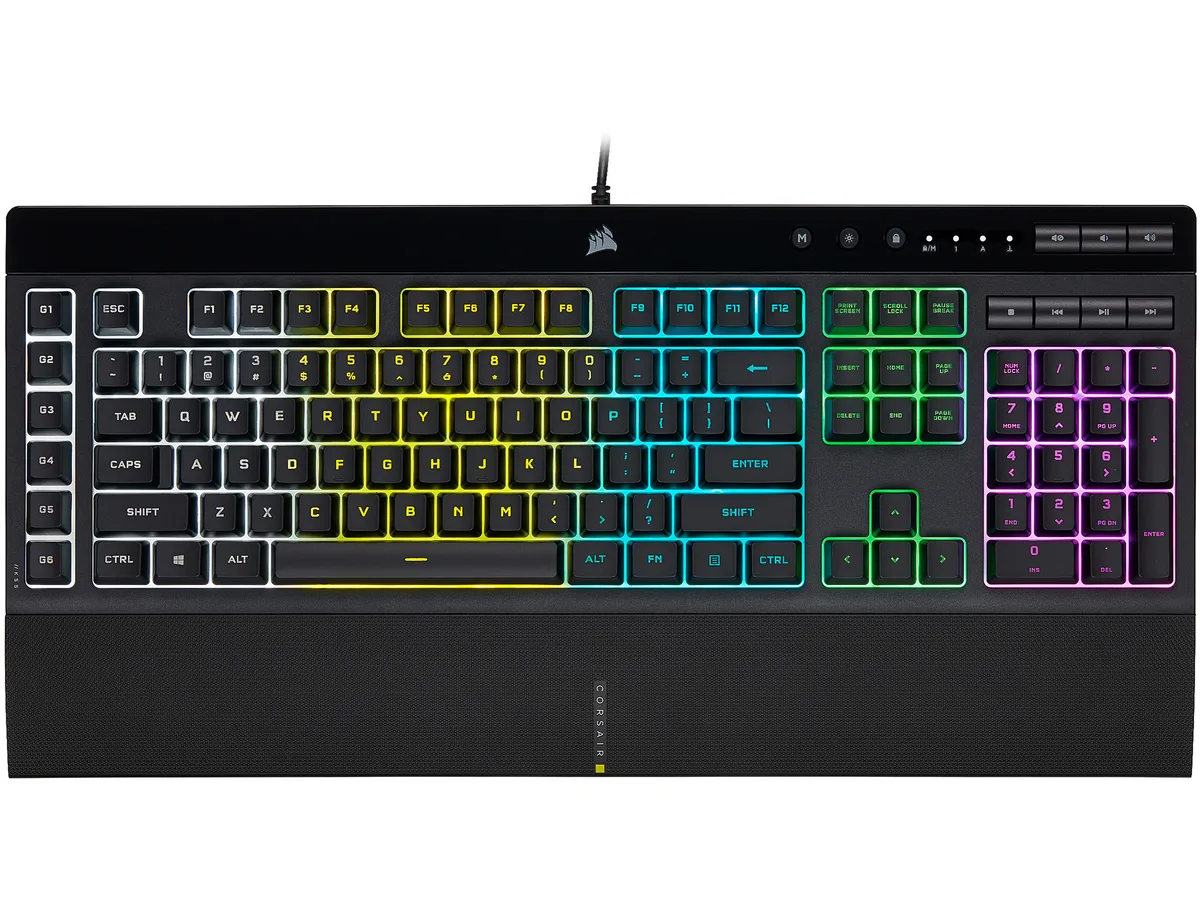
A membrane gaming keyboard with five-zone RGB lighting, six dedicated macro keys, IP42 spill resistance and a detachable palm rest
Options K55 PRO
The Corsair K55 RGB PRO is a membrane gaming keyboard built for players who want macro control and RGB lighting without a mechanical price tag. Its tactile rubber-dome switches suit both gaming sessions and everyday typing.
A wired USB 2.0 Type-A cable provides a direct link to the PC, while IP42-rated dust and spill resistance protects the internals from accidents. The detachable soft-touch palm rest adds wrist support and can be removed for a compact footprint.
This keyboard replaces basic office boards that lack dedicated macro keys, per-zone RGB control or media shortcuts. The jump is worth it when you need six programmable macro keys with Elgato Stream Deck integration and iCUE synchronisation across other Corsair gear.
| Brand | Corsair |
|---|---|
| Name | K55 RGB PRO |
| Model | CH-9226765-NA |
| Keyboard Interface | USB 2.0 Type-A |
| Design Style | Gaming |
| Palm Rest | Detachable |
| Key Switch | Rubber Dome |
| Key Switch Type | Tactile |
| Keyboard Color | Black |
| Backlit | RGB, 16.8 million colors |
| Dimensions | 1.42" x 19.00" x 6.58" |
| Type | Membrane |
| Mouse Included | No |
| Features | Dynamic RGB Backlighting: Light up your desktop with six onboard lighting effects, assign a color to each lighting zone, or program your own vibrant lighting effects across five RGB lighting zones with CORSAIR iCUE software. Six Dedicated Macro Keys: Activate functions, shortcuts, or keypresses in just one stroke with six dedicated macro keys, easily set up through CORSAIR iCUE software, or use instant streaming commands through Elgato Stream Deck software. Dust and Spill-Resistant Design: IP42-rated protection guards against accidents so your gameplay never has to stop. Detachable P |
| Package Contents | CORSAIR K55 RGB PRO gaming keyboard Detachable soft touch palm rest Quick start guide Safety information Warranty card |
| Přepravní hmotnost | 1.27 kg |
| Rozměry balení | 502 × 197 × 53 mm |
Další verze tohoto modelu
Stejná řada, jiná paměť, chladič nebo takt — porovnejte, než se rozhodnete.
The USB 2.0 Type-A interface provides standard wired connectivity; polling rate is handled by the keyboard's internal controller and iCUE software settings.
The keyboard measures 6.58 inches deep without the palm rest; adding the rest increases the total depth, so a 6-inch desk would be too shallow.
Install CORSAIR iCUE software, select the K55 RGB PRO, choose the macro keys, and create or edit macros in the Actions tab before saving to the board.
Také v této kategorii
Stejná kategorie, stejná pokladna — osm měn a kurz zamčený na 30 minut.
Měna, ve které platíte, a měna, ve které se zobrazují ceny.
Odesláno z vaší peněženky u pokladny
Pouze pro zobrazení — katalog je veden v dolarech
Žádná měna neodpovídá.
Vyberte jazyk, ve kterém s vámi bude web komunikovat.
Poprvé tady?
Už účet máte?
Neexistuje žádná automatická obnova hesla: tento obchod neposílá žádné e-maily, takže neexistuje jednorázový odkaz, o který by bylo možné požádat. Nechte adresu uvedenou u účtu, vyřídíme ji ručně.
Žádost zaznamenána
Do vaší schránky nic nedorazí — tento obchod neposílá žádné e-maily. Někdo se o to postará ručně.
Vzpomněli jste si?


