Corsair
Corsair K55 Core TKL Gaming Keyboard CH-9216065-NA
- K55 CORE TKL
- Gaming
$36.99$44.24−16%
0.00047572BTC
In stockWe take cryptocurrency — so the coins you hold can buy real hardware.Pay in crypto, spend it on real hardware. Free insured shipping worldwide over $399. Plain, unbranded boxes, sent from Germany.Free insured shipping over $399. Your rate is locked for 30 minutes once checkout opens.Rate locked 30 minutes. Every item sealed, serial-checked and covered by a 24-month warranty.Sealed, 24-month warranty.


Corsair
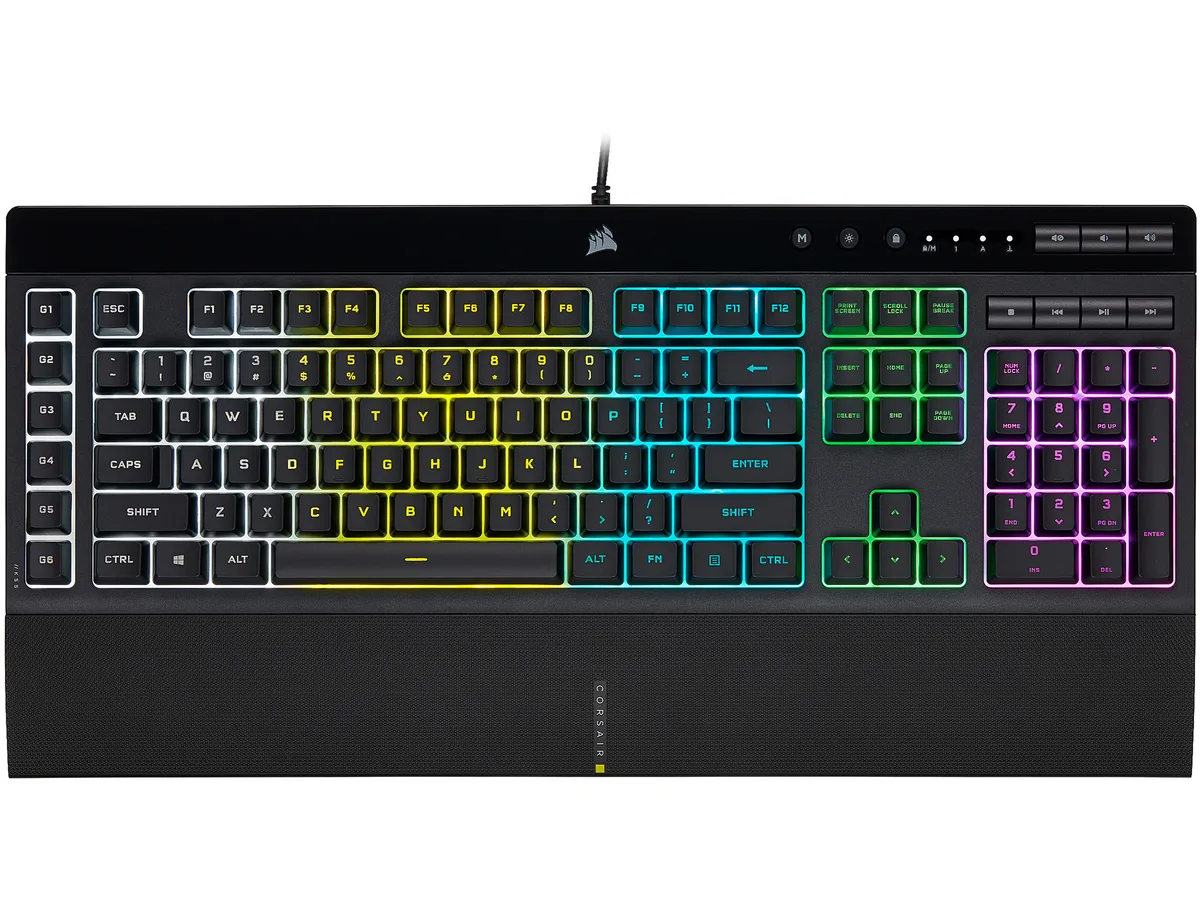
A membrane gaming keyboard with five-zone RGB lighting, six dedicated macro keys, IP42 spill resistance and a detachable palm rest
Options K55 PRO
The Corsair K55 RGB PRO is a membrane gaming keyboard built for players who want macro control and RGB lighting without a mechanical price tag. Its tactile rubber-dome switches suit both gaming sessions and everyday typing.
A wired USB 2.0 Type-A cable provides a direct link to the PC, while IP42-rated dust and spill resistance protects the internals from accidents. The detachable soft-touch palm rest adds wrist support and can be removed for a compact footprint.
This keyboard replaces basic office boards that lack dedicated macro keys, per-zone RGB control or media shortcuts. The jump is worth it when you need six programmable macro keys with Elgato Stream Deck integration and iCUE synchronisation across other Corsair gear.
| Brand | Corsair |
|---|---|
| Name | K55 RGB PRO |
| Model | CH-9226765-NA |
| Keyboard Interface | USB 2.0 Type-A |
| Design Style | Gaming |
| Palm Rest | Detachable |
| Key Switch | Rubber Dome |
| Key Switch Type | Tactile |
| Keyboard Color | Black |
| Backlit | RGB, 16.8 million colors |
| Dimensions | 1.42" x 19.00" x 6.58" |
| Type | Membrane |
| Mouse Included | No |
| Features | Dynamic RGB Backlighting: Light up your desktop with six onboard lighting effects, assign a color to each lighting zone, or program your own vibrant lighting effects across five RGB lighting zones with CORSAIR iCUE software. Six Dedicated Macro Keys: Activate functions, shortcuts, or keypresses in just one stroke with six dedicated macro keys, easily set up through CORSAIR iCUE software, or use instant streaming commands through Elgato Stream Deck software. Dust and Spill-Resistant Design: IP42-rated protection guards against accidents so your gameplay never has to stop. Detachable P |
| Package Contents | CORSAIR K55 RGB PRO gaming keyboard Detachable soft touch palm rest Quick start guide Safety information Warranty card |
| Shipping weight | 1.27 kg |
| Package size | 502 × 197 × 53 mm |
Other versions of this model
Same family, different memory, cooler or clock — compare before you commit.
The USB 2.0 Type-A interface provides standard wired connectivity; polling rate is handled by the keyboard's internal controller and iCUE software settings.
The keyboard measures 6.58 inches deep without the palm rest; adding the rest increases the total depth, so a 6-inch desk would be too shallow.
Install CORSAIR iCUE software, select the K55 RGB PRO, choose the macro keys, and create or edit macros in the Actions tab before saving to the board.
Also in this aisle
Same shelf, same checkout — eight coins and a 30-minute rate lock.
What you pay in, and what you read prices in.
Sent from your wallet at checkout
Display only — the catalogue is priced in USD
No currency matches that.
Pick the language the site speaks to you in.
New here?
Already have one?
There is no automatic reset: this shop sends no mail, so there is no one-time link to ask for. Leave the address on the account and it gets picked up by hand.
Request noted
Nothing is on its way to your inbox — this shop sends no mail at all. Someone picks these up by hand.
Remembered it?