MCHOSE
MCHOSE MC-Ace68Turbo-7 65% 68-key gaming keyboard 16K polling Peach Pink
- Full-aluminum Espor…
- USB Type-C
96,99 $
0.00120631BTC
Auf LagerWir akzeptieren Kryptowährungen — so können die Coins, die Sie besitzen, echte Hardware kaufen.Zahlen Sie mit Krypto, geben Sie sie für echte Hardware aus. Weltweit kostenloser versicherter Versand ab 399 $. Neutrale Kartons ohne Markenaufdruck, versendet aus Deutschland.Kostenloser versicherter Versand ab 399 $. Ihr Kurs wird 30 Minuten lang gesperrt, sobald die Kasse geöffnet wird.Kurs 30 Minuten gesperrt. Jeder Artikel ist versiegelt, die Seriennummer wird geprüft, und es gilt eine Garantie von 24 Monaten.Versiegelt, 24 Monate Garantie.


MCHOSE
A compact 65% wired keyboard with 68 keys, Hall Effect magnetic switches, 16K polling, 256K scan rate and 0.06ms latency in a full aluminium shell
Color Berry Red
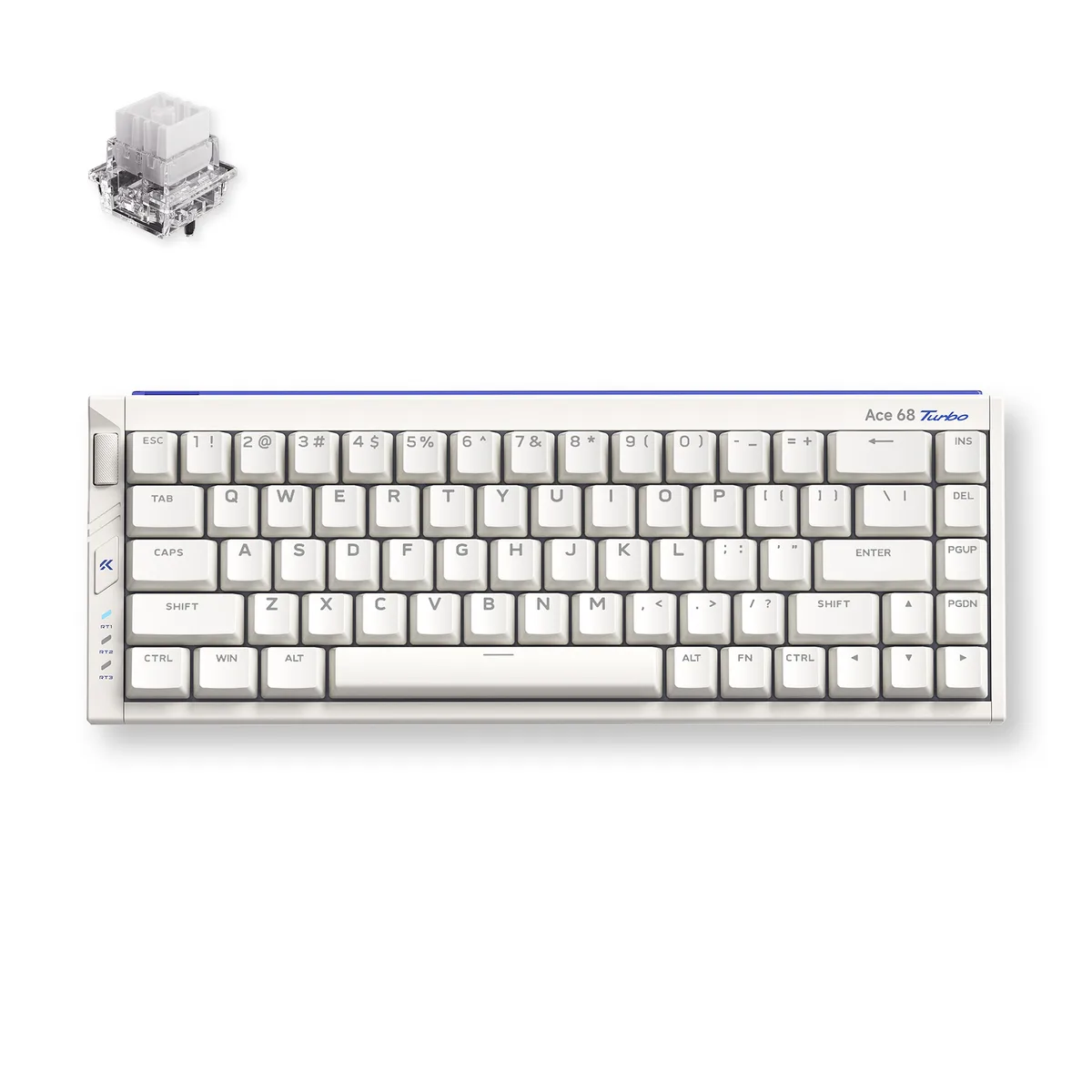
The MCHOSE Ace 68 Turbo is a 65% ANSI keyboard with 68 keys wired over USB Type-C. Its full CNC aluminium shell houses Mount Tai Magnetic GT Hall Effect switches and south-facing RGB LEDs. The compact form factor saves desk space while keeping arrow and navigation keys for first-person shooter and MOBA players who want quick actuation without a numpad.
Magnetic actuation removes physical leaf wear and lets the board achieve 0.06 ms latency with 0.001 mm precision. A 16 000 Hz polling rate and 256 000 Hz scan rate are supported on Windows; Mac tops out at 8 000 Hz. Dual-core Tianwen MCU running at 512 MHz drives the four-layer PCB. The jump is worth it for players who need rapid-trigger stops and consistent repeated presses without debounce delay.
Connect the Type-C cable and the keyboard is recognised instantly — no driver required for basic input. The box supplies a key-and-switch puller plus two spare Mount Tai Magnetic GT switches for quick replacement. Advanced features such as SOCD, rapid snap, dynamic keystroke, multi-tap, toggle modes and key macros are configured through the companion software. The aluminium chassis adds weight, so the board stays planted during aggressive keystrokes.
| Brand | MCHOSE |
|---|---|
| Name | Full-aluminum Esports Hall Effect Keyboard |
| Model | Ace 68 Turbo |
| Part Number | MC-Ace68Turbo-8 |
| Keyboard Interface | USB Type-C |
| Design Style | Compact |
| Layout | 65% ANSI (68 keys) |
| Palm Rest | No |
| Function Keys | SOCD, RS, DKS, MT, TGL, Key Macros |
| Key Switch | Mount Tai Magnetic GT Switch (16k) |
| Keycaps | Color-matching Cherry profile |
| Keyboard Color | Berry Red |
| Backlit | South-facing RGB LED Lights |
| Dimensions | 1.5" x 12.76" x 4.69" |
| Type | Wired |
| Mouse Included | No |
| Package Contents | 1 x Ace 68 Turbo HE Keyboard 1 x Function Card 1 x Type-C Cable 1 x Key & Switch Puller 2 x Spare Switches 1 x Dust Cover |
| Versandgewicht | 2.09 kg |
| Paketgröße | 366 × 168 × 76 mm |
Andere Versionen dieses Modells
Gleiche Familie, unterschiedlicher Speicher, Kühler oder Takt — vergleichen Sie, bevor Sie sich entscheiden.
The compact 65% layout measures 12.76 inches wide by 4.69 inches deep and stands 1.5 inches high, so it fits on any flat surface without brackets or mounting holes.
Connect the supplied Type-C cable to a USB port; on Windows you must select 16K polling in the MCHOSE software, otherwise the board defaults to a lower rate.
Use the included puller to remove the keycap and switch, then press in one of the two spare GT switches provided; no soldering is required.
Ebenfalls in dieser Kategorie
Gleiche Abteilung, gleiche Kasse — acht Kryptowährungen und ein für 30 Minuten fixierter Kurs.
Womit Sie bezahlen und in welcher Währung Sie die Preise sehen.
Wird von Ihrem Wallet an der Kasse gesendet
Nur zur Anzeige — der Katalog ist in US-Dollar ausgezeichnet
Keine passende Währung gefunden.
Wählen Sie die Sprache, in der die Seite mit Ihnen spricht.
Neu hier?
Haben Sie bereits eins?
Es gibt keine automatische Zurücksetzung: Dieser Shop versendet keine E-Mails, daher gibt es auch keinen Einmal-Link, den Sie anfordern könnten. Lassen Sie die im Konto hinterlegte Adresse stehen, sie wird von Hand bearbeitet.
Anfrage vermerkt
Es ist nichts auf dem Weg in Ihr Postfach — dieser Shop versendet grundsätzlich keine E-Mails. Jemand bearbeitet diese Anfragen von Hand.
Wieder eingefallen?