VinPower
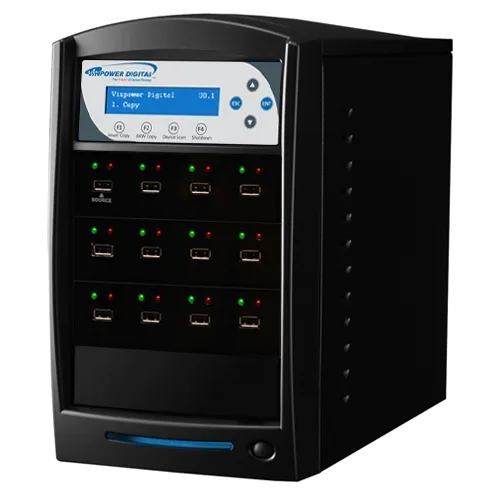
VinPower USBShark-11T-BK 1 to 11 USB 3.0 duplicator 128M buffer
- USB Flash Drive Dup…
- 1 to 11
774,99 $
0.00951562BTC
LaosMe võtame vastu krüptoraha — nii saab teie hoitav krüptoraha osta päris riistvara.Makske krüptorahaga, kulutage seda päris riistvarale. Tasuta kindlustatud tarne kogu maailmas, üle 399 $. Lihtsad, kaubamärgita väliskarbid, saadetud Saksamaalt.Tasuta kindlustatud tarne üle 399 $. Teie kurss lukustatakse 30 minutiks kohe, kui kassa avaneb.Kurss lukustatud 30 minutiks. Iga toode on pitseeritud, selle seerianumber on kontrollitud ja sellel kehtib 24-kuuline garantii.Pitseeritud, 24-kuulise garantiiga.


Lenovo
An internal M.2 SSD tray providing one expansion bay for compatible Lenovo ThinkPad P Series systems
This internal expansion bay tray fits Lenovo ThinkPad P Series systems. It provides a single slot for adding an M.2 solid-state drive. The tray is designed for direct installation inside compatible mobile workstations. Buyers who need a 2.5-inch drive caddy or an external enclosure cannot use this part.
The tray itself draws no power and has no moving parts. Thermals and noise depend entirely on the M.2 drive you install and the host system's cooling design. No fan, heatsink or power connector is included with the tray.
| Brand | Lenovo |
|---|---|
| Model | 4XB0K59917 |
| Capacity | N/A |
| Tarnekaal | 0.50 kg |
| Pakendi mõõtmed | 178 × 147 × 51 mm |
Power off the laptop, remove the bottom cover, locate the single internal expansion bay, insert the tray into the M.2 slot at the correct angle, secure it with the retention screw, then reassemble the cover.
The tray itself has no moving parts and needs no routine maintenance; only the M.2 SSD seated inside it may eventually require replacement if the drive fails or capacity needs increase.
Veel samast osakonnast
Sama osakond, sama kassa — kaheksa krüptovaluutat ja 30-minutiline kursilukk.
See, millega maksate, ja see, milles vaatate hindu.
Saadetud teie rahakotist kassas
Ainult kuvamiseks — kataloogi hinnad on dollarites
Ükski vääring ei vasta sellele.
Valige keel, milles sait teiega räägib.
Ükski keel ei vasta.
Esimest korda siin?
Teil on juba konto?
Automaatset lähtestamist ei ole: see pood ei saada ühtegi e-kirja, seega pole ka ühekordset linki, mida küsida. Jätke aadress kontole alles, seda käsitletakse käsitsi.
Päring registreeritud
Teie postkasti ei jõua midagi — see pood ei saada e-kirju üldse. Keegi tegeleb sellega käsitsi.
Tuli meelde?