VinPower
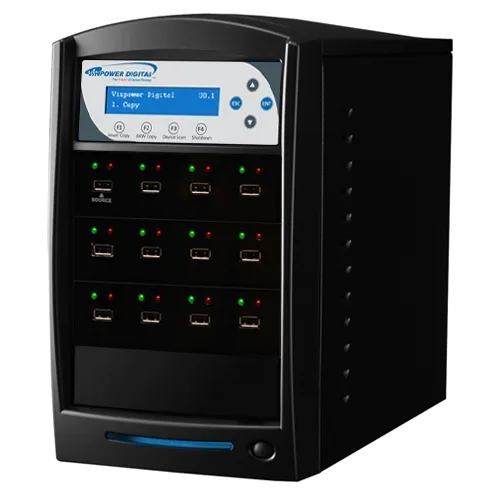
VinPower USBShark-11T-BK 1 to 11 USB 3.0 duplicator 128M buffer
- USB Flash Drive Dup…
- 1 to 11
774,99 USD
0.00951562BTC
RaktáronElfogadjuk a kriptovalutát — így az Ön birtokában lévő érmékből valódi hardvert vásárolhat.Fizessen kriptóval, és költse el valódi hardverre. 399 $ felett világszerte díjmentes a biztosított szállítás. Egyszerű, jelöletlen külső kartonok, Németországból küldve.399 $ felett díjmentes a biztosított szállítás. Az Ön árfolyama a pénztár megnyitásától számított 30 percre zárolva marad.Árfolyam zárolva 30 percre. Minden termék gyárilag zárt, sorozatszáma ellenőrzött, és 24 hónapos garancia fedezi.Zárt csomagolás, 24 hónap garancia.


Lenovo
An internal M.2 SSD tray providing one expansion bay for compatible Lenovo ThinkPad P Series systems
This internal expansion bay tray fits Lenovo ThinkPad P Series systems. It provides a single slot for adding an M.2 solid-state drive. The tray is designed for direct installation inside compatible mobile workstations. Buyers who need a 2.5-inch drive caddy or an external enclosure cannot use this part.
The tray itself draws no power and has no moving parts. Thermals and noise depend entirely on the M.2 drive you install and the host system's cooling design. No fan, heatsink or power connector is included with the tray.
| Brand | Lenovo |
|---|---|
| Model | 4XB0K59917 |
| Capacity | N/A |
| Szállítási súly | 0.50 kg |
| Csomagméret | 178 × 147 × 51 mm |
Power off the laptop, remove the bottom cover, locate the single internal expansion bay, insert the tray into the M.2 slot at the correct angle, secure it with the retention screw, then reassemble the cover.
The tray itself has no moving parts and needs no routine maintenance; only the M.2 SSD seated inside it may eventually require replacement if the drive fails or capacity needs increase.
Szintén ezen a polcon
Ugyanaz a polc, ugyanaz a pénztár — nyolc pénznem és 30 perces árfolyamzár.
Amivel fizet, és amiben az árakat olvassa.
A pénztárnál küldi el a tárcájából
Csak tájékoztató jellegű — a katalógus dollárban van árazva
Nincs ilyen pénznem.
Válassza ki, milyen nyelven szóljon Önhöz az oldal.
Nincs egyező nyelv.
Először jár itt?
Már van fiókja?
Nincs automatikus visszaállítás: ez a bolt nem küld e-mailt, tehát nincs kérhető egyszer használatos link. Hagyja meg a fiókhoz tartozó címet, azt valaki kézzel átnézi.
Kérés rögzítve
Semmi nem érkezik a postafiókjába — ez a bolt egyáltalán nem küld e-mailt. Ezeket valaki kézzel intézi.
Eszébe jutott?