VinPower
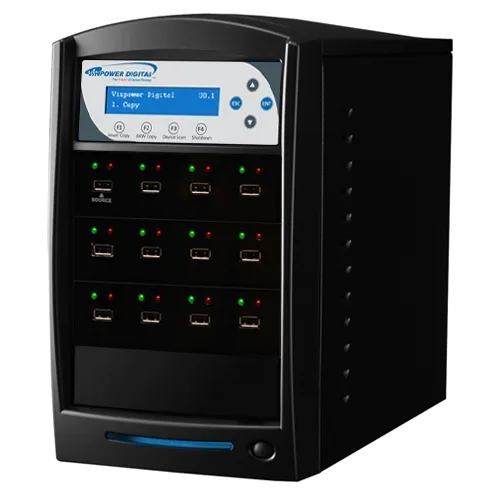
VinPower USBShark-11T-BK 1 to 11 USB 3.0 duplicator 128M buffer
- USB Flash Drive Dup…
- 1 to 11
774,99 USD
0.00951562BTC
SkladomPrijímame kryptomeny — takže mince, ktoré držíte, môžete zameniť za skutočný hardvér.Plaťte v krypte, miňte ho na skutočný hardvér. Poistená doprava zadarmo po celom svete nad 399 $. Neutrálne kartóny bez potlače, odosielané z Nemecka.Poistená doprava zadarmo nad 399 $. Váš kurz je zablokovaný na 30 minút hneď po otvorení pokladne.Kurz zablokovaný na 30 minút. Každý produkt je zapečatený, jeho sériové číslo je overené a vzťahuje sa naň 24-mesačná záruka.Zapečatené, 24-mesačná záruka.


Lenovo
An internal M.2 SSD tray providing one expansion bay for compatible Lenovo ThinkPad P Series systems
This internal expansion bay tray fits Lenovo ThinkPad P Series systems. It provides a single slot for adding an M.2 solid-state drive. The tray is designed for direct installation inside compatible mobile workstations. Buyers who need a 2.5-inch drive caddy or an external enclosure cannot use this part.
The tray itself draws no power and has no moving parts. Thermals and noise depend entirely on the M.2 drive you install and the host system's cooling design. No fan, heatsink or power connector is included with the tray.
| Brand | Lenovo |
|---|---|
| Model | 4XB0K59917 |
| Capacity | N/A |
| Prepravná hmotnosť | 0.50 kg |
| Rozmery balenia | 178 × 147 × 51 mm |
Power off the laptop, remove the bottom cover, locate the single internal expansion bay, insert the tray into the M.2 slot at the correct angle, secure it with the retention screw, then reassemble the cover.
The tray itself has no moving parts and needs no routine maintenance; only the M.2 SSD seated inside it may eventually require replacement if the drive fails or capacity needs increase.
Aj v tomto oddelení
Rovnaké oddelenie, rovnaká pokladňa — osem mien a kurz zablokovaný na 30 minút.
Mena, v ktorej platíte, a mena, v ktorej sa zobrazujú ceny.
Odoslané z vašej peňaženky na pokladni
Len na zobrazenie — katalóg je uvedený v dolároch
Žiadna mena nezodpovedá.
Vyberte jazyk, v ktorom s vami bude web komunikovať.
Žiadny jazyk nezodpovedá.
Ste tu prvýkrát?
Účet už máte?
Automatický reset hesla neexistuje: tento obchod neposiela žiadne e-maily, takže neexistuje jednorazový odkaz, o ktorý by ste mohli požiadať. Nechajte adresu na účte — niekto sa jej ujme ručne.
Žiadosť zaznamenaná
Do vašej schránky nič nepríde — tento obchod neposiela vôbec žiadne e-maily. Niekto sa o to postará ručne.
Spomenuli ste si?