VinPower
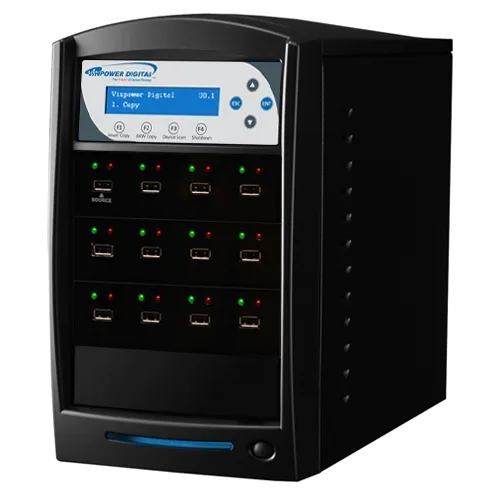
VinPower USBShark-11T-BK 1 to 11 USB 3.0 duplicator 128M buffer
- USB Flash Drive Dup…
- 1 to 11
774,99 US$
0.00951562BTC
En stockAceptamos criptomonedas — así, las criptos que usted tiene pueden comprar hardware real.Pague en cripto y gástela en hardware real. Envío asegurado gratis a nivel mundial a partir de $399. Cajas neutras, sin marca, enviadas desde Alemania.Envío asegurado gratis a partir de $399. Su cotización queda bloqueada 30 minutos en cuanto se abre el pago.Cotización bloqueada 30 minutos. Todos los artículos vienen sellados, con el número de serie verificado y cubiertos por una garantía de 24 meses.Sellado, con 24 meses de garantía.


Lenovo
An internal M.2 SSD tray providing one expansion bay for compatible Lenovo ThinkPad P Series systems
This internal expansion bay tray fits Lenovo ThinkPad P Series systems. It provides a single slot for adding an M.2 solid-state drive. The tray is designed for direct installation inside compatible mobile workstations. Buyers who need a 2.5-inch drive caddy or an external enclosure cannot use this part.
The tray itself draws no power and has no moving parts. Thermals and noise depend entirely on the M.2 drive you install and the host system's cooling design. No fan, heatsink or power connector is included with the tray.
| Brand | Lenovo |
|---|---|
| Model | 4XB0K59917 |
| Capacity | N/A |
| Peso de envío | 0.50 kg |
| Dimensiones del paquete | 178 × 147 × 51 mm |
Power off the laptop, remove the bottom cover, locate the single internal expansion bay, insert the tray into the M.2 slot at the correct angle, secure it with the retention screw, then reassemble the cover.
The tray itself has no moving parts and needs no routine maintenance; only the M.2 SSD seated inside it may eventually require replacement if the drive fails or capacity needs increase.
También en este pasillo
Mismo estante, mismo pago — ocho criptomonedas y un tipo de cambio fijado 30 minutos.
Lo que usted paga, y la moneda en la que lee los precios.
Se envía desde su billetera al finalizar la compra
Solo informativo — el catálogo está en dólares
Ninguna moneda coincide.
Elija el idioma en el que el sitio le habla.
Ningún idioma coincide.
¿Es nuevo aquí?
¿Ya tiene una?
No existe ningún restablecimiento automático: esta tienda no envía correos electrónicos, así que no hay ningún enlace de un solo uso que solicitar. Deje la dirección asociada a la cuenta y se atenderá de forma manual.
Solicitud registrada
No hay nada de camino a su bandeja de entrada: esta tienda no envía correos en absoluto. Alguien se encarga de esto manualmente.
¿La recordó?