

BFKK
BFKK 3U Rackmount Server Chassis EATX/ATX/MATX 4x5.25 6x3.5 Top/Side Cooling
- Rackmount
214,99 $
0.00280092BTC
VarastossaHyväksymme kryptoa — hallussasi olevat kolikot voivat näin ostaa oikeaa laitteistoa.Maksa kryptolla, käytä se oikeaan laitteistoon. Ilmainen vakuutettu toimitus maailmanlaajuisesti yli 399 $. Neutraalit, tuotemerkittömät ulkopakkaukset, lähetetään Saksasta.Ilmainen vakuutettu toimitus yli 399 $. Kurssisi lukitaan 30 minuutiksi heti, kun kassa avautuu.Kurssi lukittu 30 minuutiksi. Jokainen tuote on sinetöity, sen sarjanumero on tarkistettu, ja sillä on 24 kuukauden takuu.Sinetöity, 24 kuukauden takuu.


MSI
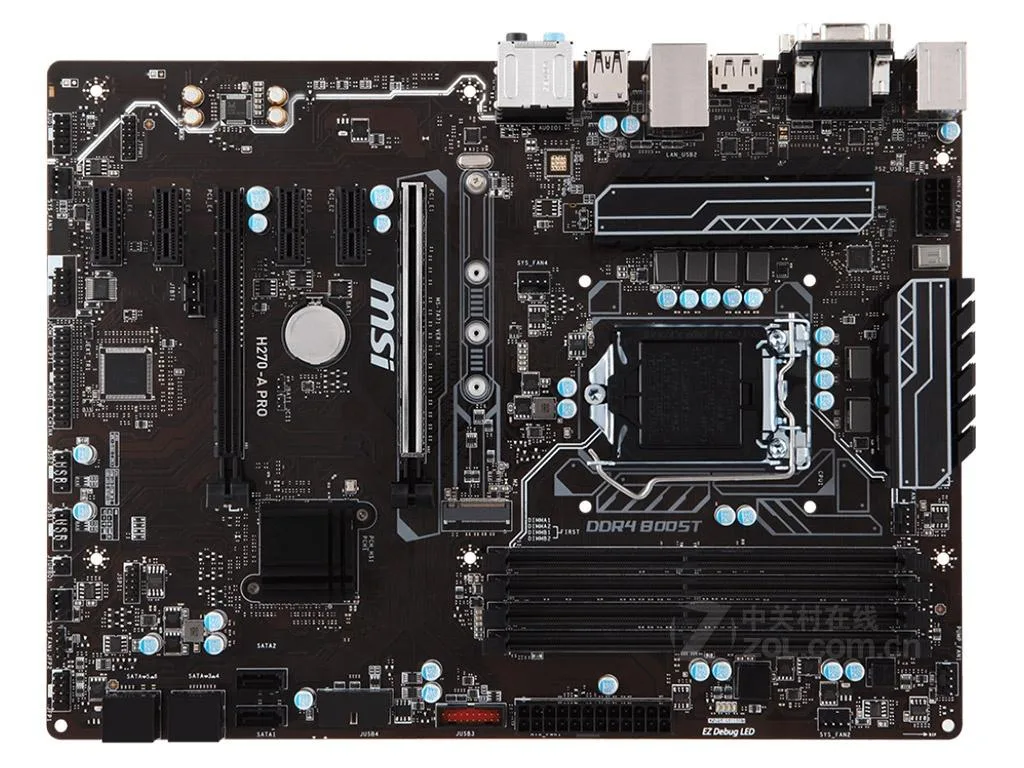
LGA 1151 ATX board with H270 chipset, dual-channel DDR4 to 2400 MHz, 64 GB max, two PCIe 3.0 x16 slots, six SATA ports and Realtek 7.1 audio
The MSI H270-A PRO is an Intel H270 motherboard for LGA 1151 processors. It supports 6th and 7th generation Intel Core i3, i5 and i7 CPUs plus Pentium and Celeron models. Dual-channel DDR4 memory runs at 2400 or 2133MHz up to a 64GB maximum. The board uses the standard ATX form factor.
This board suits owners of LGA 1151 processors who need a replacement H270 platform with 64GB memory headroom and multiple expansion slots. It provides two PCIe 3.0 x16 slots, four PCIe 3.0 x1 slots and six SATA III ports. Builders starting a new system or using 8th generation or newer Intel CPUs should choose a different socket and chipset.
The 64GB DDR4 limit is the key figure for capacity planning. Four DIMM slots accept dual-channel kits at 2400 or 2133MHz. If the workload requires more than 64GB of system memory, this motherboard cannot meet that requirement and a different platform must be selected.
| Brand | MSI |
|---|---|
| Series | MSI H270-A PRO |
| Model | MSI H270-A PRO |
| CPU Socket Type | LGA 1151 |
| CPU Type | Supports 6th/7th generation Intel Core ™ i3/i5/i7 processors, as well as Intel Pentium and Celeron processors with pin LGA1151 |
| Chipset | Intel H270 |
| Memory Standard | Supports dual-channel DDR4 2400/2133MHz memory |
| Maximum Memory Supported | 64GB |
| PCI Slots | 2 PCIe 3.0 x16 slots (supports x16/x4 modes) 4 PCIe 3.0 x1 slots |
| SATA RAID | 1XM.2 interface, 6xSATA III interface |
| Audio Chipset | Realtek ALC892 decoding chip - 7.1 channel high-quality sound effects |
| LAN Chipset | 1 Realtek RTL8111H Gigabit network interface card |
| Onboard USB | - 8 USB 3.1 Gen1 (SuperSpeed USB) ports (4 Type-A ports on the backplane, 4 via onboard USB ports) - 6 USB 2.0 (High-speed USB) ports (2 Type-A ports on the backplane, 4 via onboard USB ports) |
The board follows the standard ATX form factor, so it fits any case with ATX standoffs and the matching I/O shield cut-out.
Mount the board on ATX standoffs, attach the supplied I/O shield, connect the 24-pin and 4-pin power cables, then seat the LGA 1151 CPU, DDR4 modules and SATA cables; the step most often missed is fitting the I/O shield before the board.
The included CMOS battery keeps the real-time clock running and will need replacing when the system starts losing date and time after power-off.
Myös tällä osastolla
Sama osasto, sama kassa — kahdeksan kryptovaluuttaa ja 30 minuutin kurssilukko.
Valuutta, jolla maksetaan, sekä valuutta, jossa hinnat näytetään.
Lähetetään lompakostasi kassalla
Vain näyttöä varten — hinnat ovat Yhdysvaltain dollareissa
Valuuttaa ei löytynyt.
Valitse kieli, jolla sivusto puhuu sinulle.
Ei vastaavaa kieltä.
Uusi täällä?
Onko sinulla jo tili?
Automaattista palautusta ei ole: kauppa ei lähetä sähköpostia lainkaan, joten kertakäyttöistä linkkiä ei ole mistä pyytää. Jätä osoite tilille, niin se käsitellään käsin.
Pyyntö kirjattu
Mikään ei ole tulossa sähköpostiisi — tämä kauppa ei lähetä sähköpostia lainkaan. Joku käsittelee nämä pyynnöt käsin.
Muistitko sen?



