


ASUS
ASUS Mini PC PL64 90MS02J2-M006X0 i5-1235U 8GB 512GB
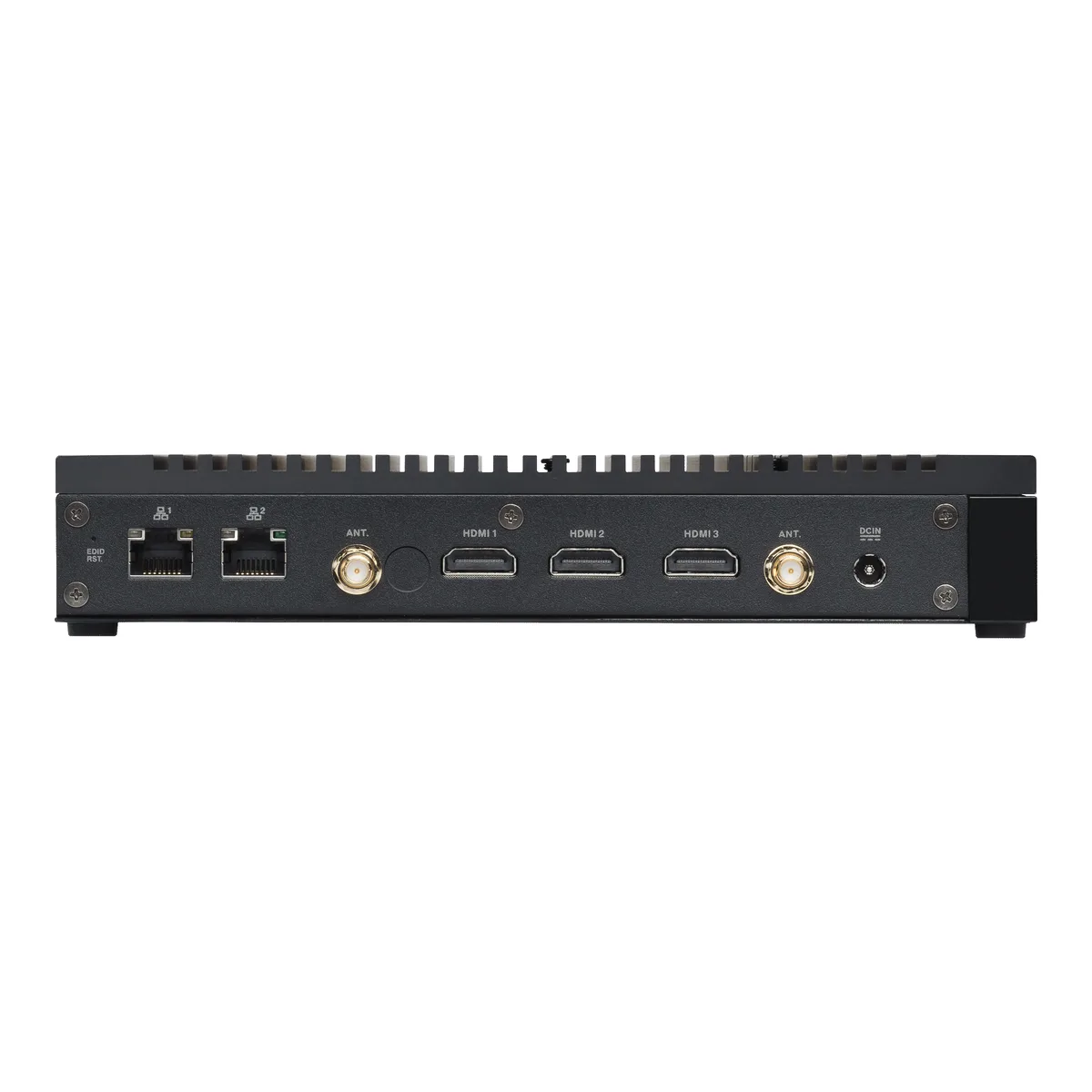
Fan-less ultra-slim workstation with 12th Gen Intel Core i5, 8 GB RAM, 512 GB PCIe 4.0 SSD, triple 4K HDMI, dual LAN including 2.5G, dual COM and Wi-Fi 6E
- WorkloadWorkstation
- TypeTiny
- CPU TypeIntel Core i5 12th Gen
- CPU FeaturesIntel® Core™i5-1235U Processor
- # of Processors Installed1
- Installed Memory Size8GB
- Silent fan-less chassis rated for 15 W CPU and 50 °C ambient
- Triple 4K display via three HDMI 2.1 ports with EDID emulation
- Dual Intel LAN with 2.5 G and 1 G ports for segregated traffic
- Two RS-232/422/485 COM ports plus five USB 3.2 Gen 2/Gen 1 ports
- PCIe 4.0 NVMe SSD and Wi-Fi 6E ready for fast storage and wireless
Ultraslim workstation with 12th Gen Intel Core i5
The ASUS Mini PC PL64 is a fan-less ultraslim workstation built around an Intel Core i5-1235U processor rated at 15 watts. It ships with 8GB of installed memory and a 512GB M.2 NVMe PCIe 4.0 SSD. The compact chassis measures 199.7 x 119.7 x 33.9 mm and weighs 1.0 kg, operating silently in ambient temperatures up to 50°C. No operating system is pre-installed, with support for Windows 11 Pro and Home editions.
Dual LAN and triple 4K display for industrial use
This system suits deployments needing dual Intel LAN ports — one 2.5G and one 1G — plus triple 4K@60Hz output via three HDMI 2.1 ports with EDID emulation. Two COM ports (RJ50) support RS232, 422 and 485 serial protocols for legacy equipment integration. Buyers requiring discrete graphics performance, higher sustained CPU power, or more than two memory slots should consider larger form-factor workstations.
8GB memory and 512GB SSD with expansion headroom
The installed 8GB memory handles typical office, signage and light industrial workloads; two SO-DIMM slots allow expansion up to 64GB total for heavier multitasking. The 512GB NVMe PCIe 4.0 SSD provides fast boot and application storage, while a second M.2 PCIe Gen4x4 slot supports additional capacity. The 65W power adapter supplies the 19Vdc, 3.42A input required for the platform.
Points forts
- Silent fan-less chassis rated for 15 W CPU and 50 °C ambient
- Triple 4K display via three HDMI 2.1 ports with EDID emulation
- Dual Intel LAN with 2.5 G and 1 G ports for segregated traffic
- Two RS-232/422/485 COM ports plus five USB 3.2 Gen 2/Gen 1 ports
- PCIe 4.0 NVMe SSD and Wi-Fi 6E ready for fast storage and wireless
Caractéristiques
| Brand | ASUS |
|---|---|
| Model | Mini PC PL64 |
| Part Number | 90MS02J2-M006X0 |
| Workload | Workstation |
| Type | Tiny |
| CPU Type | Intel Core i5 12th Gen |
| CPU Features | Intel® Core™i5-1235U Processor |
| # of Processors Installed | 1 |
| Installed Memory Size | 8GB |
| Max Memory Capacity | Max Capacity: 32GB x 2 |
| Number of Memory Slots | 2 |
| SSD (Installed) | 512GB M.2 NVMe™ PCIe® 4.0 SSD |
| LAN Ports | 10/100/1000/2500 Mbps, 2.5G Intel® LAN 10/100/1000 Mbps, 1G Intel® LAN |
| Other ports | Front(Side) I/O Ports: 3 x USB 3.2 Gen2 Type-A(5V/0.9A, 10Gbps) 2 x USB 3.2 Gen1 Type-A(5V/0.9A, 5Gbps)(side) 2 x COM (RJ50; support RS232, 422, 485 ) 1 x Audio Jack(Line out/Mic in/Headphone out) 1 x Kensington Lock(side) Back I/O Ports: 3 x HDMI 2.1 (Up to 4K@60Hz) 1 x 2.5G RJ45 LAN 1 x RJ45 LAN 1 x EDID reset 2 x Antenna Jack 1 x DC-in |
| Operating System | Operating system not installed Support Win11 Pro, Win 11 Home |
| Power Characteristics | 19Vdc, 3.42A, 65W Power Adapter |
| Weight | 1.0 kg |
| Features | Certificates: BSMI/CB/CE/FCC/UL/CCC/Energy Star/C-Tick/WiFi/RF/VCCI |
| Package Contents | Accessories: AC Adapter Driver DVD (non OS SKU only) Power Cord Screw Pack User Manual Warranty Card Keyboard & Mouse (optional) RJ50 to COM Cable (optional) VESA Mount (optional) Wall Mount (optional) Wi-Fi Antenna (optional) |
| Poids d’expédition | 2.04 kg |
| Dimensions du colis | 305 × 216 × 70 mm |
Questions sur cet article
What display cables do I need to use the three HDMI 2.1 ports for 4K triple-display?
The back panel provides three HDMI 2.1 ports supporting up to 4K@60Hz each, so three standard HDMI cables and three compatible monitors are required.
Will my existing RS-422 serial device connect directly to the dual COM ports?
The two RJ50 COM ports support RS232, 422 and 485, so an RS-422 device can be connected using a suitable RJ50-to-DB9 or RJ50-to-terminal-block cable.
How can I confirm the 512 GB M.2 NVMe PCIe 4.0 SSD is recognised and running at Gen 4 speed after setup?
In the OS device manager or BIOS the drive should appear as a PCIe 4.0 x4 NVMe device with 512 GB capacity; benchmark tools will show sequential reads near the drive's rated Gen 4 performance.
Également dans ce rayon
Les clients ont aussi comparé
Même rayon, même caisse — huit monnaies et un taux bloqué 30 minutes.



HPE
HPE P22020B21 2U Cable Management Arm for DL38X Gen10 Plus Rail Kit
52,99 $US67,99 $US−22%
0.0006748BTC
En stock
Lenovo
Lenovo ThinkSystem ST250 V3 7DCEA01YNA Tower Server Xeon E-2434 16 GB RAM
1 267,99 $US
0.01614719BTC
En stock