ASUS
ASUS Vivobook 16" WUXGA i9-13900H 24GB DDR4 1TB SSD + 1TB Dock Silver
- Silver
- Fingerprint reader
898,99 $US
0.0116881BTC
En stockNous acceptons la cryptomonnaie — les cryptos que vous détenez peuvent ainsi acheter du matériel réel.Payez en crypto, dépensez-la en matériel réel. Livraison assurée offerte partout dans le monde au-delà de 399 $. Cartons neutres, sans marque, expédiés depuis l’Allemagne.Livraison assurée offerte au-delà de 399 $. Votre taux est bloqué pendant 30 minutes dès l’ouverture de la caisse.Taux bloqué 30 minutes. Chaque article est scellé, son numéro de série est vérifié, et il est couvert par une garantie de 24 mois.Scellé, garanti 24 mois.


ASUS
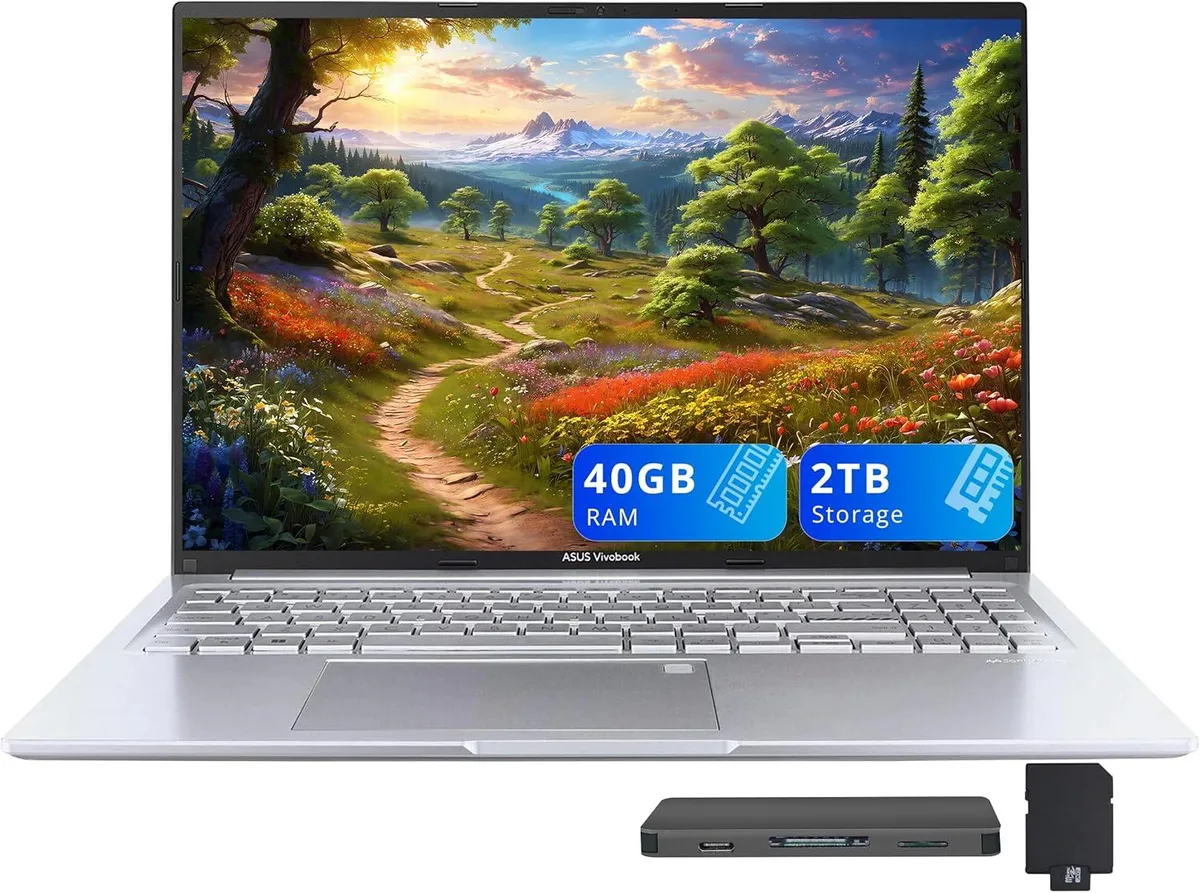
A 16-inch WUXGA business laptop with a 14-core Intel Core i9-13900H, 40GB DDR4, 1TB internal SSD and a 1TB docking station bundle
Capacity 40GB / 2TB Storage
The ASUS Vivobook 16 combines a 16.0-inch 1920 x 1200 display with an Intel Core i9-13900H processor. Fourteen cores and 40GB DDR4 memory handle demanding workloads and heavy multitasking. Integrated Intel Iris Xe Graphics supports casual gaming and creative tasks. Windows 11 Pro ships pre-installed for professional environments.
Ports include one USB-A 2.0, two USB-A 3.2, one USB-C 3.2, HDMI 1.4 and a combo audio jack. The bundle adds a 7-in-1 docking station with 1TB storage, a 32GB MicroSD card, cables and a cleaning cloth. Wireless 802.11ax and Bluetooth provide cable-free networking. The extra storage and ports free the laptop from dongle clutter on a desk setup.
The 14-core i9-13900H maintains high clocks during extended renders, compiles or data analysis. Integrated graphics share system memory, so long GPU tasks draw from the 40GB DDR4 pool. Thermal design in the 0.78-inch chassis manages heat without throttling under continuous load. Fingerprint reader and backlit keyboard stay responsive during marathon sessions.
| Brand | ASUS |
|---|---|
| Series | ASUS Vivobook |
| Model | ASUS Vivobook |
| Color | Silver |
| Other Features | Fingerprint reader |
| Operating System | Windows 11 Pro |
| CPU Type | Intel Core i9 13th Gen |
| Processor Name | Intel Core i9-13900H |
| Number of Cores | 14-cores Processor |
| Screen Size | 16.0" |
| Touchscreen | Non-Touch Screen |
| Display Type | WUXGA |
| Resolution | 1920 x 1200 |
| GPU/VPU | Intel Iris Xe Graphics |
| Graphic Type | Integrated Card |
| SSD | 1TB |
| Storage Spec | 1TB |
| Memory | 40GB DDR4 |
| WLAN | 802.11ax Wireless LAN |
| Bluetooth | Yes |
| USB | 1x USB-C, 3x USB-A |
| HDMI | 1 x HDMI 1.4 |
| Audio Ports | 1 x Headphone/Microphone Combo Jack |
| Backlit Keyboard | Backlit |
| Webcam | 720p HD |
| Style | Standard |
| Type | Work / Business |
| Usage | Business |
| Package Content | Laptop; Power Adapter; Documentation; 1TB Docking Station Set |
Autres versions de ce modèle
Même famille, mémoire, ventirad ou fréquence différents — comparez avant de vous décider.
The 14-core i9-13900H in this 16.0" chassis will throttle once its thermal limits are reached under continuous full-load tasks such as video rendering or large compiles.
Under all-day load the dual-fan cooling keeps surface temperatures manageable, though fan noise becomes audible in a quiet room; the 0.78" profile limits airflow compared to thicker workstations.
The included 7-in-1 docking station provides the 1TB expansion drive and connects via the single USB-C 3.2 port; no extra dock or cable is required.
Également dans ce rayon
Même rayon, même caisse — huit monnaies et un taux bloqué 30 minutes.
Ce que vous envoyez, et ce dans quoi vous lisez les prix.
Envoyé depuis votre portefeuille à la caisse
Affichage seul — le catalogue est libellé en dollars
Aucune monnaie ne correspond.
Choisissez la langue dans laquelle le site vous parle.
Aucune langue ne correspond.
Première visite ?
Vous avez déjà un compte ?
Il n’y a pas de réinitialisation automatique : cette boutique n’envoie aucun e-mail, il n’existe donc aucun lien à usage unique à demander. Laissez l’adresse sur le compte, elle sera traitée à la main.
Demande enregistrée
Rien n’arrivera dans votre boîte de réception — cette boutique n’envoie aucun e-mail. Quelqu’un s’en occupe à la main.
Vous l’avez retrouvé ?