


ASUS
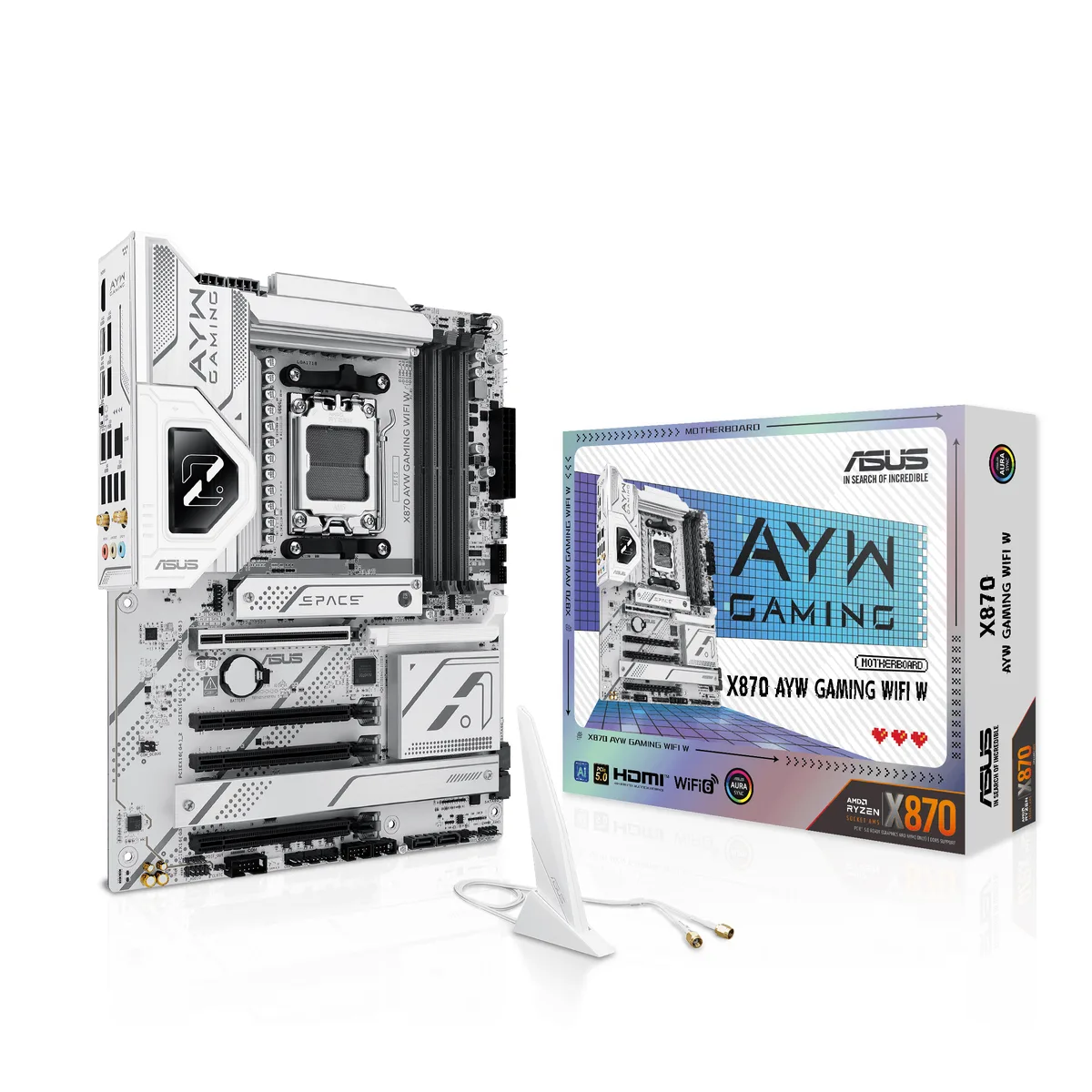
ASUS X870 AYW GAMING WIFI W AMD motherboard
ATX board for AMD AM5 Ryzen 7000, 8000 and 9000 CPUs with 12+2+1 80A DrMOS power stages, DDR5 up to 8000+ MT/s, PCIe 5.0 x16 and M.2, Wi-Fi 6, 2.5Gb LAN, USB4 and 20Gbps Type-C
- CPU Socket TypeAM5
- CPU TypeRyzen 7000 Series / Ryzen 8000 Series / Ryzen 9000 Series
- ChipsetAMD X870
- Number of Memory Slots4x288pin (DDR5)
- Memory StandardUp to 8000+MT/s (OC)
- Maximum Memory Supported256GB
- Supports Ryzen 7000, 8000 and 9000 series CPUs on AM5 socket
- 12+2+1 80A DrMOS power stages with 8-layer PCB for stable delivery
- PCIe 5.0 x16 slot plus PCIe 5.0 M.2 for fastest graphics and storage
- Wi-Fi 6, 2.5Gb LAN and USB4 40Gbps Type-C for high-speed connectivity
- Four DDR5 slots up to 8000+ MT/s with AMD EXPO and ECC support
AM5 Platform Board
The ASUS X870 AYW GAMING WIFI W is an ATX motherboard built on the AMD X870 chipset for Ryzen 7000, 8000 and 9000 series processors. It targets enthusiasts who want a white-themed build with high-speed connectivity and robust power delivery.
DIY-Friendly Installation
A pre-mounted I/O shield, PCIe Slot Q-Release and M.2 Q-Latch simplify the build process. BIOS FlashBack allows firmware updates without a CPU installed. The PCIe 3.0 x16 slot shares bandwidth with two SATA ports, so using that slot disables those SATA connections unless the BIOS is adjusted.
High-End Gaming and AI Workloads
The 12+2+1 80A DrMOS power stages, DDR5 support up to 8000+ MT/s and PCIe 5.0 x16 plus M.2 slots suit demanding gaming and AI tasks. Builders needing more than four SATA ports or legacy PCIe 3.0 expansion should consider alternative boards.
Points forts
- Supports Ryzen 7000, 8000 and 9000 series CPUs on AM5 socket
- 12+2+1 80A DrMOS power stages with 8-layer PCB for stable delivery
- PCIe 5.0 x16 slot plus PCIe 5.0 M.2 for fastest graphics and storage
- Wi-Fi 6, 2.5Gb LAN and USB4 40Gbps Type-C for high-speed connectivity
- Four DDR5 slots up to 8000+ MT/s with AMD EXPO and ECC support
Caractéristiques
| Brand | ASUS |
|---|---|
| Model | X870 AYW GAMING WIFI W |
| Part Number | 90MB1LA0-MVAAY0 |
| CPU Socket Type | AM5 |
| CPU Type | Ryzen 7000 Series / Ryzen 8000 Series / Ryzen 9000 Series |
| Chipset | AMD X870 |
| Number of Memory Slots | 4x288pin (DDR5) |
| Memory Standard | Up to 8000+MT/s (OC) |
| Maximum Memory Supported | 256GB |
| Channel Supported | Dual Channel |
| Memory Performance Profile | AMD EXPO |
| ECC Supported | Yes |
| Buffer Supported | Un-buffered |
| PCI Express 5.0 x16 | AMD Ryzen 9000 & 7000 Series Desktop Processors* 1 x PCIe 5.0 x16 slot (supports x16 mode) |
| PCI Express 4.0 x16 | AMD Ryzen 8000 Series Desktop Processors 1 x PCIe 4.0 x16 slot (supports x8/x4 mode)** AMD X870 Chipset 2 x PCIe 4.0 x16 slots (support x1 mode) |
| PCI Express 3.0 x16 | 1 x PCIe 3.0 x16 slot (support x1 mode)*** *** PCIEX16(G3) slot shares bandwidth with SATA6G_3 and SATA6G_4 ports. Both SATA ports will be disabled when PCIEX16(G3) slot is running. You can enter the BIOS to adjust the default Settings as required. |
| Serial ATA (SATA) | 4 x SATA 6Gb/s |
| M.2 | AMD Ryzen 9000 & 7000 Series Desktop Processors M.2_1 slot (Key M), type 2280 (supports PCIe 5.0 x4 mode) M.2_2 slot (Key M), type 2242/2260/2280 (supports PCIe 4.0 x4 mode)** AMD Ryzen 8000 Series Desktop Processors M.2_1 slot (Key M), type 2280 (supports PCIe 4.0 x4 mode) M.2_2 slot (Key M), type 2242/2260/2280 (supports PCIe 4.0 x4/x2 mode)** AMD X870 Chipset M.2_3 slot (Key M), type 2280 (supports PCIe 4.0 x4 mode)** ** Specifications vary by CPU types. |
| SATA RAID | 0/1/5/10 |
| Audio Channels | Realtek 7.1 Surround Sound High Definition Audio CODEC* - Supports: Jack-detection, Multi-streaming, Front Panel Jack-retasking - Supports up to 24-Bit/192 kHz playback Audio Features - Audio Shielding - Premium audio capacitors - Dedicated audio PCB layers * A chassis with an HD audio module in the front panel is required to support 7.1 Surround Sound audio output. |
| Max LAN Speed | 2.5Gbps |
| Wireless LAN | Wi-Fi 802.11 ax |
| Bluetooth | Bluetooth 5.2 |
| Back I/O Ports | 2 x USB4 (40Gbps) ports (2 x USB Type-C) 1 x USB 10Gbps port (1 x Type-A) 3 x USB 5Gbps ports (3 x Type-A) 4 x USB 2.0 ports (4 x Type-A) 1 x HDMI port 1 x Wi-Fi module 1 x Realtek 2.5Gb Ethernet port 3 x Audio jacks 1 x BIOS FlashBack button |
| Onboard USB | 1 x USB 20Gbps connector (supports USB Type-C) 1 x USB 5Gbps header supports 2 additional USB 5Gbps ports 2 x USB 2.0 headers support 4 additional USB 2.0 ports |
| Other Connectors | Fan and Cooling Related 1 x 4-pin CPU Fan header 1 x 4-pin CPU OPT Fan header 1 x 4-pin AIO Pump header 4 x 4-pin Chassis Fan headers Miscellaneous 3 x Addressable RGB Gen 2 headers 1 x Clear CMOS header 1 x Chassis Intrusion header 1 x COM Port header 1 x Front Panel Audio header (F_AUDIO) 1 x S/PDIF Out header 1 x SPI TPM header (14-1 pin) 1 x 10⁻¹ pin System Panel header |
| Form Factor | ATX |
| Dimensions (W x L) | 12.0" x 9.6" |
| Power Pin | 1 x 24-pin Main Power connector 2 x 8-pin +12V CPU Power connectors |
| BIOS Feature | 256 Mb Flash ROM, UEFI AMI BIOS |
| Software | ASUS Exclusive Software Armoury Crate - Aura Creator - Aura Sync - Fan Xpert 4 (with AI Cooling II) - Power Saving ASUS AI Advisor ASUS DriverHub ASUS GlideX TurboV Core ASUS CPU-Z Adobe Creative Cloud (Free Trial) Norton 360 Deluxe (60 Days Free Trial) WinRAR (40 Days Free Trial) UEFI BIOS ASUS EZ DIY - ASUS CrashFree BIOS 3 - ASUS EZ Flash 3 - ASUS UEFI BIOS EZ Mode - ASUS MyHotkey |
| Windows 11 | Supported |
| Features | ASUS 5X PROTECTION III - DIGI+ VRM (- Digital power design with DrMOS) - LANGuard - Overvoltage protection - SafeSlot - Stainless-steel back I/O ASUS Q-Design - M.2 Q-Latch - PCIe Slot Q-Release - Q-Dashboard - Q-DIMM - Q-LED (CPU [red], DRAM [yellow], VGA [white], Boot Device [yellow green]) - Q-Slot ASUS Thermal Solution - M.2 heatsink - VRM heatsink design ASUS EZ DIY - BIOS FlashBack button - BIOS FlashBack LED - ProCool - Pre-mounted I/O shield - SafeSlot Aura Sync - Addressable RGB Gen 2 headers |
| Package Contents | Cables 2 x SATA 6Gb/s cables Miscellaneous 1 x ASUS Wi-Fi moving antenna 2 x M.2 rubber packages 1 x Screw packages for M.2 SSD Documentation 1 x Quick start guide |
| Poids d’expédition | 1.95 kg |
| Dimensions du colis | 356 × 267 × 76 mm |
Questions sur cet article
How do I confirm the 12+2+1 80A DrMOS power delivery is operating correctly after assembly?
Enter the BIOS and open the hardware-monitor page; it reports real-time CPU Vcore, VRM temperature and phase current for each of the 12+2+1 power stages, so you can verify stable readings under load.
What accessories are included and which items must be purchased separately for a complete build?
The box contains the ATX motherboard with pre-mounted I/O shield, SATA cables, M.2 Q-Latch screws, Wi-Fi 6 antenna, driver disc and manual; you still need an AM5 Ryzen 7000/8000/9000 processor, DDR5 memory, graphics card, storage drives and an ATX power supply.
Which M.2 slot should I choose for a PCIe 5.0 x4 drive versus a PCIe 4.0 x4 drive?
Use the M.2_1 slot (Key M, 2280) for a PCIe 5.0 x4 drive when paired with a Ryzen 9000 or 7000 CPU; use the M.2_2 slot (Key M, 2242/2260/2280) for a PCIe 4.0 x4 drive.
Également dans ce rayon
Les clients ont aussi comparé
Même rayon, même caisse — huit monnaies et un taux bloqué 30 minutes.


PrimoChill
PrimoChill Praxis Wetbench Open-Air Test Bench 461.8mm
- Open-Air
274,89 $US
0.00357046BTC
En stock
Silverstone Technology
SilverStone Technology Strider 1200W 80 Plus Platinum Modular Power Supply
- ATX Mid Tower
- 1200W
324,03 $US
0.00420873BTC
En stock