


GIGABYTE
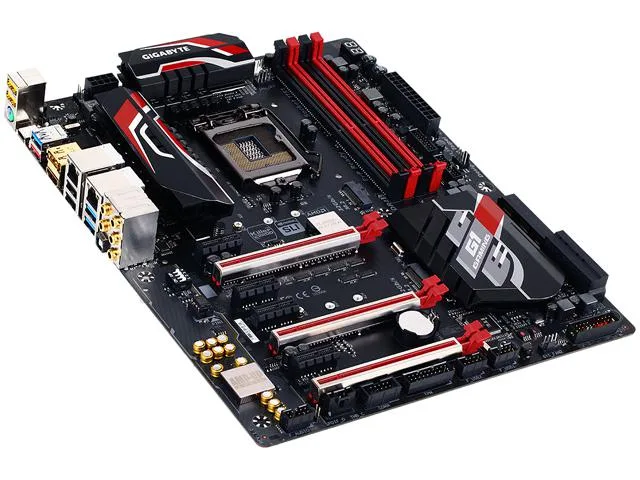
GIGABYTE GA-Z170X-Gaming 5 rev. 1.0 LGA 1151 Intel motherboard
ATX Intel Z170 board with LGA 1151 socket, four DDR4 slots up to 64 GB, dual x16 PCIe 3.0 slots, two M.2 connectors, six SATA 6 Gb/s ports, Realtek ALC1150 audio and Intel Gigabit LAN
- CPU Socket TypeLGA 1151
- CPU TypeCore i7 / i5 / i3 / Pentium / Celeron (LGA1151)
- Supported CPU Technologies* Not Compatible with Intel 8th Gen CPUs
- ChipsetIntel Z170
- Number of Memory Slots4x288pin (DDR4)
- Memory StandardDDR4 3466*(*O.C.)/ 3400*/ 3333*/ 3300*/ 3200*/ 3000*/ 2800*/
- Supports 6th and 7th generation Intel Core processors via LGA 1151 socket
- Dual-channel DDR4 memory up to 3466 MHz overclocked across four 288-pin slots
- Realtek ALC1150 audio delivers 7.1-channel high-definition sound
- Two M.2 Socket 3 connectors accept 2242, 2260 and 2280 SATA and PCIe SSDs
- Intel Gigabit LAN provides wired network connectivity
Z170 ATX motherboard for LGA 1151 CPUs
This GIGABYTE GA-Z170X-Gaming 5 board uses the Intel Z170 chipset and an LGA 1151 socket. It supports 6th and 7th Generation Core i7, i5, i3, Pentium and Celeron processors. The ATX form factor fits standard chassis and provides four 288-pin DDR4 slots for up to 64 GB of dual-channel memory.
Gamers and overclockers who need multi-GPU options
The Z170 chipset enables CPU and memory overclocking plus multi-GPU support across three x16-length slots. Builders locked to non-K CPUs or seeking 8th Generation compatibility should choose a different platform because this board is not compatible with Intel 8th Gen processors.
One x16 slot at full bandwidth or two at x8
A single graphics card runs at PCI Express 3.0 x16 in the top slot. Adding a second card in the middle slot drops both to x8 mode, while the third x16-length slot shares bandwidth with an M.2 drive and runs at x4 when free.
Points forts
- Supports 6th and 7th generation Intel Core processors via LGA 1151 socket
- Dual-channel DDR4 memory up to 3466 MHz overclocked across four 288-pin slots
- Realtek ALC1150 audio delivers 7.1-channel high-definition sound
- Two M.2 Socket 3 connectors accept 2242, 2260 and 2280 SATA and PCIe SSDs
- Intel Gigabit LAN provides wired network connectivity
Caractéristiques
| Brand | GIGABYTE |
|---|---|
| Series | G1 Gaming |
| Model | GA-Z170X-Gaming 5 (rev. 1.0) |
| CPU Socket Type | LGA 1151 |
| CPU Type | Core i7 / i5 / i3 / Pentium / Celeron (LGA1151) |
| Supported CPU Technologies | * Not Compatible with Intel 8th Gen CPUs |
| Chipset | Intel Z170 |
| Number of Memory Slots | 4x288pin (DDR4) |
| Memory Standard | DDR4 3466*(*O.C.)/ 3400*/ 3333*/ 3300*/ 3200*/ 3000*/ 2800*/ 2666*/ 2400*/ 2133 |
| Maximum Memory Supported | 64GB |
| Channel Supported | Dual Channel |
| PCI Express 3.0 x16 | 1 x PCI Express x16 slot, running at x16 (PCIEX16) / * For optimum performance, if only one PCI Express graphics card is to be installed, be sure to install it in the PCIEX16 slot. / 1 x PCI Express x16 slot, running at x8 (PCIEX8) / * The PCIEX8 slot shares bandwidth with the PCIEX16 slot. When the PCIEX8 slot is populated, the PCIEX16 slot will operate at up to x8 mode. / 1 x PCI Express x16 slot, running at x4 (PCIEX4) / * The PCIEX4 slot shares bandwidth with the M2H_32G connector. The PCIEX4 slot will become unavailable when an SSD is installed in the M2H_32G connector. |
| PCI Express x1 | 4 x PCI Express x1 slots / (All of the PCI Express slots conform to PCI Express 3.0 standard.) |
| Serial ATA (SATA) | 6 x SATA 6Gb/s |
| SATA Express | 3 x SATA Express connectors |
| M.2 | 2 x M.2 Socket 3 connectors (Socket 3, M key, type 2242/2260/2280 SATA & PCIe x4/x2/x1 SSD support) |
| SATA RAID | 0/1/5/10 |
| Audio Chipset | Realtek ALC1150 |
| Audio Channels | 2/4/5.1/7.1-channel |
| LAN Chipset | Intel GbE LAN chip |
| Second LAN Chipset | Killer E2201 chip |
| Max LAN Speed | 2 x 1Gbps |
| PS/2 | 1 x PS/2 keyboard/mouse port |
| HDMI | 1 x HDMI |
| RJ45 | 2 x RJ45 |
| DisplayPort | 1 x DisplayPort |
| USB 3.1 | 1 x USB Type-C port, with USB 3.1 support / 1 x USB 3.1 Type-A port (red) |
| USB 3.0 | 3 x USB 3.0 |
| USB 1.1/2.0 | 4 x USB 2.0 |
| S/PDIF Out | 1 x Optical |
| Audio Ports | 5 x audio jacks (Center/Subwoofer Speaker Out, Rear Speaker Out, Line In, Line Out, Mic In) |
| Onboard USB | 2 x USB 3.0/2.0 headers / 2 x USB 2.0/1.1 headers |
| Other Connectors | 1 x CPU fan header / 1 x water cooling fan header (CPU_OPT) / 3 x system fan headers / 1 x front panel header / 1 x front panel audio header / 1 x Trusted Platform Module (TPM) header / 1 x Thunderbolt add-in card connector / 1 x serial port header / 1 x Clear CMOS jumper / 1 x ECO button / 1 x OC button / 1 x audio gain control switch |
| Form Factor | ATX |
| Dimensions (W x L) | 12.01" x 9.61" |
| Power Pin | 1 x 24-pin ATX main power connector / 1 x 8-pin ATX 12V power connector |
| Features | Multi-Graphics Technology: / Support for NVIDIA Quad-GPU SLI and 2-Way NVIDIA SLI technologies / Support for AMD Quad-GPU CrossFireX and 3-Way/2-Way AMD CrossFire technologies / / I/O Controller: / iTE I/O Controller Chip / / H/W Monitoring: / System voltage detection / CPU/System/Chipset temperature detection / CPU/CPU OPT/System fan speed detection / CPU/System/Chipset overheating warning / CPU/CPU OPT/System fan fail warning / CPU/CPU OPT/System fan speed control / * Whether the fan speed control function is supported will depend on the cooler you install. / / BIOS: / 2 x 128 Mbit |
| Package Contents | GA-Z170X-Gaming 5 motherboard / Four SATA cables / Motherboard driver disk / I/O Shield / User's Manual / One 2-Way SLI bridge connector / Quick Installation Guide / One G Connector |
Questions sur cet article
How do I install the CPU into the LGA 1151 socket, and which step do people get wrong?
Lift the socket lever, align the processor triangle with the socket marker, place the CPU gently without pressure, then lower and lock the lever — the common mistake is forcing the chip before the lever is fully open.
What maintenance or replacement will the Realtek ALC1150 audio chipset need later?
The onboard audio codec is soldered and requires no scheduled maintenance; if it fails the board must be serviced or replaced, as the chip cannot be swapped by the user.
What limit appears first when the PCIEX16 slot shares bandwidth with the PCIEX8 slot under sustained multi-GPU use?
Populating the PCIEX8 slot forces the PCIEX16 slot to run at x8 instead of x16, halving the graphics link bandwidth for the primary card.
Également dans ce rayon
Les clients ont aussi comparé
Même rayon, même caisse — huit monnaies et un taux bloqué 30 minutes.


PrimoChill
PrimoChill Praxis Wetbench Open-Air Test Bench 461.8mm
- Open-Air
274,89 $US
0.00357213BTC
En stock
Silverstone Technology
SilverStone Technology Strider 1200W 80 Plus Platinum Modular Power Supply
- ATX Mid Tower
- 1200W
324,03 $US
0.0042107BTC
En stock