

Micron Technology, Inc.
Micron Technology, Inc. MT4JTF12864AZ-1G4D1 1GB DDR3 1333 Desktop RAM
- 1GB
- DDR3 1333 (PC3 1060…
$28.99
0.00037497BTC
En stockNous acceptons la cryptomonnaie — les cryptos que vous détenez peuvent ainsi acheter du matériel réel.Payez en crypto, dépensez-la en matériel réel. Livraison assurée offerte partout dans le monde au-delà de 399 $. Cartons neutres, sans marque, expédiés depuis l’Allemagne.Livraison assurée offerte au-delà de 399 $. Votre taux est bloqué pendant 30 minutes dès l’ouverture de la caisse.Taux bloqué 30 minutes. Chaque article est scellé, son numéro de série est vérifié, et il est couvert par une garantie de 24 mois.Scellé, garanti 24 mois.


GIGABYTE
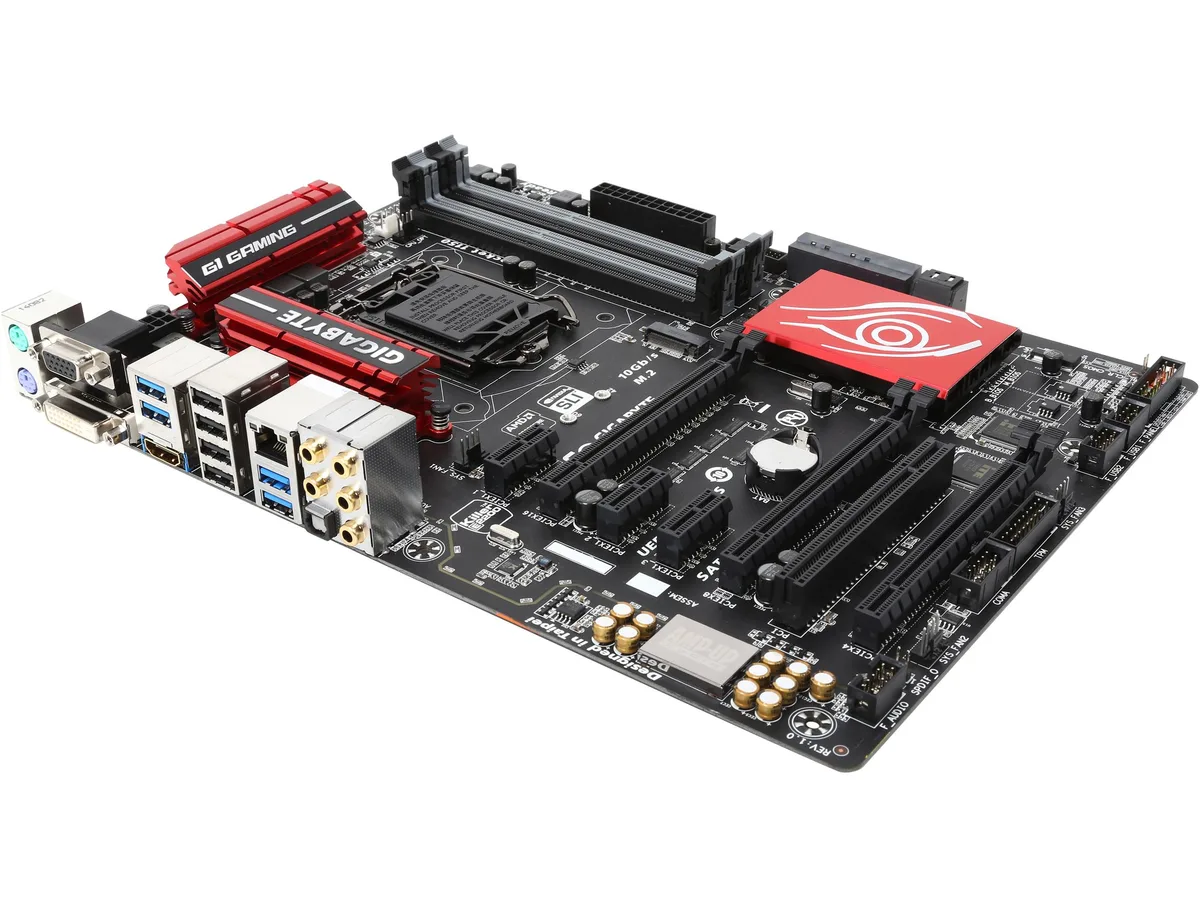
ATX Z97 board for LGA 1150 CPUs with four DDR3 slots up to 32 GB, one PCIe 3.0 x16, one PCIe x4, three PCIe x1, six SATA 6Gb/s, SATA Express, M.2 and Realtek ALC1150 7.1 audio
The GIGABYTE GA-Z97X-Gaming 5 revision 1.0 is an ATX motherboard built on the Intel Z97 chipset for LGA 1150 processors. It supports Core i7, i5, i3, Pentium and Celeron CPUs and provides four 240-pin slots for dual-channel DDR3 memory up to 32 GB.
This board fits builders assembling a new LGA 1150 system or upgrading an existing Z97 platform. Users who require a newer CPU socket or a different memory type should select a motherboard designed for that platform.
The primary PCI Express 3.0 x16 slot runs at full x16 electrical speed for a single graphics card. A second x16-sized slot operates at x4 and shares bandwidth with the three x1 slots, limiting multi-GPU expansion.
| Brand | GIGABYTE |
|---|---|
| Series | G1 Gaming |
| Model | GA-Z97X-Gaming 5 (rev. 1.0) |
| CPU Socket Type | LGA 1150 |
| CPU Type | Core i7 / i5 / i3 / Pentium / Celeron (LGA1150) |
| Chipset | Intel Z97 |
| Number of Memory Slots | 4x240pin |
| Memory Standard | DDR3 3200*(*O.C.)/ 3100*/ 3000*/ 2933*/ 2800*/ 2666*/ 2600*/ 2500*/ 2400*/ 2200*/ 2133*/ 2000*/ 1866*/ 1800*/ 1600/ 1333 |
| Maximum Memory Supported | 32GB |
| Channel Supported | Dual Channel |
| PCI Express 3.0 x16 | 1 x PCI Express x16 slot, running at x16 (PCIEX16) / * For optimum performance, if only one PCI Express graphics card is to be installed, be sure to install it in the PCIEX16 slot. / / 1 x PCI Express x16 slot, running at x8 (PCIEX8) / * The PCIEX8 slot shares bandwidth with the PCIEX16 slot. When the PCIEX8 slot is populated, the PCIEX16 slot will operate at up to x8 mode. / / (The PCIEX16 and PCIEX8 slots conform to PCI Express 3.0 standard.) |
| PCI Express x16 | 1 x PCI Express x16 slot, running at x4 (PCIEX4) / * The PCIEX4 slot shares bandwidth with all PCI Express x1 slots. All PCI Express x1 slots will become unavailable when a PCIe x4 expansion card is installed. / * When installing a x8 or above card in the PCIEX4 slot, make sure to set PCIE Slot Configuration in BIOS Setup to x4. |
| PCI Express x1 | 3 x PCI Express x1 slots / (The PCIEX4 and PCI Express x1 slots conform to PCI Express 2.0 standard.) |
| PCI Slots | 1 x PCI Slot |
| Serial ATA (SATA) | 6 x SATA 6Gb/s connectors / (M.2, SATA Express, and SATA3 4/5 connectors can only be used one at a time. The SATA3 4/5 connectors will become unavailable when an M.2 SSD is installed.) |
| SATA Express | 1 x SATA Express connector |
| M.2 | 1 x M.2 PCIe connector / (Socket 3, M key, type 2242/2260/2280 SATA & PCIe SSD support) |
| SATA RAID | 0/1/5/10 |
| Audio Chipset | Realtek ALC1150 |
| Audio Channels | 2/4/5.1/7.1-channel |
| LAN Chipset | Qualcomm Atheros Killer E2201 |
| Max LAN Speed | 1Gbps |
| Back I/O Ports | 1 x HDMI / 1 x Optical S/PDIF Out / 2 x PS/2 / 4 x USB 2.0/1.1 / 4 x USB 3.0 |
| PS/2 | 1 x PS/2 keyboard port / 1 x PS/2 mouse port |
| Video Ports | 1 x D-Sub port / 1 x DVI-D port |
| HDMI | 1 x HDMI |
| RJ45 | 1 x RJ45 |
| USB 3.0 | 4 x USB 3.0/2.0 ports |
| USB 1.1/2.0 | 4 x USB 2.0/1.1 ports |
| S/PDIF Out | 1 x Optical |
| Audio Ports | 5 x audio jacks (Center/Subwoofer Speaker Out, Rear Speaker Out, Line In, Line Out, Mic In) |
| Onboard USB | 1 x USB 3.0/2.0 header / 2 x USB 2.0/1.1 headers |
| Other Connectors | 1 x 24-pin ATX main power connector / 1 x 8-pin ATX 12V power connector / 1 x CPU fan header / 1 x water cooling fan header (CPU_OPT) / 3 x system fan headers / 1 x front panel header / 1 x front panel audio header / 1 x S/PDIF Out header / 1 x serial port header / 1 x Clear CMOS jumper / 1 x Trusted Platform Module (TPM) header |
| Form Factor | ATX |
| Dimensions (W x L) | 12.0" x 8.9" |
| Power Pin | 24 Pin |
| Features | Supports 4th and 5th Generation Intel Core processors / Creative SoundBlaster X-Fi MB3 gaming audio suite / Audio Noise Guard with LED path lighting / Gold plated display and audio ports / High end Nichicon audio capacitors / Realtek ALC1150 115dB SNR HD Audio with Built-in rear audio amplifier / Killer E2200 gaming networking platform / Extreme multi graphics support / SATA Express support for 10 Gb/s data transfer / M.2 for SSDs drives with up to 10 Gb/s data transfer / Long lifespan Durable Black Solid caps / APP Center including EasyTune and Cloud Station utilities / GIGABYTE UEF |
The board runs DDR3 at 1333, 1600, 1800, 1866, 2000, 2133, 2200, 2400, 2500, 2600, 2666, 2800, 2933, 3000, 3100 and up to 3200 when overclocked across its four slots for a 32 GB maximum in dual-channel mode.
Installing a PCIe x4 card in the PCIEX4 slot disables all three PCI Express x1 slots because they share bandwidth, so the older x1 card would no longer function.
Open the Realtek audio console in Windows, select 7.1-channel in the speaker configuration tab and run the built-in speaker test; each of the eight channels should play a distinct tone.
Également dans ce rayon
Même rayon, même caisse — huit monnaies et un taux bloqué 30 minutes.
Ce que vous envoyez, et ce dans quoi vous lisez les prix.
Envoyé depuis votre portefeuille à la caisse
Affichage seul — le catalogue est libellé en dollars
Aucune monnaie ne correspond.
Choisissez la langue dans laquelle le site vous parle.
Première visite ?
Vous avez déjà un compte ?
Il n’y a pas de réinitialisation automatique : cette boutique n’envoie aucun e-mail, il n’existe donc aucun lien à usage unique à demander. Laissez l’adresse sur le compte, elle sera traitée à la main.
Demande enregistrée
Rien n’arrivera dans votre boîte de réception — cette boutique n’envoie aucun e-mail. Quelqu’un s’en occupe à la main.
Vous l’avez retrouvé ?



