


IHDAPP
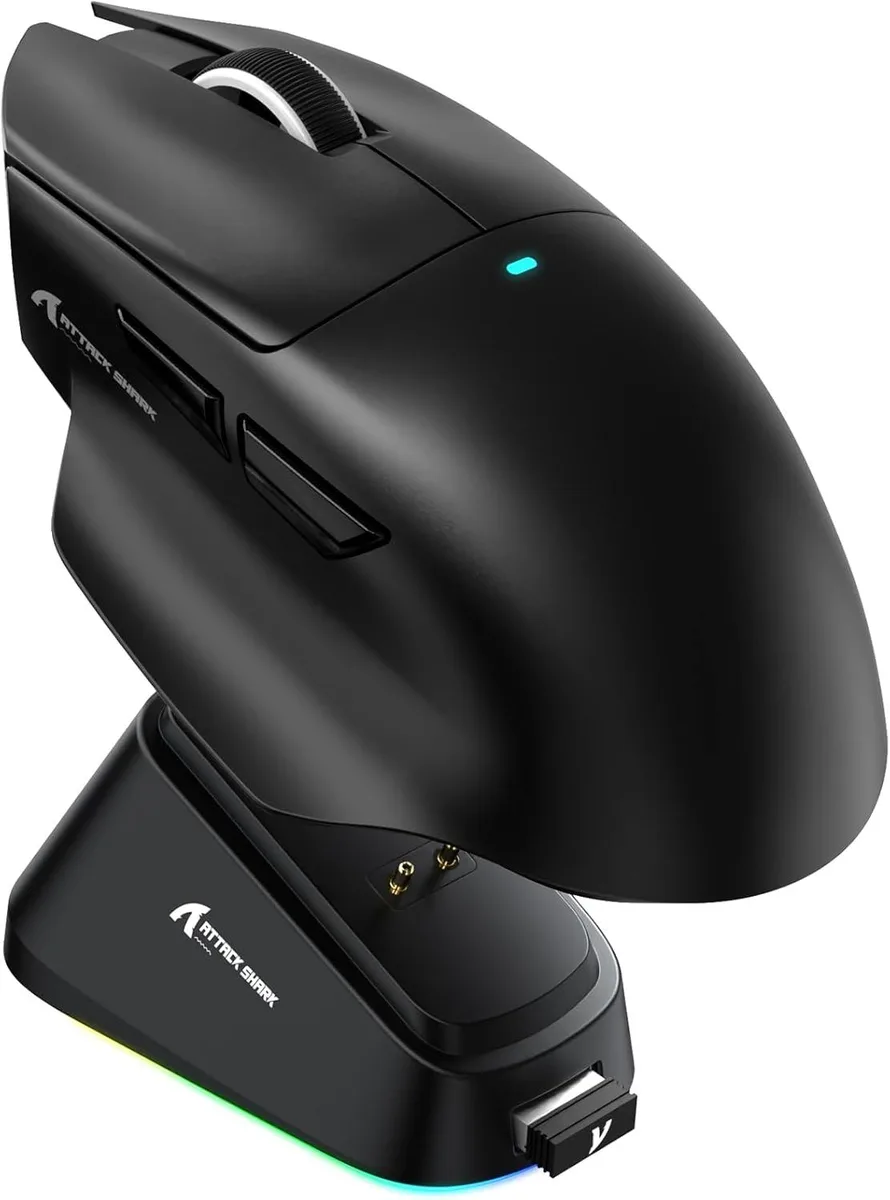
IHDAPP V6 65g Gaming Mouse PAW3311 25000 DPI Tri-Mode Magnetic Dock
A 65 g optical gaming mouse with a PixArt 3311 sensor up to 25000 DPI, tri-mode connectivity, 1000 Hz polling, 40 G acceleration.
- TypeBluetooth / 2.4GHz / Wired
- ColorBlack
- InterfaceUSB & Bluetooth
- Tracking MethodOptical
- Resolution (DPI)25000 dpi
- Buttons6
- Lightweight 65g build reduces fatigue during long sessions
- PixArt PAW3311 sensor delivers 25000 DPI for precise tracking
- Tri-mode connectivity with 1000Hz polling ensures responsive control
- Japanese micro switches rated for 100 million clicks extend durability
- Magnetic charging dock with 500 mAh battery keeps you powered
Ultra-Lightweight Gaming Mouse
The IHDAPP V6 weighs about 65g and uses a PixArt PAW3311 optical sensor with up to 25000 DPI adjustable in 50 DPI steps. It connects via wired USB, 2.4GHz wireless or Bluetooth and runs on a 500 mAh rechargeable battery. Six buttons and Japanese micro switches rated for over 100 million clicks complete the package.
Tri-Mode Connectivity Upgrade
This mouse replaces single-connection or heavier rodents by adding Bluetooth and 2.4GHz wireless alongside wired operation at a 1000Hz polling rate. The jump is worth it when you need low-latency wireless freedom across Windows 11, macOS 10.12, Android or iOS without carrying multiple devices.
Magnetic Dock And Driver Setup
A magnetic charging dock snaps the mouse into place for effortless top-ups while the cloud-based AI driver auto-detects the hardware for button mapping and DPI profiles. The only common snag is forgetting to pair the 2.4GHz dongle before first use or skipping the driver download for full customisation.
Points forts
- Lightweight 65g build reduces fatigue during long sessions
- PixArt PAW3311 sensor delivers 25000 DPI for precise tracking
- Tri-mode connectivity with 1000Hz polling ensures responsive control
- Japanese micro switches rated for 100 million clicks extend durability
- Magnetic charging dock with 500 mAh battery keeps you powered
Caractéristiques
| Model | V6 |
|---|---|
| Type | Bluetooth / 2.4GHz / Wired |
| Color | Black |
| Interface | USB & Bluetooth |
| Tracking Method | Optical |
| Resolution (DPI) | 25000 dpi |
| Buttons | 6 |
| Weight | About 65g |
| Operating System Supported | Android, Windows 11, iOS, macOS 10.12 Sierra |
| Features | Ergonomic Design, Lightweight, Portable, Rechargeable, Wireless |
| Package Contents | 1 x Wireless Mouse, 1 x Charging Dock, 1 x User Manual |
Questions sur cet article
What desk space does the magnetic charging dock need?
The dock sits flat and holds the 65 g mouse magnetically; allow roughly a hand-span of clear surface so the dock and mouse can align without cables pulling.
How do I pair the mouse in 2.4 GHz mode, and what step is often missed?
Plug the USB receiver, switch the mouse to 2.4 GHz, then press the pairing button on the dock until the LED flashes — skipping the dock button leaves the link inactive.
When will the 500 mAh battery need replacing, and what wears first?
The battery is rated for hundreds of cycles; the Japanese micro-switches are rated for 100 million clicks and will likely outlast the cell.
Également dans ce rayon
Les clients ont aussi comparé
Même rayon, même caisse — huit monnaies et un taux bloqué 30 minutes.



BFKK
BFKK Wireless Gaming Mouse PAW 3950Max 42000 DPI 8KHz 38g Black & Sticker
- Black
106,99 $US
0.00137147BTC
En stock
BFKK
BFKK Wireless Gaming Mouse Red 7 Silent Buttons 5 Adjustable DPI
- Red
34,99 $US
0.00044853BTC
En stock
BFKK
BFKK Wireless Gaming Mouse Blue 7 Silent Buttons 1000-4000 DPI
- Blue
30,99 $US
0.00039725BTC
En stock