Panasonic
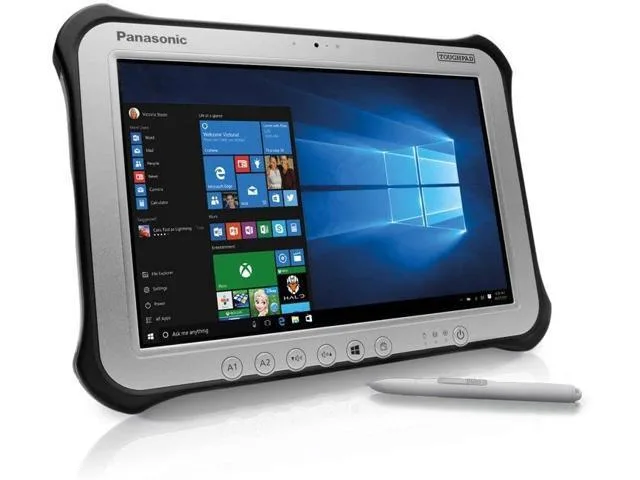
Panasonic Toughpad FZ-G1 MK4 10.1" Tablet i5-6300U 8GB 256GB SSD
- Silver
- Standard
230,99 $US
0.00293742BTC
En stockNous acceptons la cryptomonnaie — les cryptos que vous détenez peuvent ainsi acheter du matériel réel.Payez en crypto, dépensez-la en matériel réel. Livraison assurée offerte partout dans le monde au-delà de 399 $. Cartons neutres, sans marque, expédiés depuis l’Allemagne.Livraison assurée offerte au-delà de 399 $. Votre taux est bloqué pendant 30 minutes dès l’ouverture de la caisse.Taux bloqué 30 minutes. Chaque article est scellé, son numéro de série est vérifié, et il est couvert par une garantie de 24 mois.Scellé, garanti 24 mois.


Panasonic
A rugged 10.1-inch Windows tablet with a daylight-readable 1920 x 1200 display, Intel Core i5-6300U processor, 8GB DDR3L memory, 128GB SSD, and pen-plus-touch input
SSD 128 GB
Option No
Les versions barrées existent, mais ne sont pas disponibles ici.
The Panasonic Toughpad FZ-G1 is a fully rugged Windows 10 Pro tablet built for field workforces operating outdoors. It combines an Intel Core i5-6300U vPro processor with 8GB DDR3L memory and a 128GB SSD. The 10.1" WUXGA display reaches up to 800 nits for daylight readability and supports 10-point capacitive multi-touch plus digitiser input.
This device replaces standard consumer tablets when workloads demand MIL-STD durability, a daylight-viewable screen, and integrated digitiser support for pen or glove use. The jump is worth it when teams need reliable operation in rain, dust, or bright sunlight and require Windows 10 Pro manageability with TPM 2.0 security for corporate data.
It suits mobile technicians, logistics staff, and survey crews who need a handheld Windows device with a rotating hand strap and corner guards for drop protection. Buyers who need larger internal storage, a built-in keyboard, or a lighter consumer form factor should look at something else.
| Brand | Panasonic |
|---|---|
| Series | Toughpad |
| Model | FZ-G1 |
| Part Number | FZ-G1PXXXXXX |
| Color | Silver |
| Operating System | Windows 10 Pro |
| CPU Type | Intel Core i5 6th Gen |
| Processor Name | 2.40 GHz |
| Number of Cores | Dual-core Processor |
| Touchscreen | Touch Screen |
| Display Type | Wide XGA |
| Panel | TFT IPS |
| Display Features | Daylight-viewable WUXGA Active Matrix TFT IPS colour LCD with circular polarizer (up to 800cd/m² brightness), 10 finger capacitive multi-touchscreen + digitiser (pen, finger and glove modes) |
| Resolution | 1920 x 1200 |
| GPU/VPU | Intel HD Graphics 520 |
| SSD | 128GB |
| HDD | No |
| Memory | 8GB |
| Optical Drive Type | N/A |
| LAN | N/A |
| WLAN | 802.11ac Wireless LAN |
| Bluetooth | Bluetooth 4.1 |
| HDMI | 1 x HDMI |
| Docking Connector | 1 |
| Audio Ports | 1 x Headphone/Microphone Combo Jack |
Autres versions de ce modèle
Même famille, mémoire, ventirad ou fréquence différents — comparez avant de vous décider.
The tablet has a dedicated docking connector on its base for Panasonic desktop and vehicle cradles; no VESA holes are present on the unit itself.
Attach the corner guards first, then thread the rotating hand strap through its slots, and finally lower the tablet straight down onto the dock connector until the latch clicks.
Power off the tablet, slide the battery release latch on the rear, remove the old pack, insert the new battery until it clicks, and power on to calibrate.
Également dans ce rayon
Même rayon, même caisse — huit monnaies et un taux bloqué 30 minutes.
Ce que vous envoyez, et ce dans quoi vous lisez les prix.
Envoyé depuis votre portefeuille à la caisse
Affichage seul — le catalogue est libellé en dollars
Aucune monnaie ne correspond.
Choisissez la langue dans laquelle le site vous parle.
Première visite ?
Vous avez déjà un compte ?
Il n’y a pas de réinitialisation automatique : cette boutique n’envoie aucun e-mail, il n’existe donc aucun lien à usage unique à demander. Laissez l’adresse sur le compte, elle sera traitée à la main.
Demande enregistrée
Rien n’arrivera dans votre boîte de réception — cette boutique n’envoie aucun e-mail. Quelqu’un s’en occupe à la main.
Vous l’avez retrouvé ?