Panasonic
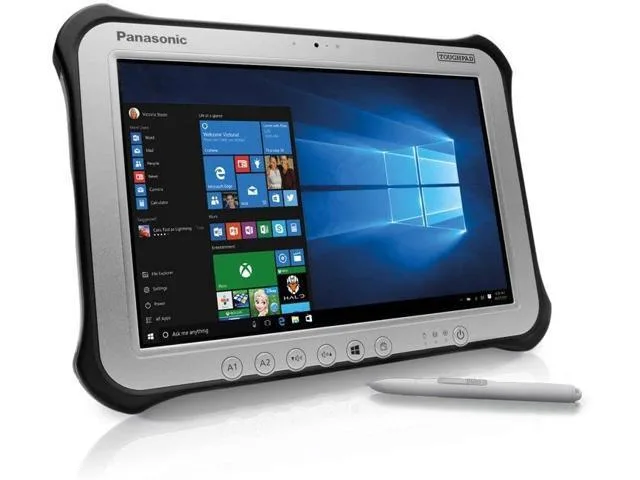
Panasonic Toughpad FZ-G1 MK4 10.1" Tablet i5-6300U 8GB 256GB SSD
- Silver
- Standard
$230.99
0.00293742BTC
In stockWe take cryptocurrency — so the coins you hold can buy real hardware.Pay in crypto, spend it on real hardware. Free insured shipping worldwide over $399. Plain, unbranded boxes, sent from Germany.Free insured shipping over $399. Your rate is locked for 30 minutes once checkout opens.Rate locked 30 minutes. Every item sealed, serial-checked and covered by a 24-month warranty.Sealed, 24-month warranty.


Panasonic
A rugged 10.1-inch Windows tablet with a daylight-readable 1920 x 1200 display, Intel Core i5-6300U processor, 8GB DDR3L memory, 128GB SSD, and pen-plus-touch input
SSD 128 GB
Option No
Struck-through versions exist but are not stocked here.
The Panasonic Toughpad FZ-G1 is a fully rugged Windows 10 Pro tablet built for field workforces operating outdoors. It combines an Intel Core i5-6300U vPro processor with 8GB DDR3L memory and a 128GB SSD. The 10.1" WUXGA display reaches up to 800 nits for daylight readability and supports 10-point capacitive multi-touch plus digitiser input.
This device replaces standard consumer tablets when workloads demand MIL-STD durability, a daylight-viewable screen, and integrated digitiser support for pen or glove use. The jump is worth it when teams need reliable operation in rain, dust, or bright sunlight and require Windows 10 Pro manageability with TPM 2.0 security for corporate data.
It suits mobile technicians, logistics staff, and survey crews who need a handheld Windows device with a rotating hand strap and corner guards for drop protection. Buyers who need larger internal storage, a built-in keyboard, or a lighter consumer form factor should look at something else.
| Brand | Panasonic |
|---|---|
| Series | Toughpad |
| Model | FZ-G1 |
| Part Number | FZ-G1PXXXXXX |
| Color | Silver |
| Operating System | Windows 10 Pro |
| CPU Type | Intel Core i5 6th Gen |
| Processor Name | 2.40 GHz |
| Number of Cores | Dual-core Processor |
| Touchscreen | Touch Screen |
| Display Type | Wide XGA |
| Panel | TFT IPS |
| Display Features | Daylight-viewable WUXGA Active Matrix TFT IPS colour LCD with circular polarizer (up to 800cd/m² brightness), 10 finger capacitive multi-touchscreen + digitiser (pen, finger and glove modes) |
| Resolution | 1920 x 1200 |
| GPU/VPU | Intel HD Graphics 520 |
| SSD | 128GB |
| HDD | No |
| Memory | 8GB |
| Optical Drive Type | N/A |
| LAN | N/A |
| WLAN | 802.11ac Wireless LAN |
| Bluetooth | Bluetooth 4.1 |
| HDMI | 1 x HDMI |
| Docking Connector | 1 |
| Audio Ports | 1 x Headphone/Microphone Combo Jack |
Other versions of this model
Same family, different memory, cooler or clock — compare before you commit.
The tablet has a dedicated docking connector on its base for Panasonic desktop and vehicle cradles; no VESA holes are present on the unit itself.
Attach the corner guards first, then thread the rotating hand strap through its slots, and finally lower the tablet straight down onto the dock connector until the latch clicks.
Power off the tablet, slide the battery release latch on the rear, remove the old pack, insert the new battery until it clicks, and power on to calibrate.
Also in this aisle
Same shelf, same checkout — eight coins and a 30-minute rate lock.
What you pay in, and what you read prices in.
Sent from your wallet at checkout
Display only — the catalogue is priced in USD
No currency matches that.
Pick the language the site speaks to you in.
New here?
Already have one?
There is no automatic reset: this shop sends no mail, so there is no one-time link to ask for. Leave the address on the account and it gets picked up by hand.
Request noted
Nothing is on its way to your inbox — this shop sends no mail at all. Someone picks these up by hand.
Remembered it?