

Razer USA Ltd
Razer USA Ltd Huntsman Mini 60 Gaming Keyboard Quartz Pink
35,99 $US
0.00045579BTC
En stockNous acceptons la cryptomonnaie — les cryptos que vous détenez peuvent ainsi acheter du matériel réel.Payez en crypto, dépensez-la en matériel réel. Livraison assurée offerte partout dans le monde au-delà de 399 $. Cartons neutres, sans marque, expédiés depuis l’Allemagne.Livraison assurée offerte au-delà de 399 $. Votre taux est bloqué pendant 30 minutes dès l’ouverture de la caisse.Taux bloqué 30 minutes. Chaque article est scellé, son numéro de série est vérifié, et il est couvert par une garantie de 24 mois.Scellé, garanti 24 mois.


TUKO
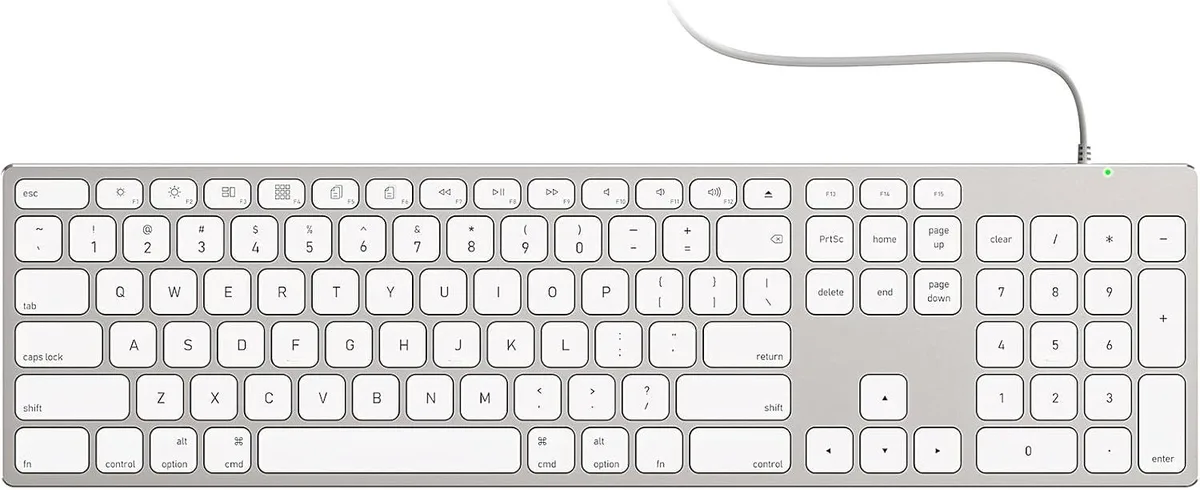
A full-size wired Mac keyboard with numeric keypad, all-aluminium unibody, USB-A/USB-C 2-in-1 cable and stick-on risers
The TUKO keyboard uses a solid aluminium unibody that matches the finish of Apple desktop hardware. It provides a full-size layout with a numeric keypad arranged in the standard macOS positions. The board is aimed at iMac, Mac mini and MacBook users who want a permanent, wired typing solution without pairing steps or battery management.
A single detachable cable carries both USB-A and USB-C connectors so the keyboard works with older Macs and newer models alike. There is no driver installation or Bluetooth pairing required; the connection is active the moment the cable is plugged in. This replaces wireless keyboards that need recharging or occasional re-pairing, and it suits users who prefer a stable, latency-free link for long work sessions. It is not for buyers who want a cable-free desk or a keyboard that pairs with multiple devices over Bluetooth.
Included adhesive risers attach to the underside to raise the rear edge and create a sloped typing angle. The aluminium chassis stays rigid on the desk during extended typing, and the fixed cable eliminates the intermittent disconnects that can appear with wireless models after hours of use. The keyboard draws power directly from the host Mac, so there is no internal battery to degrade or recharge. It is not for users who need a built-in trackpad, programmable macro keys or a low-profile chassis that fits in a laptop sleeve.
| Layout | Full-size |
|---|
The keyboard sits directly on the desk surface; no special mounting hardware is needed. Stick-on risers are included to adjust the typing angle if desired.
Plug the appropriate connector — USB-A or USB-C — into the Mac. The keyboard works immediately with no driver installation; the step users miss is assuming pairing or charging is required.
The risers use adhesive backing; they are not designed for repeated removal and reattachment. If the adhesive fails or you reposition the keyboard, replacement risers would be needed.
Également dans ce rayon
Même rayon, même caisse — huit monnaies et un taux bloqué 30 minutes.
Ce que vous envoyez, et ce dans quoi vous lisez les prix.
Envoyé depuis votre portefeuille à la caisse
Affichage seul — le catalogue est libellé en dollars
Aucune monnaie ne correspond.
Choisissez la langue dans laquelle le site vous parle.
Première visite ?
Vous avez déjà un compte ?
Il n’y a pas de réinitialisation automatique : cette boutique n’envoie aucun e-mail, il n’existe donc aucun lien à usage unique à demander. Laissez l’adresse sur le compte, elle sera traitée à la main.
Demande enregistrée
Rien n’arrivera dans votre boîte de réception — cette boutique n’envoie aucun e-mail. Quelqu’un s’en occupe à la main.
Vous l’avez retrouvé ?


