

SanDisk
SanDisk Cruzer Blade 8 GB USB 2.0 USB flash drive Black SDCZ50-008G-B35
$391.99
0.00496039BTC
在庫あり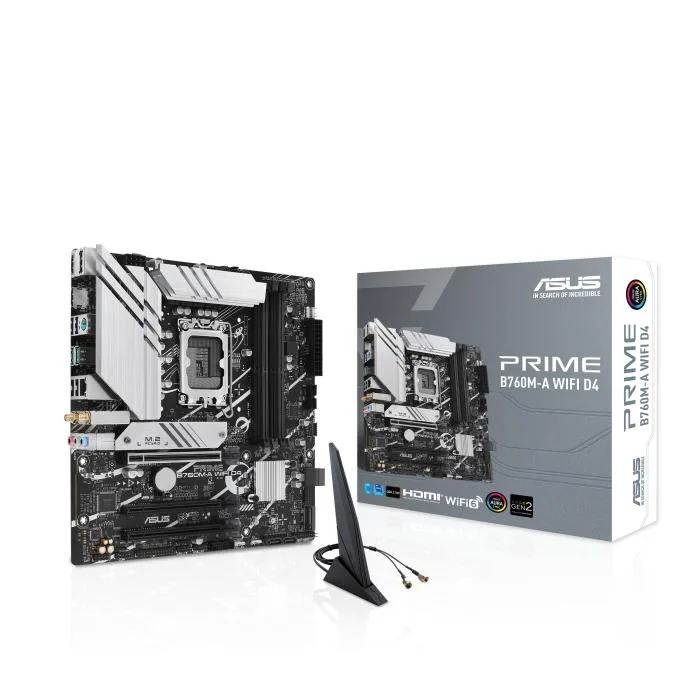


ASUS
Micro-ATX board with LGA 1700 socket, PCIe 4.0, two M.2 slots, 2.5Gb Ethernet, Wi-Fi 6, rear USB 3.2 Gen 2 and front USB 3.2 Gen 1 Type-C
This Intel B760 board uses the LGA 1700 socket and supports 12th, 13th and 14th Gen processors in a micro-ATX layout. It targets builders who want current Intel performance without the cost or size of a full ATX platform.
Heatsinks cover the VRM, M.2 and PCH zones while hybrid fan headers and Fan Xpert 2+ manage airflow. Rear I/O includes 2.5 Gb Ethernet, Wi-Fi 6, DisplayPort and USB 3.2 Gen 2 ports; a front-panel USB 3.2 Gen 1 Type-C header and Addressable Gen 2 RGB headers simplify case wiring.
Two M.2 slots share PCIe 4.0 lanes, so adding a second high-speed drive reduces bandwidth for the first slot. Buyers who need more storage lanes or multiple full-length PCIe cards should consider a larger chipset board.
| CPU Socket Type | LGA 1700 |
|---|
Both M.2 slots run on PCIe 4.0, so each drive is limited to the bandwidth of a four-lane Gen 4 link.
The board uses the standard micro-ATX footprint and mounting holes, so any case that supports mATX will fit it.
The Wi-Fi 6 controller is soldered on-board; the only installation step is attaching the two supplied external antennas to the rear I/O connectors.
同じ売り場の商品
同じ売り場、同じレジ — 8種類のコインと30分間のレートロック。
お支払いに使うコインと、価格表示に使う通貨です。
チェックアウト時にウォレットから送信されます。
表示のみ—カタログの価格は米ドル建てです。
該当する通貨がありません。
サイトの表示言語を選択してください。
一致する言語がありません。
初めてのご利用ですか?
すでにお持ちですか?
自動的な再設定はありません。当店はメールを送信しないため、ワンタイムリンクをお送りすることもできません。アカウントにメールアドレスを残しておいていただければ、担当者が手作業で確認いたします。
リクエストを受け付けました
受信箱に何かが届くことはありません — 当店はメールを一切送信していません。担当者が手作業で確認いたします。
思い出しましたか?



