

OWC
OWC 16GB DDR4 3200MHz CL22 1.2V 260pin SODIMM Alienware X17 R1
- 16GB
- 260-Pin DDR4 Non-EC…
$82.99
0.00106888BTC
在庫あり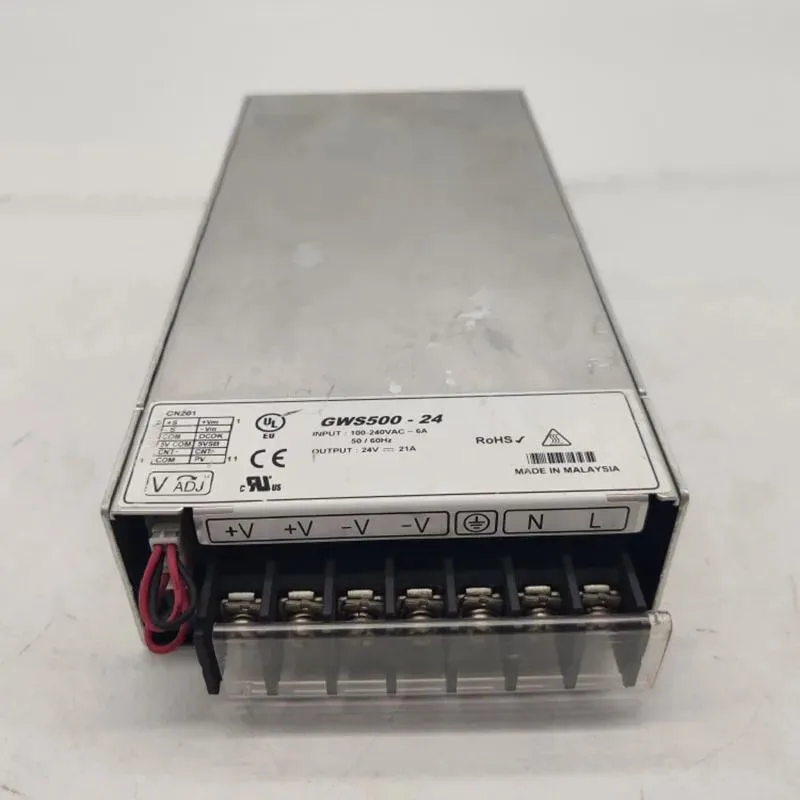
KHACHIMO
ATX power supply accepting 100-240 V input at 50/60 Hz with 500 W output, first listed in 2024
The KHACHIMO GWS500-24 is an ATX power supply built for standard desktop builds. It accepts a universal 100-240V input at 50/60Hz, so it works worldwide without a voltage switch. The unit is supplied new and has been tested working by the manufacturer.
This 500W module steps up from lower-capacity ATX supplies that cannot sustain modern mid-range components. The upgrade is worthwhile when a system adds a dedicated graphics card, more drives or a higher-wattage CPU that pushes the old unit past its limit. It fits any chassis that accepts a standard ATX power supply.
At 500W the supply comfortably runs a mainstream processor, a mid-range graphics card, several storage drives and typical peripherals. Headroom remains for moderate overclocking or future component additions within the same power envelope. Loads that exceed 500W continuous draw will require a higher-rated unit.
| Type | ATX |
|---|
The unit follows the ATX form factor, so it aligns with the standard four-screw mounting pattern used in most cases.
Align the keyed 24-pin connector with the motherboard socket and press straight in until the latch clicks; forcing it at an angle is the common mistake.
Use compressed air to clear dust from the fan intake every six to twelve months, depending on how dusty the environment is.
同じ売り場の商品
同じ売り場、同じレジ — 8種類のコインと30分間のレートロック。
お支払いに使うコインと、価格表示に使う通貨です。
チェックアウト時にウォレットから送信されます。
表示のみ—カタログの価格は米ドル建てです。
該当する通貨がありません。
サイトの表示言語を選択してください。
初めてのご利用ですか?
すでにお持ちですか?
自動的な再設定はありません。当店はメールを送信しないため、ワンタイムリンクをお送りすることもできません。アカウントにメールアドレスを残しておいていただければ、担当者が手作業で確認いたします。
リクエストを受け付けました
受信箱に何かが届くことはありません — 当店はメールを一切送信していません。担当者が手作業で確認いたします。
思い出しましたか?



