
ASUS
ASUS RNUC15CRSU70000U barebone mini PC Core Ultra 7 255H 16-core DDR5
- Silver
- Processor Essential…
US$569.99
0.00729139BTC
재고 있음


ASUS
Barebone mini PC with Intel Core Ultra 5 225H, dual DDR5 SO-DIMM slots supporting 96 GB, two M.2 NVMe slots, Wi-Fi 7, Bluetooth 5.4, 2.5 Gbps LAN and Thunderbolt 4
CPU Type Intel Core Ultra 5 225H
The ASUS NUC 15 PRO+ RNUC15CRSU50000U is a new barebone mini PC built around a 1.7 GHz Intel Core Ultra 5 225H processor with 14 cores. It targets system builders who want a small silver chassis that supports up to 96 GB of DDR5 memory and dual M.2 NVMe storage. Memory and storage are sold separately so the buyer chooses capacity and speed.
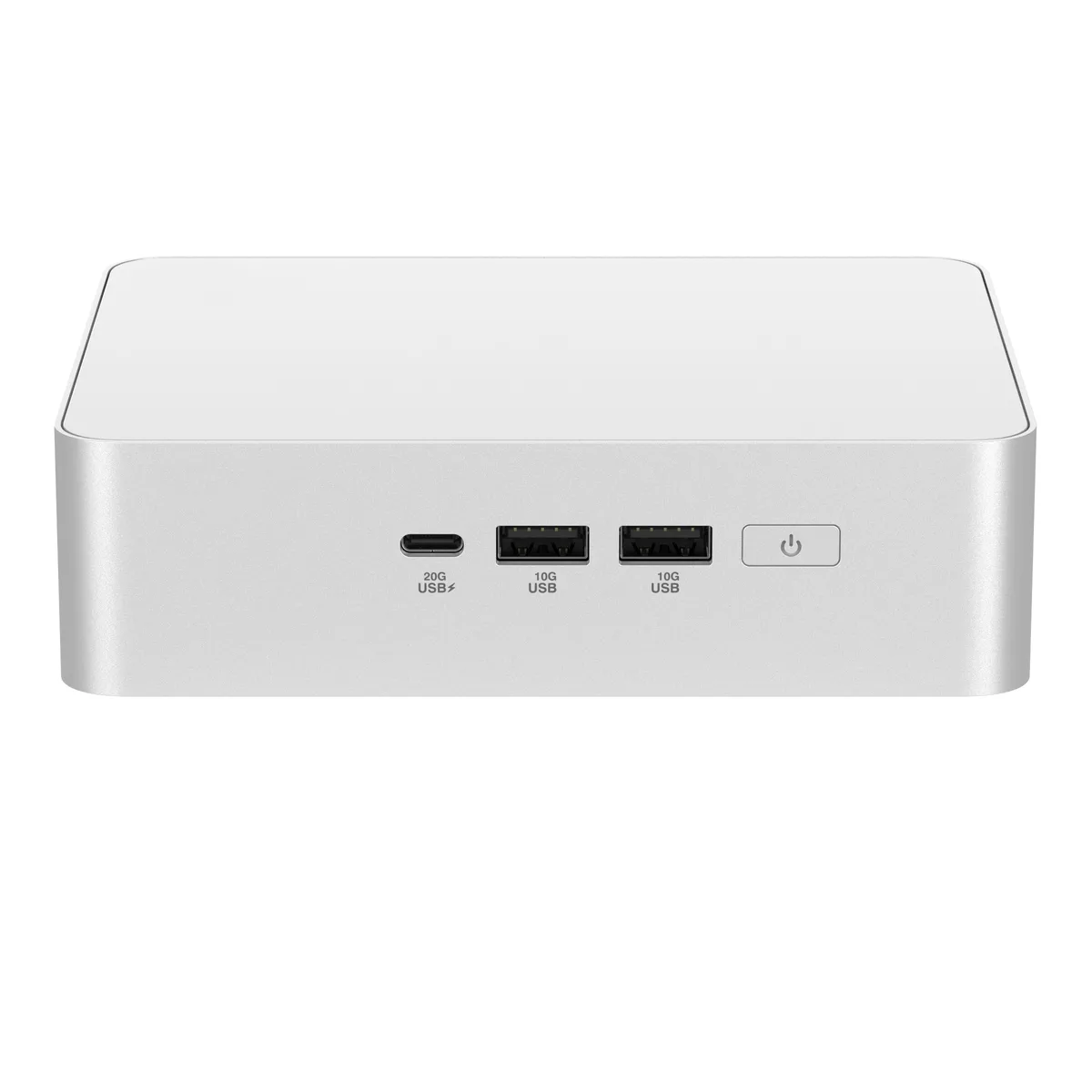
The 1.52 lb aluminium enclosure measures 5.67 by 4.41 by 1.65 inches and includes a VESA mount kit for behind-display installation. Front I/O provides one USB 3.2 Gen2x2 Type-C port and two USB 3.2 Gen2 Type-A ports for fast peripheral access. Rear connectivity adds two Thunderbolt 4 ports with DisplayPort 2.1, one USB 3.2 Gen2 Type-A, one USB 2.0 Type-A, 2.5 Gbps Ethernet, Wi-Fi 7 and Bluetooth 5.4.
This unit replaces larger legacy mini PCs or full-size towers when a builder needs modern DDR5 memory, PCIe 4.0 NVMe slots and 4K 60 Hz dual-display output over HDMI 2.1. The jump is worth it for workflows that benefit from Arc 130T integrated graphics, 2.5 Gbps wired networking and the latest wireless standards. Buyers who require pre-installed memory or storage should look elsewhere.
| Brand | ASUS |
|---|---|
| Series | NUC 15 PRO+ |
| Model | RNUC15CRSU50000U |
| Part Number | 90AR00P3-M00190 |
| Color | Silver |
| CPU Type | Intel Core Ultra 5 225H |
| Memory installed | No Memory |
| Memory slot | 2 x 262Pin SO-DIMM |
| Memory Type Supported | SO-DIMM DDR5-5600 MHz / CSO-DIMM DDR5-6400 MHz |
| Max Memory Supported | 96GB |
| Storage Installed | No Hard Drive |
| M.2 Slot | 1 x M.2 2280 PCIe Gen4x4 NVMe SSD slot 1 x M.2 2242 PCIe Gen4x4 NVMe SSD slot |
| Integrated Graphics | Intel Arc 130T Graphics |
| LAN | Intel i226V |
| Max LAN Speed | 2.5Gbps |
| Wireless LAN | 802.11be |
| WiFi Generation | Wi-Fi 7 |
| Bluetooth | Bluetooth 5.4 |
| Front USB | 1 x USB 3.2 Gen2x2 Type-C 2 x USB 3.2 Gen2 Type-A |
| HDMI | 2 x HDMI 2.1 (up to 4K@60Hz) |
| Thunderbolt | 2 x Thunderbolt 4 (with DisplayPort 2.1) |
| Rear USB | 1 x USB 3.2 Gen2 Type-A (5V/0.9A, 10Gbps) 1 x USB 2.0 Type-A (5V/0.5A, 480Mbps) |
| RJ45 | 1 |
| Power Supply | 120W |
| Dimensions | 5.67" x 4.41" x 1.65" |
| Weight | 1.52 lbs. |
| Packaging | VESA Mount & Screws / AC Power Adapter/ Power Cord |
| 배송 무게 | 1.68 kg |
| 포장 크기 | 172 × 160 × 121 mm |
이 모델의 다른 버전
같은 제품군에서 메모리·쿨러·클럭이 다릅니다 — 결정 전에 비교해 보세요.
The M.2 2280 slot is PCIe Gen4x4, so an NVMe SSD is limited to Gen 4 transfer rates.
The unit measures 5.67 x 4.41 x 1.65 inches and includes a VESA mount with screws in the box.
Open the case, insert DDR5 SO-DIMMs into the two 262-pin slots and NVMe drives into the 2280 and 2242 slots, then remember to secure each M.2 drive with its retention screw.
이 진열대의 다른 상품
같은 진열대, 같은 체크아웃 — 코인 8종, 환율 잠금 30분.
결제할 코인과 가격을 확인할 통화입니다.
체크아웃 시 지갑에서 전송됩니다.
표시 전용 — 카탈로그 가격은 달러 기준입니다.
일치하는 통화가 없습니다.
사이트에서 사용할 언어를 선택하십시오.
일치하는 언어가 없습니다.
처음 방문하셨나요?
이미 계정이 있으신가요?
자동 재설정 기능은 없습니다. 이 쇼핑몰은 어떠한 메일도 보내지 않으므로 요청할 일회용 링크 자체가 없습니다. 계정에 등록된 이메일 주소를 그대로 두시면 담당자가 직접 확인해 처리합니다.
요청 접수
받은편지함으로 오는 것은 아무것도 없습니다 — 이 쇼핑몰은 메일을 전혀 보내지 않습니다. 담당자가 직접 확인해 처리합니다.
기억나셨나요?





