

SanDisk
SanDisk Cruzer Blade 8 GB USB 2.0 USB flash drive Black SDCZ50-008G-B35
US$391.99
0.00501664BTC
재고 있음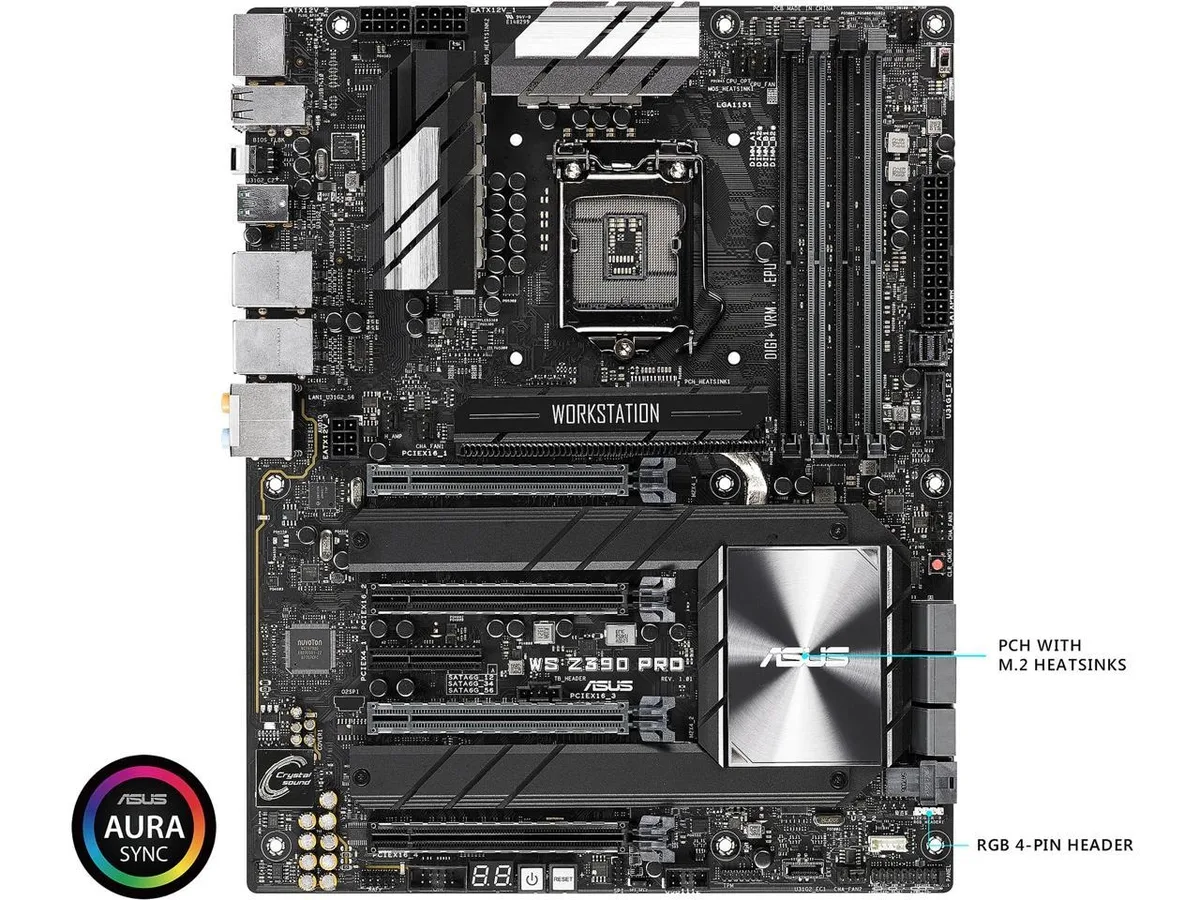
ASUS
Workstation-class ATX board with Intel Z390 chipset, LGA 1151 socket, HDMI output, SATA 6Gb/s and USB 3.1 connectivity
The ASUS WS Z390 PRO is an ATX motherboard built around the Intel Z390 chipset and LGA 1151 socket. It targets professionals assembling workstations that require stable multi-core performance and extensive I/O connectivity. The board delivers a reliable foundation for content creation and compute tasks.
This motherboard fits builders configuring a single Intel processor on the 300-series platform with SATA storage and USB 3.1 peripherals. It does not serve users who need dual-socket capability, server-grade management features, or support for newer processor generations that require a different socket.
The physical LGA 1151 socket is the specification that determines which CPUs can be installed. Buyers must confirm their processor matches this exact socket before purchase, as compatibility with other socket types is not possible.
이 상품에 대해 아직 공개된 사양이 없습니다.
Mount the board on the supplied standoffs, connect the 24-pin and CPU power cables, then install the I/O shield before securing the board — the shield is the step most builders forget.
Periodically remove dust from the heatsinks and fan headers with compressed air; the only user-replaceable part is the onboard CMOS battery when the system clock begins to drift.
The chipset heatsink reaches its thermal limit before the VRM or SATA interfaces, so case airflow directly over the PCH area becomes the bottleneck.
이 진열대의 다른 상품
같은 진열대, 같은 체크아웃 — 코인 8종, 환율 잠금 30분.
결제할 코인과 가격을 확인할 통화입니다.
체크아웃 시 지갑에서 전송됩니다.
표시 전용 — 카탈로그 가격은 달러 기준입니다.
일치하는 통화가 없습니다.
사이트에서 사용할 언어를 선택하십시오.
일치하는 언어가 없습니다.
처음 방문하셨나요?
이미 계정이 있으신가요?
자동 재설정 기능은 없습니다. 이 쇼핑몰은 어떠한 메일도 보내지 않으므로 요청할 일회용 링크 자체가 없습니다. 계정에 등록된 이메일 주소를 그대로 두시면 담당자가 직접 확인해 처리합니다.
요청 접수
받은편지함으로 오는 것은 아무것도 없습니다 — 이 쇼핑몰은 메일을 전혀 보내지 않습니다. 담당자가 직접 확인해 처리합니다.
기억나셨나요?



