DELL
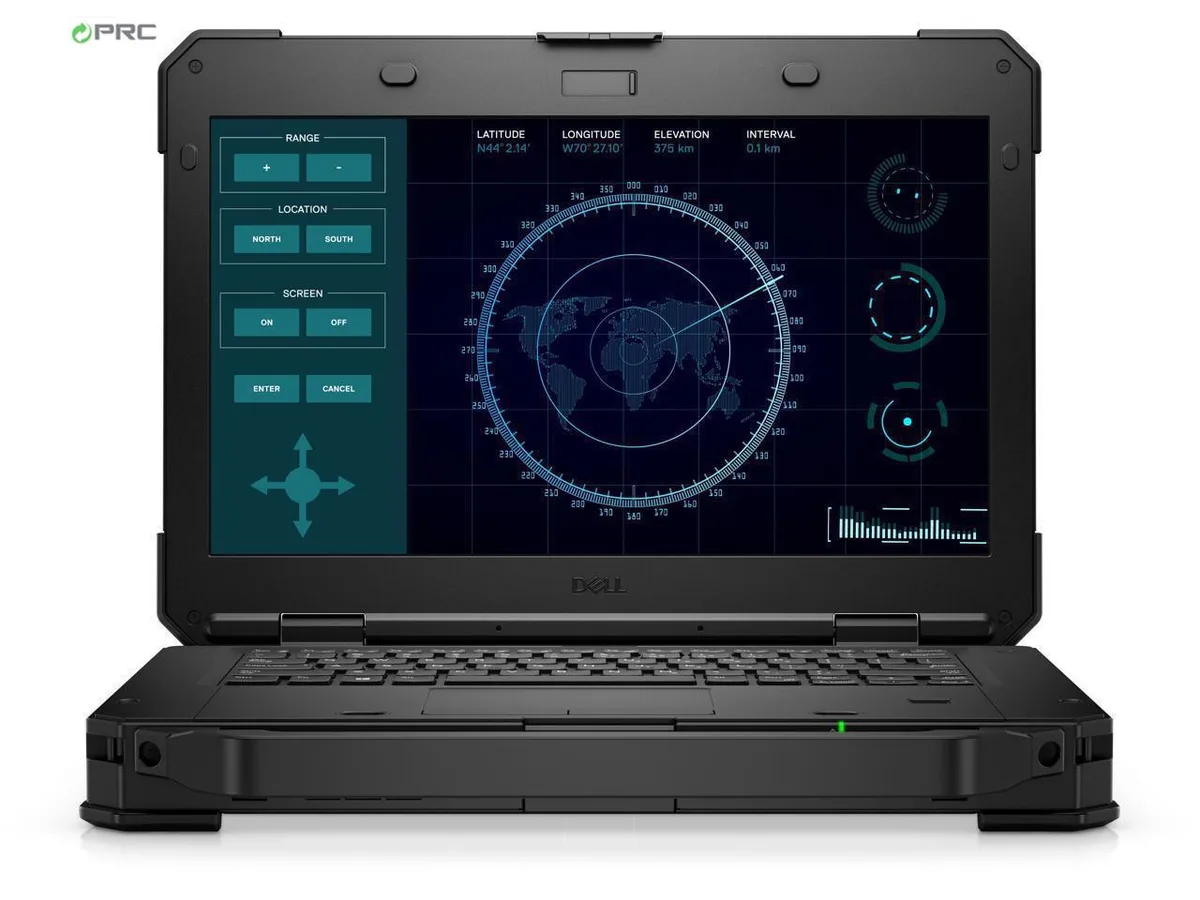
DELL Latitude 5424 Rugged laptop i5-8350U 32 GB 256 GB + 2 TB SSD 14.0" FHD touchscreen
- Black
- Windows 11 Pro
US$954.99
0.01231022BTC
재고 있음


DELL
A 14.0-inch FHD touchscreen rugged laptop with an Intel Core i7-8650U quad-core processor, 8GB DDR4 memory, dual 256GB and 2TB SSDs, and Windows 11 Pro
Options 8GB/256GB+2TB W11P Touch
The Dell Latitude 5424 is a new 14.0-inch rugged laptop built to military-grade durability standards. It combines a Quad-core Intel Core i7-8650U processor with 8 GB DDR4 memory and a dual-drive configuration of 256 GB plus 2 TB SSD storage. The 1920 x 1080 touchscreen supports 10-point input and remains viewable in direct sunlight, making it suitable for professionals who operate outdoors or in harsh environments.
This model replaces conventional office notebooks that lack reinforced chassis construction, sunlight-readable displays, or glove-compatible touch input. The jump is worth it when your workflow demands survival against dust, vibration, temperature extremes, and wet conditions that would disable a regular ultrabook. Integrated Intel UHD Graphics 620 handles everyday visualisation tasks without discrete GPU power draw.
Verify that your existing USB 3.0, USB Type-C, HDMI, DisplayPort, serial and RJ-45 cables match the ports provided, as legacy docking stations may require adapters. Confirm that Windows 11 Pro 64-bit is compatible with your specialised field software and fleet management tools. The hot-swap bridge battery and spare chargers are optional accessories not included in the base configuration.
| Brand | DELL |
|---|---|
| Series | Rugged 14 |
| Model | Latitude |
| Part Number | 5424 |
| Color | Black |
| Operating System | Windows 11 Pro |
| CPU Type | Intel Core i7 8th Gen |
| Processor Name | Intel Core i7-8650U |
| Number of Cores | Quad-core Processor |
| CPU L2 Cache | 8MB |
| Screen Size | 14.0" |
| Touchscreen | Touch Screen |
| Display Type | FHD |
| Resolution | 1920 x 1080 |
| GPU/VPU | Intel UHD Graphics 620 |
| Graphic Type | Integrated Card |
| SSD | 256GB |
| HDD | 2TB |
| Storage Spec | 256 GB M.2 + 1TB M.2 DUAL SSD |
| Memory | 8GB |
| Memory Speed | DDR4 |
| Memory Spec | 4 GB x 2 |
| Memory Slot (Total) | 2 |
| Memory Slot (Available) | 0 |
| Max Memory Supported | 32 GB |
| Optical Drive Type | DVD-ROM |
| LAN | 10/100/1000Mbps |
| WiFi Generation | Wi-Fi 4 and earlier generation |
| Bluetooth | Yes |
| USB | 3 x USB 3.0 Type A, and 1 x USB Type C |
| Thunderbolt | 1 x Thunderbolt 3 |
| Video Port | 1 x DisplayPort, 1 x HDMI |
| HDMI | 1 x HDMI |
| Ethernet | 1 x RJ-45 (1Gbps) |
| Other port | 1 x Serial Port |
| Audio Ports | 1 x Microphone Jack, 1 x Headphone Jack |
| Audio | Integrated Sound card |
| Touchpad | Yes |
| Keyboard | Standard |
| Webcam | Yes |
| Card Reader | Micro SD |
| Style | Standard |
| Type | Work / Business |
| Usage | Business |
| AC Adapter/Charger | 65-watt AC Adapter |
| Dimensions (W x D x H) | 13.7 x 9.6 x 1.7 |
| Weight | 6 - 6.9 lbs. |
이 모델의 다른 버전
같은 제품군에서 메모리·쿨러·클럭이 다릅니다 — 결정 전에 비교해 보세요.
The Latitude 5424 uses Dell's proprietary rugged dock connector on the bottom; no standard VESA pattern is present on the magnesium-alloy frame.
Enable UEFI boot mode and disable Legacy Option ROMs; the M.2 slot only exposes the drive to the firmware when UEFI is active.
Replace the internal battery when Windows reports less than 80 % of original design capacity or when the hot-swap bridge battery no longer sustains the system during a swap.
이 진열대의 다른 상품
같은 진열대, 같은 체크아웃 — 코인 8종, 환율 잠금 30분.
결제할 코인과 가격을 확인할 통화입니다.
체크아웃 시 지갑에서 전송됩니다.
표시 전용 — 카탈로그 가격은 달러 기준입니다.
일치하는 통화가 없습니다.
사이트에서 사용할 언어를 선택하십시오.
일치하는 언어가 없습니다.
처음 방문하셨나요?
이미 계정이 있으신가요?
자동 재설정 기능은 없습니다. 이 쇼핑몰은 어떠한 메일도 보내지 않으므로 요청할 일회용 링크 자체가 없습니다. 계정에 등록된 이메일 주소를 그대로 두시면 담당자가 직접 확인해 처리합니다.
요청 접수
받은편지함으로 오는 것은 아무것도 없습니다 — 이 쇼핑몰은 메일을 전혀 보내지 않습니다. 담당자가 직접 확인해 처리합니다.
기억나셨나요?