

GIGABYTE
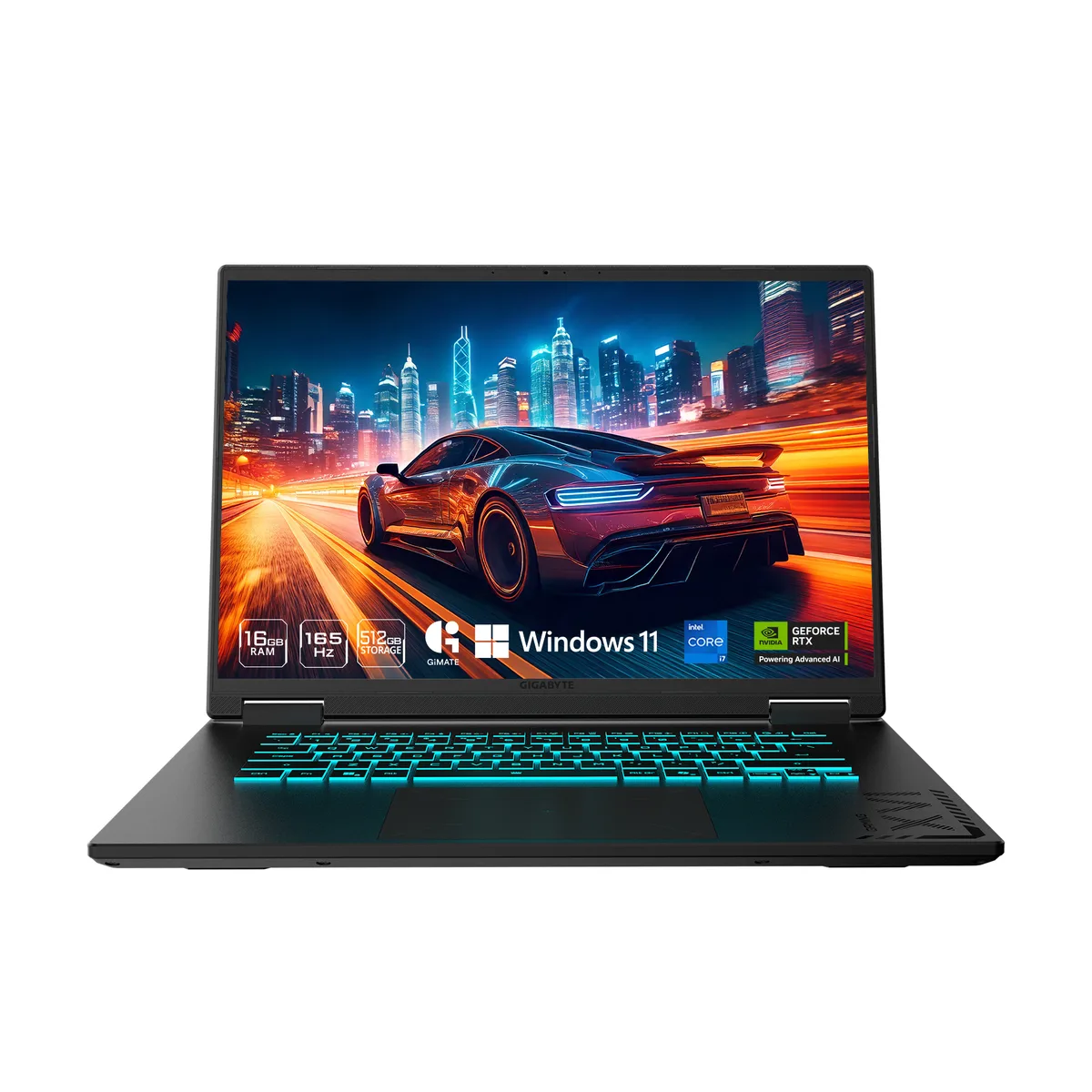
GIGABYTE GAMING A16 CTHI3US894SH gaming laptop
16-inch WUXGA 165 Hz panel driven by an RTX 5050 GPU, Intel Core i7-13620H processor, 16 GB DDR5 memory and a 1 TB NVMe SSD running Windows 11 Home
- ColorBlack Steel
- Operating SystemWindows 11 Home
- CPUIntel Core i7-13620H
- Screen16"
- Memory16GB
- Storage1 TB PCIe Gen4 NVMe M.2 SSD
- 10-core Intel i7-13620H reaches 4.9 GHz for responsive gaming
- RTX 5050 laptop GPU with 8 GB GDDR7 drives modern titles
- 0" 165 Hz WUXGA panel delivers smooth motion
- 16 GB DDR5 5200 and 1 TB PCIe Gen4 NVMe load levels fast
- Wi-Fi 6E and HDMI 2.1 connect displays and networks cleanly
16-inch WUXGA 165 Hz gaming laptop
The GIGABYTE GAMING A16 CTHI3US894SH is a 16-inch Windows 11 Home laptop built around an Intel Core i7-13620H processor and an NVIDIA GeForce RTX 5050 Laptop GPU with 8 GB GDDR7. It ships with 16 GB of DDR5 5200 memory in a single stick and a 1 TB PCIe Gen4 NVMe M.2 SSD. The non-touch IPS panel delivers 1920 x 1200 resolution at 165 Hz and supports a MUX switch for direct GPU output.
Suits mobile gamers and creators.
This configuration fits users who want high-refresh 16:10 gaming and content creation on the move, with a 10-core CPU, dedicated RTX graphics and expandable memory slots supporting up to 64 GB DDR5. Buyers needing a lighter chassis under 2 kg, a touchscreen, or a larger factory SSD should evaluate other models.
RTX 5050 8 GB GDDR7 GPU decides fit
The single specification that determines suitability is the NVIDIA GeForce RTX 5050 Laptop GPU with 8 GB GDDR7. It defines the graphics performance ceiling for modern titles and GPU-accelerated workloads; if that tier matches the target frame rates and settings, the surrounding CPU, memory and storage complement it without bottleneck.
주요 특징
- 10-core Intel i7-13620H reaches 4.9 GHz for responsive gaming
- RTX 5050 laptop GPU with 8 GB GDDR7 drives modern titles
- 0" 165 Hz WUXGA panel delivers smooth motion
- 16 GB DDR5 5200 and 1 TB PCIe Gen4 NVMe load levels fast
- Wi-Fi 6E and HDMI 2.1 connect displays and networks cleanly
사양
| Brand | GIGABYTE |
|---|---|
| Model | GAMING A16 CTHI3US894SH |
| Color | Black Steel |
| Operating System | Windows 11 Home |
| CPU | Intel Core i7-13620H |
| Screen | 16" |
| Memory | 16GB |
| Storage | 1 TB PCIe Gen4 NVMe M.2 SSD |
| Graphics Card | NVIDIA GeForce RTX 5050 Laptop GPU |
| Communication | Gigabit LAN and WLAN |
| Dimensions (W x D x H) | 14.11" x 10.33" x 0.77"-0.91" |
| Weight | 4.85 lbs. |
| CPU Type | Intel Core i7 13th Gen |
| Processor Name | Intel Core i7-13620H |
| Number of Cores | 10-core (6P+4E) Processor |
| CPU L3 Cache | 24 MB |
| Screen Size | 16" |
| Touchscreen | Non-Touch Screen |
| Wide Screen Support | Yes |
| Display Type | WUXGA |
| Resolution | 1920 x 1200 |
| Panel | IPS |
| Refresh Rate | 165 Hz |
| Display Features | Supports MUX Switch |
| GPU/VPU | GeForce RTX 5050 Laptop GPU |
| Graphic Type | Dedicated Card |
| SSD | 1TB NVMe |
| Memory Speed | DDR5 5200 |
| Memory Spec | 16 GB x 1 |
| Memory Slot (Total) | 2 |
| Memory Slot (Available) | 1 |
| Optical Drive Type | No |
| LAN | 10/100/1000Mbps |
| WLAN | 802.11ax Wireless LAN |
| WiFi Generation | Wi-Fi 6E |
| Bluetooth | Bluetooth 5.2 |
| USB | 1 x USB 2.0/1.1 / 1 x USB4 / 2 x USB 3.2 Gen 1 Type-A |
| HDMI | 1 x HDMI 2.1 |
| Ethernet | 1 x RJ-45 (1Gbps) |
| Audio Ports | 1 x Headphone/Microphone Combo Jack |
| Audio | Microphone Dolby Atmos |
| Speaker | 2 x 2W speakers |
| Virtual Reality Ready | Yes |
| Keyboard | 1-zone RGB Backlit Keyboard, Up to 1.7mm Key-travel (Support N-Key) |
| Backlit Keyboard | Backlit |
| Webcam | Yes |
| Style | Thin and Light |
| Type | Gaming |
| Usage | Consumer |
| AC Adapter/Charger | 150-watt AC Adapter |
| Battery | Li Polymer 76Wh |
이 상품에 대한 질문
Do I need to buy an external monitor to use the HDMI 2.1 output?
No, the built-in 16.0" 165Hz WUXGA panel works immediately; the HDMI 2.1 port is only required if you want a second display.
Can I keep my USB 2.0 mouse and USB 3.2 Gen1 keyboard connected at the same time?
Yes, the laptop provides one USB 2.0 Type-A and two USB 3.2 Gen1 Type-A ports so both legacy and current peripherals work together.
How do I confirm the MUX Switch is routing frames to the RTX 5050?
Open the GIGABYTE Control Center, select GPU Mode, and verify Discrete or Dynamic is active; the on-screen indicator will show the dedicated GPU driving the 165Hz panel.
이 진열대의 다른 상품
고객들이 함께 비교한 상품
같은 진열대, 같은 체크아웃 — 코인 8종, 환율 잠금 30분.