
Lenovo
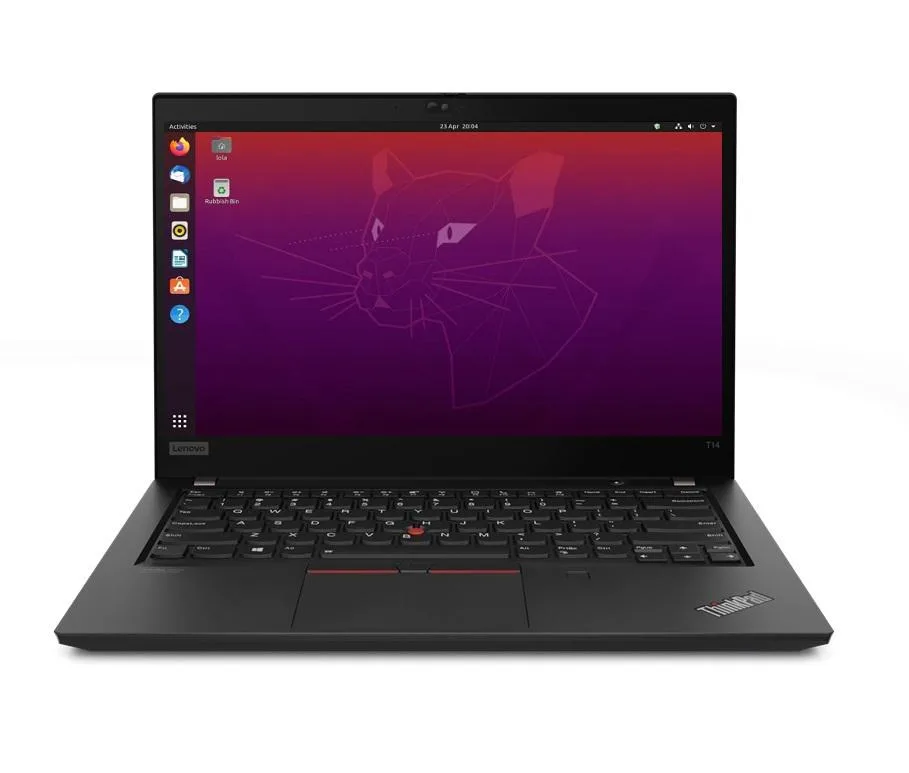
Lenovo ThinkPad T14 Gen 2 laptop i5-1135G7 32GB 4TB SSD Ubuntu
- 32GB
- DDR4
US$1,262.99
0.01636612BTC
재고 있음


Lenovo
A 14.0" Full HD business laptop with an 11th Gen Intel Core i5-1135G7, 48GB DDR4, 2TB PCIe SSD and Linux Mint 20 Cinnamon
Options 48GB/2TB
The Lenovo ThinkPad T14 Gen 2 is a new 14.0 inch business laptop running Linux Mint 20 Cinnamon. It pairs an 11th Gen Intel Core i5-1135G7 processor with 48GB DDR4 memory and a 2TB PCIe SSD. The 1920 x 1080 IPS display and Intel Iris Xe graphics handle office workloads and video calls via the 720p webcam.
This unit replaces lighter-spec models that ship with 8GB or 16GB soldered memory and smaller drives. The jump is worth it when you run virtual machines, large datasets or many browser tabs simultaneously. The 48GB capacity and 2TB PCIe SSD remove the need for external storage or memory upgrades during the laptop's service life.
The operating system arrives installed and configured on the 2TB PCIe SSD so the laptop boots to a working desktop immediately. Thunderbolt 4 ports accept docks and peripherals without driver hunting. The only common issue is verifying that proprietary drivers or kernel modules required by specific hardware tokens are compatible with the Mint 20 base.
| Memory | 48GB |
|---|---|
| Memory Speed | DDR4 |
| Type | Work / Business |
| Resolution | 1920 x 1080 |
| Screen Size | 14.0" |
| Display Type | Full HD |
| Touchscreen | No |
| SSD | 2 TB |
| HDD | No |
| Storage Spec | 2TB PCIe SSD |
| Brand | Lenovo |
| Series | Thinkpad T14 Gen 2 |
| Part Number | T14 |
| Model | Thinkpad |
| Color | Black |
| GPU/VPU | Intel Iris Xe Graphics |
| Operating System | Linux |
| WiFi Generation | Wi-Fi 6 |
| LAN | 10/100/1000Mbps |
| WLAN | Wi-Fi 6 |
| Bluetooth | Bluetooth 5.2 |
| CPU Type | Intel Core i5 11th Gen |
| Optical Drive Type | No |
| Webcam | Yes |
| Touchpad | ThinkPad UltraNav |
| Keyboard | Standard |
| Card Reader | Micro SD |
| Battery | Lithium Polymer |
| USB | 2 x USB 3.2 Gen 1 |
| Thunderbolt | 2 x Thunderbolt 4 |
| Video Port | 1 x HDMI |
| Ethernet | 1 x RJ-45 |
| Audio Ports | 1 x Headphone/Microphone Combo Jack |
| Audio | Integrated Sound card |
| Speaker | Integrated Stereo Speakers |
이 모델의 다른 버전
같은 제품군에서 메모리·쿨러·클럭이 다릅니다 — 결정 전에 비교해 보세요.
The 2TB PCIe SSD uses a standard M.2 2280 form factor retained by a single M2×3 mm screw accessible after removing the base cover.
Enter BIOS on boot, set Thunderbolt Security to 'No Security' or 'User Authorization', and enable PCIe Tunnelling; the dock will then appear in Linux Mint without further drivers.
Replace the 50WHr battery once Linux Mint reports a full-charge capacity below roughly 40WHr (about 80% of design) or when runtime drops under 4 hours at typical office load.
이 진열대의 다른 상품
같은 진열대, 같은 체크아웃 — 코인 8종, 환율 잠금 30분.
결제할 코인과 가격을 확인할 통화입니다.
체크아웃 시 지갑에서 전송됩니다.
표시 전용 — 카탈로그 가격은 달러 기준입니다.
일치하는 통화가 없습니다.
사이트에서 사용할 언어를 선택하십시오.
일치하는 언어가 없습니다.
처음 방문하셨나요?
이미 계정이 있으신가요?
자동 재설정 기능은 없습니다. 이 쇼핑몰은 어떠한 메일도 보내지 않으므로 요청할 일회용 링크 자체가 없습니다. 계정에 등록된 이메일 주소를 그대로 두시면 담당자가 직접 확인해 처리합니다.
요청 접수
받은편지함으로 오는 것은 아무것도 없습니다 — 이 쇼핑몰은 메일을 전혀 보내지 않습니다. 담당자가 직접 확인해 처리합니다.
기억나셨나요?



