

EN-Labs
EN-Labs 11-001-366 PCIe x4 USB 3.2 10Gbps 5-port card
- no
- 12CM Case fan,screw…
US$31.99
0.00041171BTC
재고 있음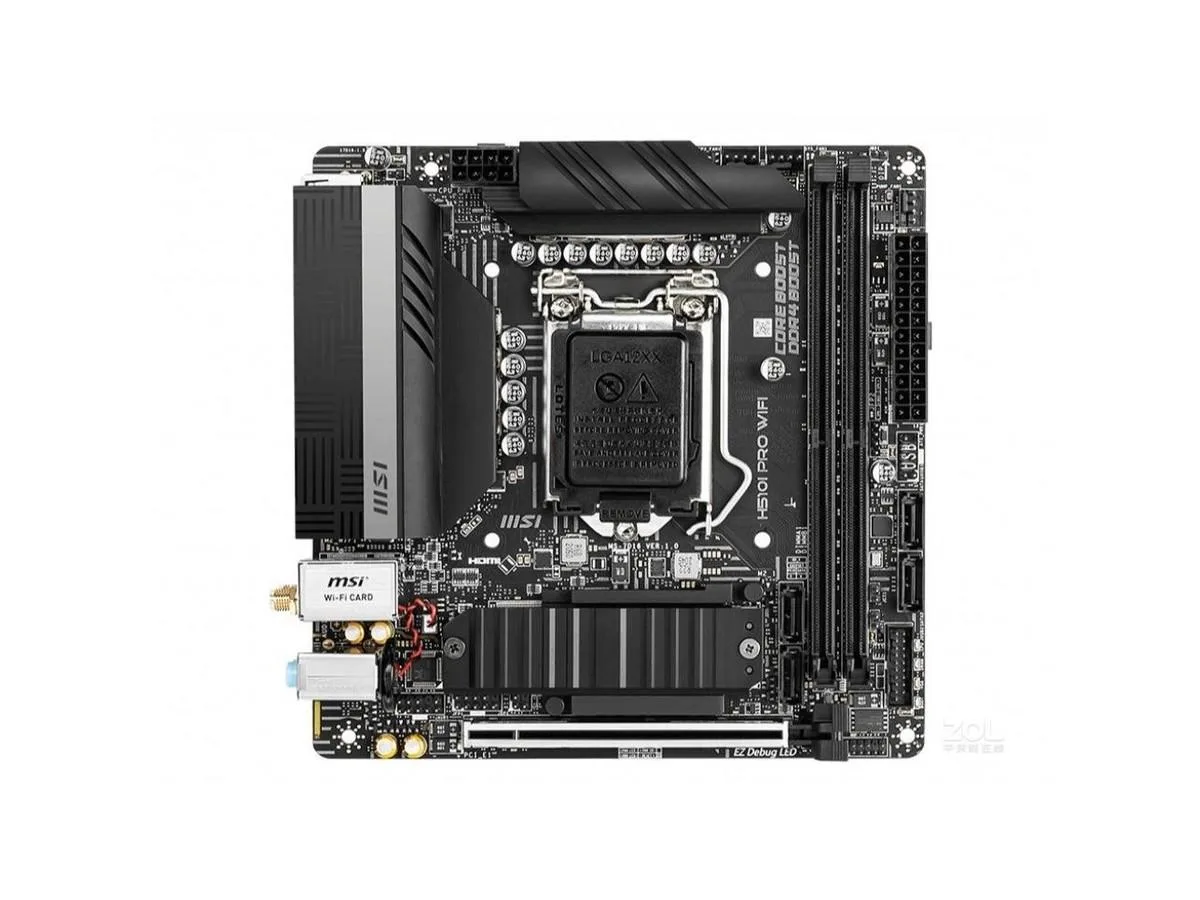


MSI
A Mini-ITX board with LGA 1200 socket for 10th and 11th Gen Intel Core processors, dual-channel DDR4 up to 3200 MHz, 64 GB maximum memory, one PCIe x16 slot, 2.5 Gbps LAN, Realtek ALC897 7.1 audio.
The MSI H510I PRO WIFI fits Intel 10th and 11th generation Core, Pentium Gold and Celeron processors into a Mini-ITX form factor. It targets system builders who need a small footprint without sacrificing core connectivity. The board delivers the essential platform features for everyday computing and light workloads.
Four memory slots support dual-channel DDR4 up to 3200 MHz and a 64 GB capacity ceiling. A Realtek 8125B controller provides 2.5 Gbps wired networking, while the ALC897 codec handles 7.1-channel audio. Rear I/O includes two USB 3.2 Gen 1 Type-A ports, four USB 2.0 Type-A ports and an internal USB 3.2 Gen 1 header for front-panel expansion.
The single PCIe x16 slot runs at PCIe 4.0 with an 11th generation processor and at PCIe 3.0 with a 10th generation processor. Storage options comprise one M.2 interface and four SATA III ports. This distinction is the key factor when matching the board to a graphics card or high-speed storage device.
| Brand | MSI |
|---|---|
| Series | MSI H510I PRO WIFI |
| Model | MSI H510I PRO WIFI |
| CPU Socket Type | LGA 1200 |
| CPU Type | Supports 10th Gen Intel Core Processors, 11th Gen Intel Core Processors, Pentium Gold and Celeron Processors Processor socket LGA1200 |
| Chipset | Intel H510 |
| Memory Standard | Support dual-channel DDR4 3200/3000/2933/2800/2666/2400/2133MHz memory |
| Maximum Memory Supported | 64GB |
| PCI Slots | 1x PCIe x16 slot Support up to PCIe 4.0 for 11th Gen Intel CPU Support up to PCIe 3.0 for 10th Gen Intel CPU |
| SATA RAID | 1XM.2 interface, 4xSATA III interface |
| Audio Chipset | Realtek ALC897 Codec 7.1-Channel High Definition Audio |
| LAN Chipset | 1x Realtek 8125B 2.5Gbps LAN controller |
| Onboard USB | ntel H510 Chipset 4x USB 3.2 Gen 1 5Gbps ports (2 Type-A ports on the back panel, 2 ports available through the internal USB connectors) 4x USB 2.0 Type-A ports on the back panel GL850G Hub 2x USB 2.0 ports available through the internal USB connector |
The x16 slot supports PCIe 4.0 when an 11th Gen Intel Core processor is installed, and PCIe 3.0 with a 10th Gen CPU.
It is a Mini-ITX board with an LGA 1200 socket, so it fits Mini-ITX cases and coolers rated for LGA 1200.
Screw the supplied antenna onto the gold MHF4 connector on the rear I/O panel; the connector is labelled and sits next to the LAN port.
이 진열대의 다른 상품
같은 진열대, 같은 체크아웃 — 코인 8종, 환율 잠금 30분.
결제할 코인과 가격을 확인할 통화입니다.
체크아웃 시 지갑에서 전송됩니다.
표시 전용 — 카탈로그 가격은 달러 기준입니다.
일치하는 통화가 없습니다.
사이트에서 사용할 언어를 선택하십시오.
처음 방문하셨나요?
이미 계정이 있으신가요?
자동 재설정 기능은 없습니다. 이 쇼핑몰은 어떠한 메일도 보내지 않으므로 요청할 일회용 링크 자체가 없습니다. 계정에 등록된 이메일 주소를 그대로 두시면 담당자가 직접 확인해 처리합니다.
요청 접수
받은편지함으로 오는 것은 아무것도 없습니다 — 이 쇼핑몰은 메일을 전혀 보내지 않습니다. 담당자가 직접 확인해 처리합니다.
기억나셨나요?



