


MSI
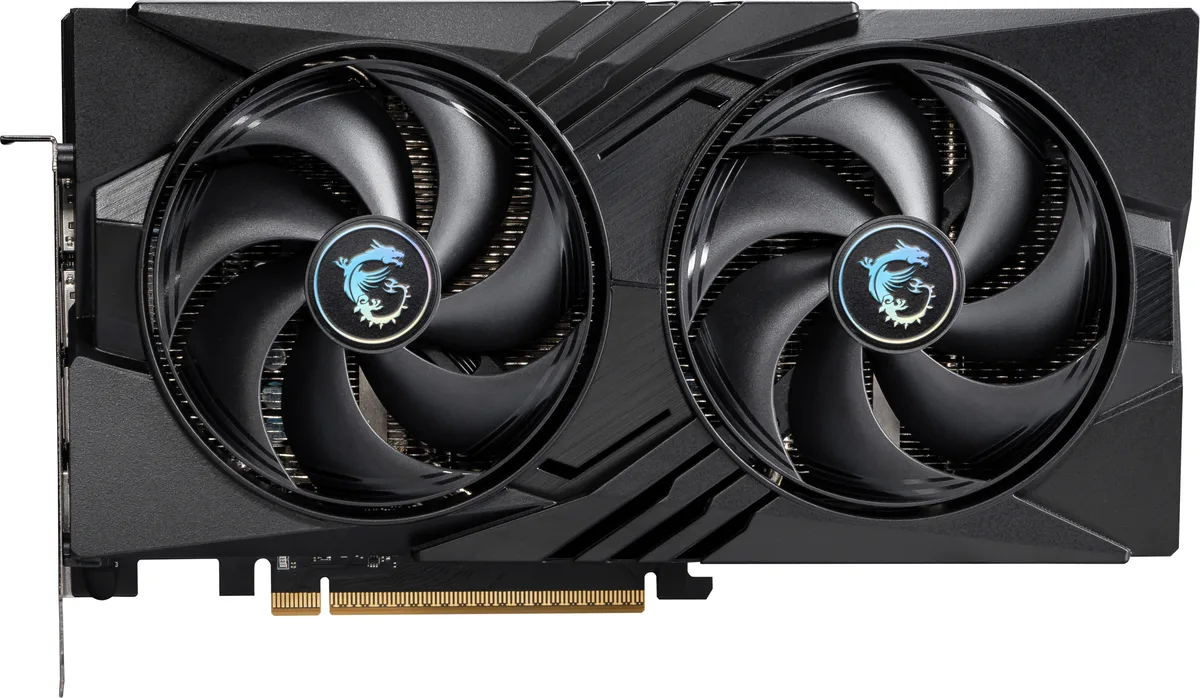
MSI RTX 5060 8G SHADOW 2X OC graphics card
GeForce RTX 5060 graphics card with 8 GB GDDR7 memory, 3840 CUDA cores and a 2527 MHz boost clock
- InterfacePCI Express 5.0 x 16 (use x8)
- Chipset ManufacturerNVIDIA
- GPU SeriesNVIDIA GeForce RTX 50 Series
- GPUGeForce RTX 5060
- Boost Clock2527 MHz
- CUDA Cores3840
Edition SHADOW 2X OC
- GAMING OC
- GAMING TRIO OC
- GAMING TRIO WHITE OC
- Inspire 2X OC
- SHADOW 2X OC
- VENTUS 2X OC
- VENTUS 2X WHITE OC
- VENTUS 3X OC
취소선으로 표시된 버전은 존재하지만, 이곳에서는 취급하지 않습니다.
- 8 GB GDDR7 memory delivers 28 Gbps bandwidth
- 3840 CUDA cores accelerate compute workloads
- Boost clock reaches 2527 MHz for higher frame rates
- HDMI 2.1b plus three DisplayPort 2.1b outputs drive four displays
- PCI Express 5.0 x16 interface provides 16 lanes of connectivity
What this card is and who it suits
The MSI RTX 5060 8G SHADOW 2X OC is a GeForce RTX 5060 graphics card aimed at gamers and creators upgrading to the Blackwell architecture. It ships with 8GB of GDDR7 memory on a 128-bit bus and a factory boost clock of 2527 MHz. The dual-fan cooler keeps the board compact for mid-tower builds.
The spec that decides fit
The PCI Express 5.0 x16 interface runs at x8 electrical width, so the motherboard must provide a compatible slot and chipset support. Memory bandwidth comes from 28 Gbps GDDR7 across the 128-bit interface, feeding 3840 CUDA cores for 1080p and 1440p workloads. Display outputs are one HDMI 2.1b and three DisplayPort 2.1b connectors for up to four monitors.
Installation and common issues
The card occupies two expansion slots and draws power through a single 12VHPWR connector, so check PSU cabling and case clearance before fitting. Driver installation via the NVIDIA app enables DLSS 4, Reflex 2 and Studio features, but a clean install is recommended when moving from an older GPU. Ensure the motherboard BIOS is current to initialise the PCIe 5.0 link at the correct speed.
주요 특징
- 8 GB GDDR7 memory delivers 28 Gbps bandwidth
- 3840 CUDA cores accelerate compute workloads
- Boost clock reaches 2527 MHz for higher frame rates
- HDMI 2.1b plus three DisplayPort 2.1b outputs drive four displays
- PCI Express 5.0 x16 interface provides 16 lanes of connectivity
사양
| Brand | MSI |
|---|---|
| Series | SHADOW |
| Model | RTX 5060 8G SHADOW 2X OC |
| Part Number | RTX 5060 8G SHADOW 2X OC |
| Interface | PCI Express 5.0 x 16 (use x8) |
| Chipset Manufacturer | NVIDIA |
| GPU Series | NVIDIA GeForce RTX 50 Series |
| GPU | GeForce RTX 5060 |
| Boost Clock | 2527 MHz |
| CUDA Cores | 3840 |
| Effective Memory Clock | 28 Gbps |
| Memory Size | 8GB |
| Memory Interface | 128-Bit |
| Memory Type | GDDR7 |
| DirectX | DirectX 12 Ultimate |
| OpenGL | OpenGL 4.6 |
| Multi-Monitor Support | 4 |
| HDMI | 1 x HDMI 2.1b |
| DisplayPort | 3 x DisplayPort 2.1b |
| Color | Black |
| Max Resolution | 7680 x 4320 |
| SLI Support | No |
| Cooler | Double Fans |
| Thermal Design Power | 145W |
| Recommended PSU Wattage | 550W |
| Power Connector | 8-Pin |
| HDCP Ready | Yes |
| Max GPU Length | 197 mm |
| Card Dimensions (L x H) | 197 x 120 x 40mm |
| 배송 무게 | 0.82 kg |
| 포장 크기 | 279 × 205 × 76 mm |
이 모델의 다른 버전
같은 라인업에서 4개 더
같은 제품군에서 메모리·쿨러·클럭이 다릅니다 — 결정 전에 비교해 보세요.



MSI
MSI RTX 5060 8G GAMING TRIO OC graphics card
- PCI Express 5.0 x 1…
- NVIDIA
US$379.99
0.00489041BTC
재고 있음이 상품에 대한 질문
What does the 2527 MHz boost clock mean for actual gaming performance?
The 2527 MHz boost clock is the maximum frequency the GeForce RTX 5060 GPU can reach under load. Higher clocks let the 3840 CUDA cores process frames faster, so games run at higher frame rates when the card stays cool and power limits allow it.
How does the PCI Express 5.0 x16 interface running at x8 affect data transfer?
The card uses a PCI Express 5.0 x16 physical slot but operates at x8 electrical width. This caps the link at 5.0 x8 bandwidth, which is still ample for the 8GB GDDR7 frame buffer and 128-bit memory interface in current games.
What slot width and power connectors does the SHADOW 2X OC need to fit in my case?
The dual-fan SHADOW design occupies two expansion slots. It requires a standard PCI Express 5.0 x16 slot and draws auxiliary power through the card's onboard connectors, so check your PSU cables and case clearance before installing.
이 진열대의 다른 상품
고객들이 함께 비교한 상품
같은 진열대, 같은 체크아웃 — 코인 8종, 환율 잠금 30분.

EN-Labs
EN-Labs 11-001-366 PCIe x4 USB 3.2 10Gbps 5-port card
- no
- 12CM Case fan,screw…
US$31.99
0.00041171BTC
재고 있음
Wadermoon
Wadermoon PCI-E 1X to 4 PCI-E USB 3.0 expansion card
- PCI Express to USB…
- 4 Port
US$35.99
0.00046319BTC
재고 있음
Orico
Orico PE20-1C 20 Gbps USB 3.2 Gen 2x2 Type-C PCIe x4 expansion card
- PCI Express to USB…
- 1x USB Port
US$40.99
0.00052754BTC
재고 있음
OWC
OWC 16GB DDR4 2666MHz CL19 ECC SODIMM 1.2V laptop RAM
- 16GB (1 x 16GB)
- 260-Pin DDR4 SO-DIMM
US$120.99
0.00155712BTC
재고 있음