


MSI
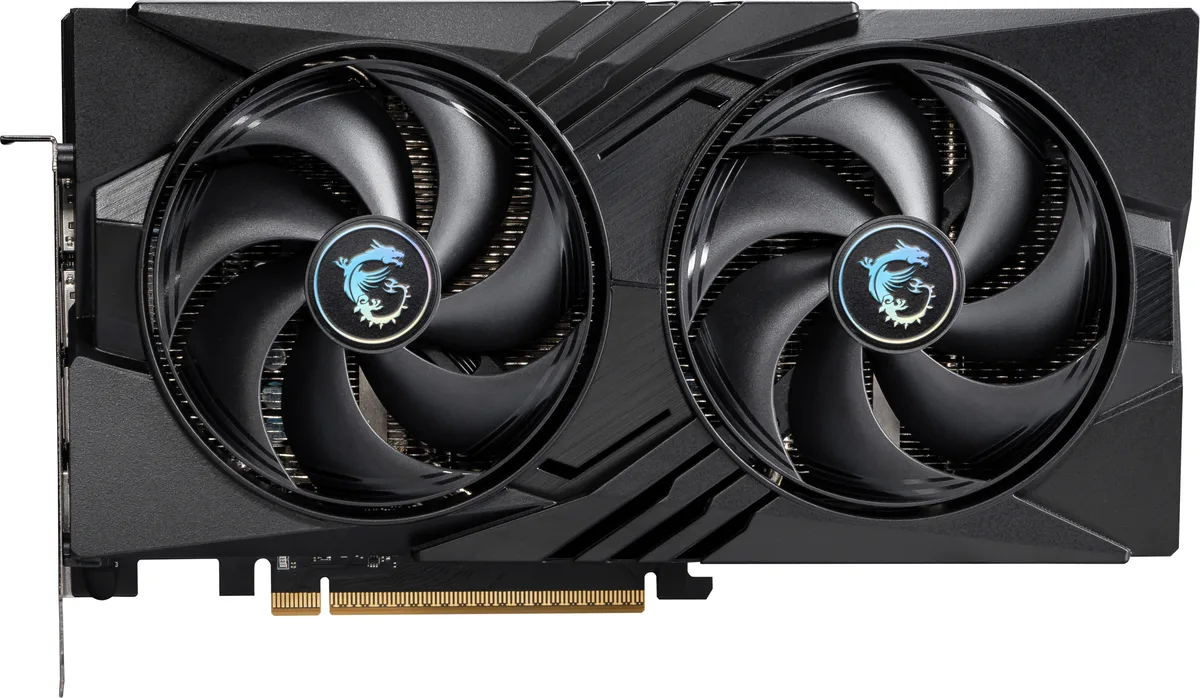
MSI RTX 5060 8G SHADOW 2X OC graphics card
GeForce RTX 5060 graphics card with 8 GB GDDR7 memory, 3840 CUDA cores and a 2527 MHz boost clock
- InterfacePCI Express 5.0 x 16 (use x8)
- Chipset ManufacturerNVIDIA
- GPU SeriesNVIDIA GeForce RTX 50 Series
- GPUGeForce RTX 5060
- Boost Clock2527 MHz
- CUDA Cores3840
Edition SHADOW 2X OC
- GAMING OC
- GAMING TRIO OC
- GAMING TRIO WHITE OC
- Inspire 2X OC
- SHADOW 2X OC
- VENTUS 2X OC
- VENTUS 2X WHITE OC
- VENTUS 3X OC
Struck-through versions exist but are not stocked here.
- 8 GB GDDR7 memory delivers 28 Gbps bandwidth
- 3840 CUDA cores accelerate compute workloads
- Boost clock reaches 2527 MHz for higher frame rates
- HDMI 2.1b plus three DisplayPort 2.1b outputs drive four displays
- PCI Express 5.0 x16 interface provides 16 lanes of connectivity
What this card is and who it suits
The MSI RTX 5060 8G SHADOW 2X OC is a GeForce RTX 5060 graphics card aimed at gamers and creators upgrading to the Blackwell architecture. It ships with 8GB of GDDR7 memory on a 128-bit bus and a factory boost clock of 2527 MHz. The dual-fan cooler keeps the board compact for mid-tower builds.
The spec that decides fit
The PCI Express 5.0 x16 interface runs at x8 electrical width, so the motherboard must provide a compatible slot and chipset support. Memory bandwidth comes from 28 Gbps GDDR7 across the 128-bit interface, feeding 3840 CUDA cores for 1080p and 1440p workloads. Display outputs are one HDMI 2.1b and three DisplayPort 2.1b connectors for up to four monitors.
Installation and common issues
The card occupies two expansion slots and draws power through a single 12VHPWR connector, so check PSU cabling and case clearance before fitting. Driver installation via the NVIDIA app enables DLSS 4, Reflex 2 and Studio features, but a clean install is recommended when moving from an older GPU. Ensure the motherboard BIOS is current to initialise the PCIe 5.0 link at the correct speed.
Highlights
- 8 GB GDDR7 memory delivers 28 Gbps bandwidth
- 3840 CUDA cores accelerate compute workloads
- Boost clock reaches 2527 MHz for higher frame rates
- HDMI 2.1b plus three DisplayPort 2.1b outputs drive four displays
- PCI Express 5.0 x16 interface provides 16 lanes of connectivity
Specifications
| Brand | MSI |
|---|---|
| Series | SHADOW |
| Model | RTX 5060 8G SHADOW 2X OC |
| Part Number | RTX 5060 8G SHADOW 2X OC |
| Interface | PCI Express 5.0 x 16 (use x8) |
| Chipset Manufacturer | NVIDIA |
| GPU Series | NVIDIA GeForce RTX 50 Series |
| GPU | GeForce RTX 5060 |
| Boost Clock | 2527 MHz |
| CUDA Cores | 3840 |
| Effective Memory Clock | 28 Gbps |
| Memory Size | 8GB |
| Memory Interface | 128-Bit |
| Memory Type | GDDR7 |
| DirectX | DirectX 12 Ultimate |
| OpenGL | OpenGL 4.6 |
| Multi-Monitor Support | 4 |
| HDMI | 1 x HDMI 2.1b |
| DisplayPort | 3 x DisplayPort 2.1b |
| Color | Black |
| Max Resolution | 7680 x 4320 |
| SLI Support | No |
| Cooler | Double Fans |
| Thermal Design Power | 145W |
| Recommended PSU Wattage | 550W |
| Power Connector | 8-Pin |
| HDCP Ready | Yes |
| Max GPU Length | 197 mm |
| Card Dimensions (L x H) | 197 x 120 x 40mm |
| Shipping weight | 0.82 kg |
| Package size | 279 × 205 × 76 mm |
Other versions of this model
4 more in the same range
Same family, different memory, cooler or clock — compare before you commit.



MSI
MSI RTX 5060 8G GAMING TRIO OC graphics card
- PCI Express 5.0 x 1…
- NVIDIA
$489.99
0.00634949BTC
In stockQuestions about this item
What does the 2527 MHz boost clock mean for actual gaming performance?
The 2527 MHz boost clock is the maximum frequency the GeForce RTX 5060 GPU can reach under load. Higher clocks let the 3840 CUDA cores process frames faster, so games run at higher frame rates when the card stays cool and power limits allow it.
How does the PCI Express 5.0 x16 interface running at x8 affect data transfer?
The card uses a PCI Express 5.0 x16 physical slot but operates at x8 electrical width. This caps the link at 5.0 x8 bandwidth, which is still ample for the 8GB GDDR7 frame buffer and 128-bit memory interface in current games.
What slot width and power connectors does the SHADOW 2X OC need to fit in my case?
The dual-fan SHADOW design occupies two expansion slots. It requires a standard PCI Express 5.0 x16 slot and draws auxiliary power through the card's onboard connectors, so check your PSU cables and case clearance before installing.
Also in this aisle
People compared these
Same shelf, same checkout — eight coins and a 30-minute rate lock.

Micron Technology, Inc.
Micron Technology, Inc. MT4JTF12864AZ-1G4D1 1GB DDR3 1333 Desktop RAM
- 1GB
- DDR3 1333 (PC3 1060…
$28.99
0.00037566BTC
In stock
Kingston Technology Corp.
Kingston Technology Corp. KTD-DM8400A/512 512MB DDR2 desktop RAM
- 512MB
- CL4
$12.99
0.00016833BTC
In stock
