

NEMIX RAM
NEMIX RAM DDR5-5600 2TB (16x128GB) ECC RDIMM CL46 1.1V Supermicro H14SST-G memory upgrade
- 2TB (16 x 128GB)
- 288-Pin DDR5 RDIMM
62 908,99 USD
0.79290383BTC
DostępnyAkceptujemy kryptowaluty — posiadane środki można więc wykorzystać na zakup prawdziwego sprzętu.Płatność kryptowalutą — realny sprzęt w zamian. Bezpłatna, ubezpieczona dostawa na całym świecie powyżej 399 $. Neutralne kartony, bez oznaczeń, wysyłane z Niemiec.Bezpłatna, ubezpieczona dostawa powyżej 399 $. Kurs zostaje zablokowany na 30 minut od otwarcia kasy.Kurs zablokowany na 30 minut. Każdy produkt jest fabrycznie zapieczętowany, jego numer seryjny jest sprawdzany, a całość objęta jest 24-miesięczną gwarancją.Zapieczętowane fabrycznie, 24 miesiące gwarancji.
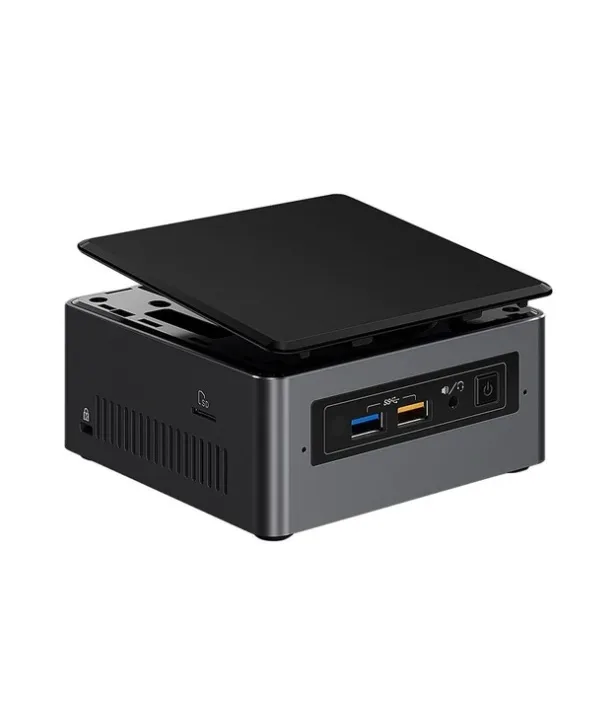
Intel
Barebone mini PC with a 2.4 GHz dual-core processor, supports up to 32 GB DDR4-2133, includes Gigabit LAN and Wi-Fi 5
The Intel BOXNUC7I3BNH is a UCFF barebone built around a 2.4 GHz dual-core i3-7100U with 15 W TDP. It ships without memory or storage so you choose the exact capacity and speed your workload requires. Two SO-DIMM slots accept up to 32 GB of DDR4-2133, while a 22 x 42/80 M.2 slot and dual SATA 6.0 Gb/s ports give flexible drive options.
Suits home-office users, digital-signage installs or secondary PCs that need a tiny footprint and quiet 15 W operation. Builders who want discrete graphics, more than two memory channels or a higher-core-count CPU should look at larger platforms.
The board only supports DDR4-2133 in 260-pin SO-DIMM form factor; standard DIMMs or faster DDR4 modules will not work. Matching this memory spec is the single decision that determines whether the kit boots.
| Brand | Intel |
|---|---|
| Series | NUC (Next Unit of Computing) |
| Model | BOXNUC7I3BNH |
| Color | Black |
| Form Factor | UCFF (4" x 4") |
| CPU Type | 7th Generation Intel Core i3-7100U 2.4 GHz, Dual Core 3MB cache, 15W TDP |
| Memory installed | No Memory |
| Memory slot | 2 x 260Pin SO-DIMM |
| Memory Type Supported | DDR4 2133 |
| Max Memory Supported | 32GB |
| Storage Installed | No Hard Drive |
| Serial ATA | 2 x SATA 6.0Gb/s |
| M.2 Slot | 22x42/80 |
| Integrated Graphics | Intel HD Graphics 620 |
| Channel | 7.1 Channel |
| LAN | Intel i219V |
| Max LAN Speed | 1Gbps |
| Wireless LAN | Intel Wireless-AC 8265 |
| Bluetooth | Bluetooth v4.2 |
| Front USB | 2 x front USB 3.0 |
| Card Reader | microSDXC with UHS-I support (Side) |
| Other Front Ports | 2 x USB 2.0 via internal headers |
| HDMI | HDMI 2.0a |
| Rear USB | 2 x USB 3.0 1 x USB 3.1 Gen 2 (10Gbps), Type-C |
| RJ45 | 1 |
| Input | 12V - 19V DC input range |
| Power Supply | 19V 65W wall-wart power supply with interchangeable plugs included |
| Dimensions | 2.01" x 4.53" x 4.37" |
| Features | Intel Optane Memory Supported Intel Virtualization Technology for Directed I/O (VT-d) Intel HD Audio Technology Intel Rapid Storage Technology Intel Virtualization Technology (VT-x) Intel Platform Trust Technology (Intel PTT) |
You must supply two 260-pin DDR4-2133 SO-DIMMs; the board supports up to 32 GB total across its two slots.
Yes, the unit provides two SATA 6.0Gb/s connectors so a 2.5-inch SATA SSD or hard drive can be installed directly.
After assembling the NUC and installing drivers, open Device Manager and verify Intel HD Graphics 620 appears under Display adapters without errors.
Także w tym dziale
Ten sam dział, ta sama kasa — osiem kryptowalut i 30-minutowa blokada kursu.
Waluta płatności i waluta wyświetlania cen.
Wysyłane z portfela przy kasie
Tylko podgląd — katalog wyceniony jest w dolarach
Brak pasującej waluty.
Wybierz język, w którym wyświetla się strona.
Pierwsza wizyta?
Konto już założone?
Nie ma automatycznego resetowania hasła: ten sklep nie wysyła żadnych e-maili, więc nie ma jednorazowego linku, o który można by poprosić. Adres pozostawiony przy koncie zostanie obsłużony ręcznie.
Zgłoszenie zapisane
Do skrzynki odbiorczej nic nie trafi — ten sklep nie wysyła żadnych e-maili. Zgłoszenia są obsługiwane ręcznie.
Hasło się przypomniało?


