

SanDisk
SanDisk Cruzer Blade 8 GB USB 2.0 USB flash drive Black SDCZ50-008G-B35
391,99 USD
0.00500958BTC
DostępnyAkceptujemy kryptowaluty — posiadane środki można więc wykorzystać na zakup prawdziwego sprzętu.Płatność kryptowalutą — realny sprzęt w zamian. Bezpłatna, ubezpieczona dostawa na całym świecie powyżej 399 $. Neutralne kartony, bez oznaczeń, wysyłane z Niemiec.Bezpłatna, ubezpieczona dostawa powyżej 399 $. Kurs zostaje zablokowany na 30 minut od otwarcia kasy.Kurs zablokowany na 30 minut. Każdy produkt jest fabrycznie zapieczętowany, jego numer seryjny jest sprawdzany, a całość objęta jest 24-miesięczną gwarancją.Zapieczętowane fabrycznie, 24 miesiące gwarancji.


MCDODO
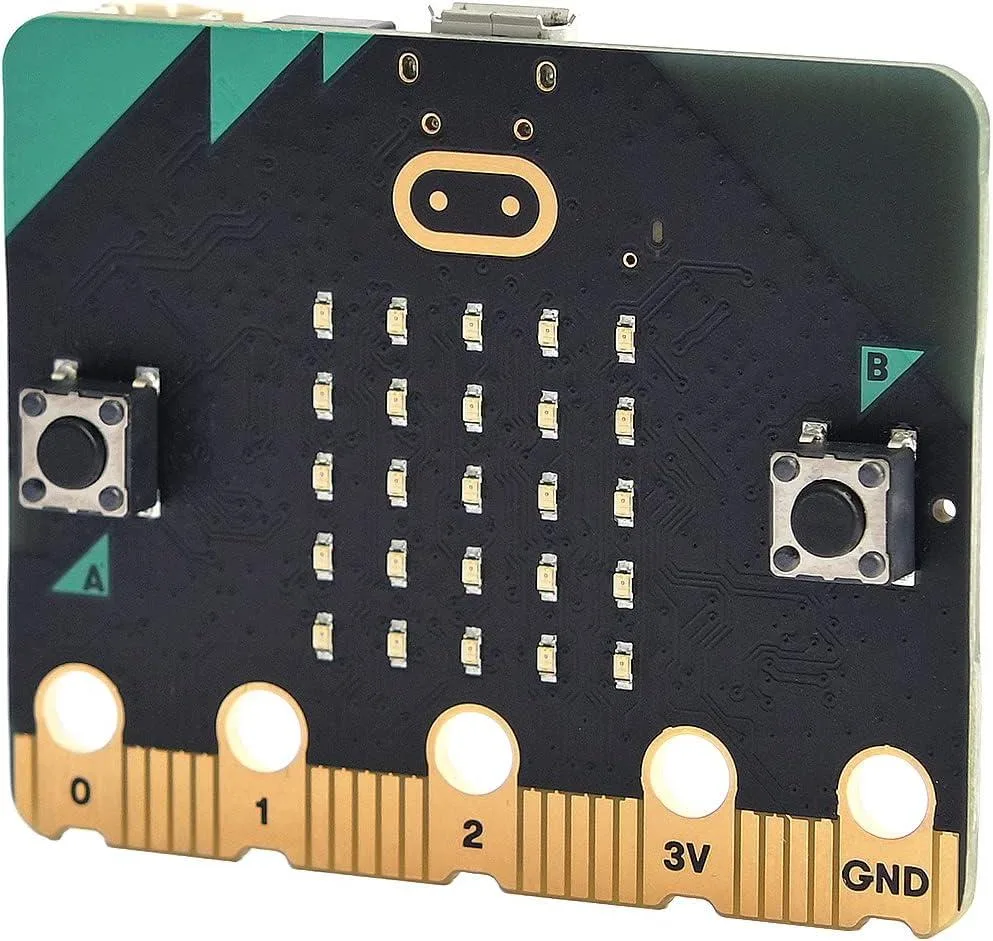
A pocket-sized programmable computer with 25 LEDs, motion sensors, speaker and microphone for classroom coding projects
The Micro:bit V2.2 is a pocket-sized programmable computer built for teaching coding and digital making in schools and clubs. It adds an onboard speaker and microphone so students can create sound-based projects without extra hardware. Twenty-five individually addressable LEDs and two programmable buttons give immediate visual and tactile feedback.
This board suits teachers, students and hobbyists who need a ready-to-program platform with built-in sensors for light, temperature and motion. Buyers who require more processing power, additional GPIO pins or a Linux environment should look at other single-board computers.
The V2.2 revision integrates a MEMS microphone and a piezoelectric speaker directly on the board, enabling sound input and output for interactive lessons. Earlier revisions lack these audio features, so confirm the version before purchasing for sound-dependent projects.
| Type | Single Board Computers |
|---|
The board uses a micro USB connector for both power and programming; a compatible cable is not included.
Connect the board to a computer via micro USB; it appears as a USB drive so you can drag compiled .hex files onto it.
The 25 programmable LEDs, two buttons, speaker, microphone, accelerometer and compass are all soldered on the board and are not user-replaceable.
Także w tym dziale
Ten sam dział, ta sama kasa — osiem kryptowalut i 30-minutowa blokada kursu.
Waluta płatności i waluta wyświetlania cen.
Wysyłane z portfela przy kasie
Tylko podgląd — katalog wyceniony jest w dolarach
Brak pasującej waluty.
Wybierz język, w którym wyświetla się strona.
Brak pasującego języka.
Pierwsza wizyta?
Konto już założone?
Nie ma automatycznego resetowania hasła: ten sklep nie wysyła żadnych e-maili, więc nie ma jednorazowego linku, o który można by poprosić. Adres pozostawiony przy koncie zostanie obsłużony ręcznie.
Zgłoszenie zapisane
Do skrzynki odbiorczej nic nie trafi — ten sklep nie wysyła żadnych e-maili. Zgłoszenia są obsługiwane ręcznie.
Hasło się przypomniało?



