

Elo Touch Solutions
Elo Touch Solutions 1991L 19" Open-Frame Touchscreen Monitor
- 19"
615,99 USD650,99 USD−5%
0.00758263BTC
În stocAcceptăm criptomonede — astfel, criptomonedele pe care le dețineți pot cumpăra echipamente reale.Plătiți în cripto, cheltuiți-o pe echipamente reale. Livrare asigurată gratuită oriunde în lume peste 399 $. Cartoane neutre, fără marcă, expediate din Germania.Livrare asigurată gratuită peste 399 $. Cursul dumneavoastră este blocat timp de 30 de minute de la deschiderea paginii de plată.Curs blocat 30 de minute. Fiecare articol este sigilat, numărul de serie este verificat, iar produsul este acoperit de o garanție de 24 de luni.Sigilat, garantat 24 de luni.


WaveShare
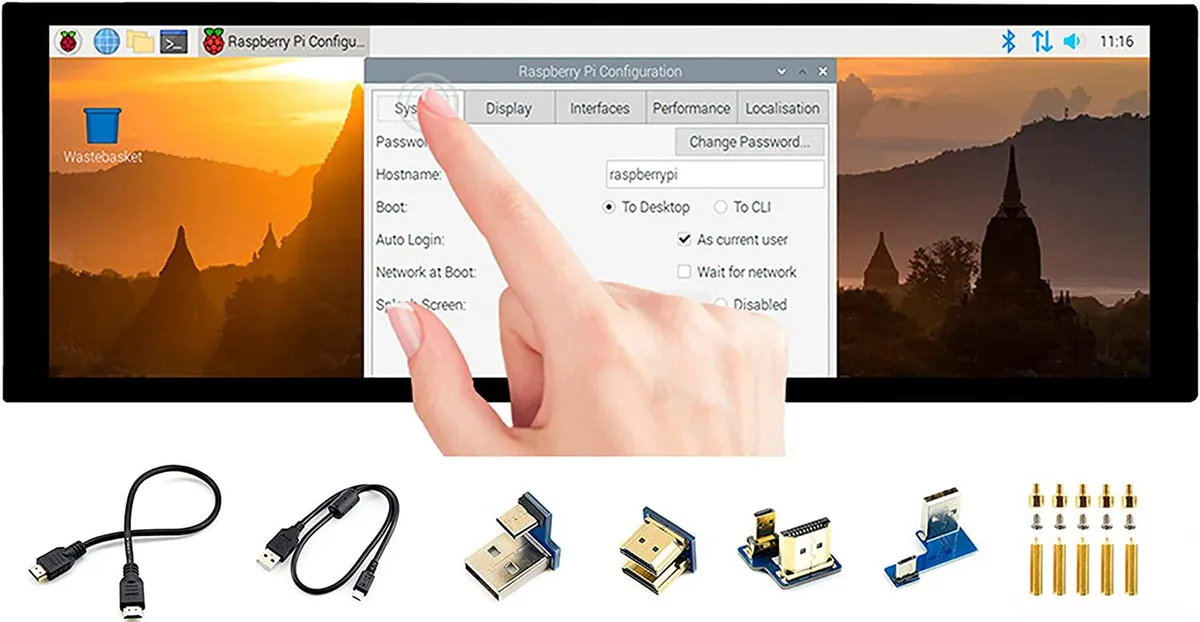
A 7.9 inch IPS touchscreen with 400×1280 resolution, HDMI and USB connectivity, toughened glass, and driver-free five-point touch for Raspberry Pi and Windows
The WaveShare 7.9inch portable monitor combines a 400x1280 IPS panel with a 10-point capacitive touch layer behind toughened glass. It targets Raspberry Pi builders, Jetson Nano developers and Windows PC users who need a small secondary screen that works without driver installation across Raspbian, Ubuntu, Kali, WIN10 IoT, Retropie and Windows 10/8.1/8/7.
Video and audio arrive over HDMI while touch data and power travel through USB, so a single cable run can handle both signals on compatible hosts. A 3.5mm jack passes HDMI audio out to headphones or speakers, and an onboard button lets you rotate the touch mapping to match the screen orientation you choose.
The 400x1280 pixel grid limits the amount of information visible at once, making dense code or spreadsheet work cramped. Five-point touch is only guaranteed on Raspberry Pi and Windows 10/8.1/8/7; other supported Linux distributions fall back to single-point input, so multi-finger gestures cannot be relied on everywhere.
| CPU Type | Other |
|---|
It uses an HDMI interface and caps at 400×1280 pixels on the IPS panel.
It has an HDMI port, a USB port for touch power, a 3.5 mm headphone jack, and toughened glass over the capacitive touch layer.
Connect HDMI and USB, then enable the touch overlay in config.txt; the step often missed is adding the dtoverlay line for the specific Pi model.
Tot din acest raion
Același raion, aceeași finalizare a comenzii — opt monede și un curs blocat 30 de minute.
În ce monedă plătiți și în ce monedă citiți prețurile.
Trimis din portofelul dumneavoastră la finalizarea comenzii
Doar pentru afișare — catalogul este exprimat în dolari
Nicio monedă nu corespunde.
Alegeți limba în care vă vorbește site-ul.
Nicio limbă nu corespunde.
Prima vizită?
Aveți deja un cont?
Nu există o resetare automată: acest magazin nu trimite niciun e-mail, deci nu există niciun link de unică folosință de solicitat. Lăsați adresa în cont. Va fi tratată manual.
Cerere înregistrată
Nu veți primi nimic în căsuța de e-mail — acest magazin nu trimite niciun e-mail. Cineva se ocupă de asta manual.
V-ați amintit-o?



