

Elo Touch Solutions
Elo Touch Solutions 1991L 19" Open-Frame Touchscreen Monitor
- 19"
$615.99$650.99−5%
0.00758263BTC
在庫あり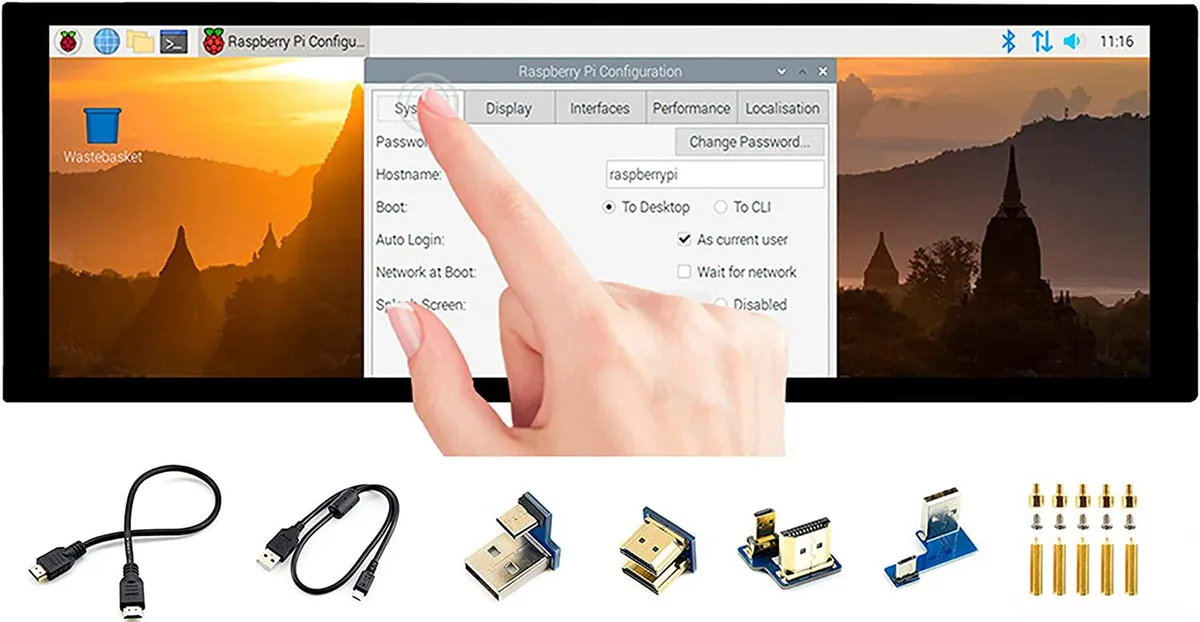


WaveShare
A 7.9 inch IPS touchscreen with 400×1280 resolution, HDMI and USB connectivity, toughened glass, and driver-free five-point touch for Raspberry Pi and Windows
The WaveShare 7.9inch portable monitor combines a 400x1280 IPS panel with a 10-point capacitive touch layer behind toughened glass. It targets Raspberry Pi builders, Jetson Nano developers and Windows PC users who need a small secondary screen that works without driver installation across Raspbian, Ubuntu, Kali, WIN10 IoT, Retropie and Windows 10/8.1/8/7.
Video and audio arrive over HDMI while touch data and power travel through USB, so a single cable run can handle both signals on compatible hosts. A 3.5mm jack passes HDMI audio out to headphones or speakers, and an onboard button lets you rotate the touch mapping to match the screen orientation you choose.
The 400x1280 pixel grid limits the amount of information visible at once, making dense code or spreadsheet work cramped. Five-point touch is only guaranteed on Raspberry Pi and Windows 10/8.1/8/7; other supported Linux distributions fall back to single-point input, so multi-finger gestures cannot be relied on everywhere.
| CPU Type | Other |
|---|
It uses an HDMI interface and caps at 400×1280 pixels on the IPS panel.
It has an HDMI port, a USB port for touch power, a 3.5 mm headphone jack, and toughened glass over the capacitive touch layer.
Connect HDMI and USB, then enable the touch overlay in config.txt; the step often missed is adding the dtoverlay line for the specific Pi model.
同じ売り場の商品
同じ売り場、同じレジ — 8種類のコインと30分間のレートロック。
お支払いに使うコインと、価格表示に使う通貨です。
チェックアウト時にウォレットから送信されます。
表示のみ—カタログの価格は米ドル建てです。
該当する通貨がありません。
サイトの表示言語を選択してください。
一致する言語がありません。
初めてのご利用ですか?
すでにお持ちですか?
自動的な再設定はありません。当店はメールを送信しないため、ワンタイムリンクをお送りすることもできません。アカウントにメールアドレスを残しておいていただければ、担当者が手作業で確認いたします。
リクエストを受け付けました
受信箱に何かが届くことはありません — 当店はメールを一切送信していません。担当者が手作業で確認いたします。
思い出しましたか?



