

Elo Touch Solutions
Elo Touch Solutions 1991L 19" Open-Frame Touchscreen Monitor
- 19"
615,99 US$650,99 US$−5%
0.00758263BTC
Em stockAceitamos criptomoeda — para que as moedas que detém possam comprar material informático real.Pague em cripto, gaste-a em material informático real. Envio seguro gratuito para todo o mundo acima de 399 $. Caixas neutras, sem marca, expedidas a partir da Alemanha.Envio seguro gratuito acima de 399 $. A sua taxa fica bloqueada durante 30 minutos assim que abre a finalização da compra.Taxa bloqueada 30 minutos. Cada artigo é selado, o seu número de série é verificado, e está coberto por uma garantia de 24 meses.Selado, garantido 24 meses.


WaveShare
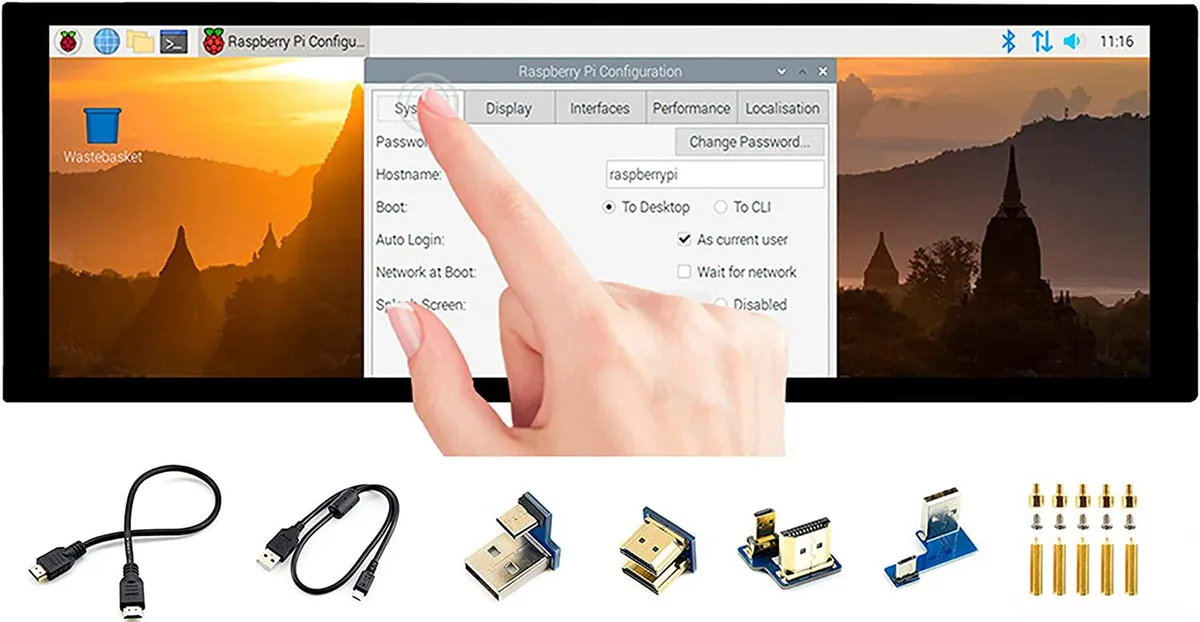
A 7.9 inch IPS touchscreen with 400×1280 resolution, HDMI and USB connectivity, toughened glass, and driver-free five-point touch for Raspberry Pi and Windows
The WaveShare 7.9inch portable monitor combines a 400x1280 IPS panel with a 10-point capacitive touch layer behind toughened glass. It targets Raspberry Pi builders, Jetson Nano developers and Windows PC users who need a small secondary screen that works without driver installation across Raspbian, Ubuntu, Kali, WIN10 IoT, Retropie and Windows 10/8.1/8/7.
Video and audio arrive over HDMI while touch data and power travel through USB, so a single cable run can handle both signals on compatible hosts. A 3.5mm jack passes HDMI audio out to headphones or speakers, and an onboard button lets you rotate the touch mapping to match the screen orientation you choose.
The 400x1280 pixel grid limits the amount of information visible at once, making dense code or spreadsheet work cramped. Five-point touch is only guaranteed on Raspberry Pi and Windows 10/8.1/8/7; other supported Linux distributions fall back to single-point input, so multi-finger gestures cannot be relied on everywhere.
| CPU Type | Other |
|---|
It uses an HDMI interface and caps at 400×1280 pixels on the IPS panel.
It has an HDMI port, a USB port for touch power, a 3.5 mm headphone jack, and toughened glass over the capacitive touch layer.
Connect HDMI and USB, then enable the touch overlay in config.txt; the step often missed is adding the dtoverlay line for the specific Pi model.
Também nesta secção
Mesma prateleira, mesma finalização da compra — oito moedas e uma taxa bloqueada durante 30 minutos.
O que paga, e a moeda em que vê os preços.
Enviado da sua carteira ao finalizar a compra
Apenas informativo — o catálogo está em dólares
Nenhuma moeda corresponde.
Escolha o idioma em que o site lhe fala.
Nenhum idioma corresponde.
Ainda não tem conta?
Já tem conta?
Não existe reposição automática: esta loja não envia qualquer e-mail, pelo que não há nenhum link de utilização única para pedir. Deixe o endereço na conta e ele será tratado manualmente.
Pedido registado
Não vai chegar nada à sua caixa de entrada — esta loja não envia qualquer e-mail. Alguém trata disto manualmente.
Recordou-se dela?



